Know every component the SDK put in your firmware

Most of a camera or router image comes from the chip vendor's SDK, open-source projects and contractors. When a buyer asks for an SBOM or a flaw makes the news, you need to know what is in each release and at which version. FDIE reads it from the firmware itself, not from a manifest that may be out of date.

Request access
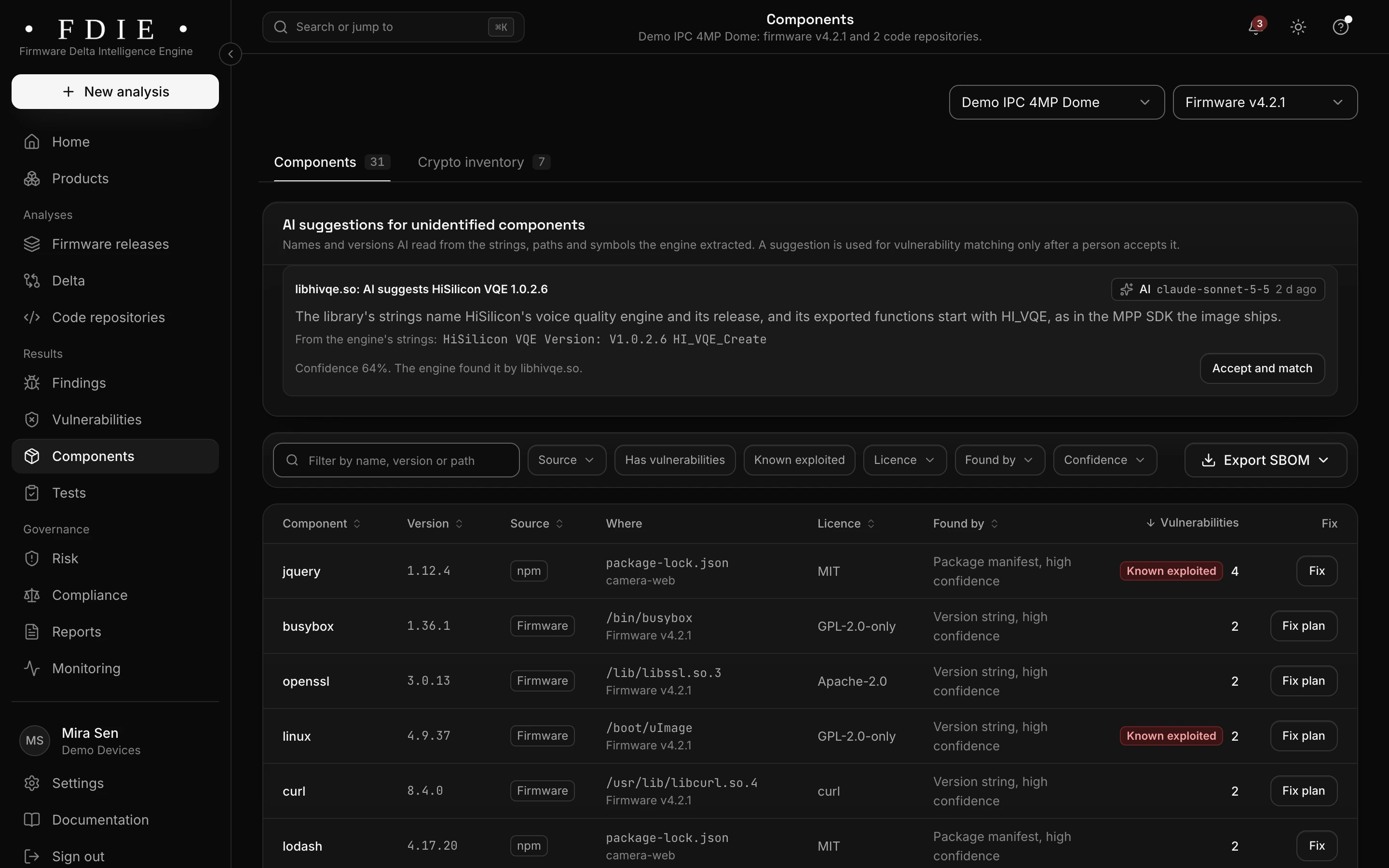
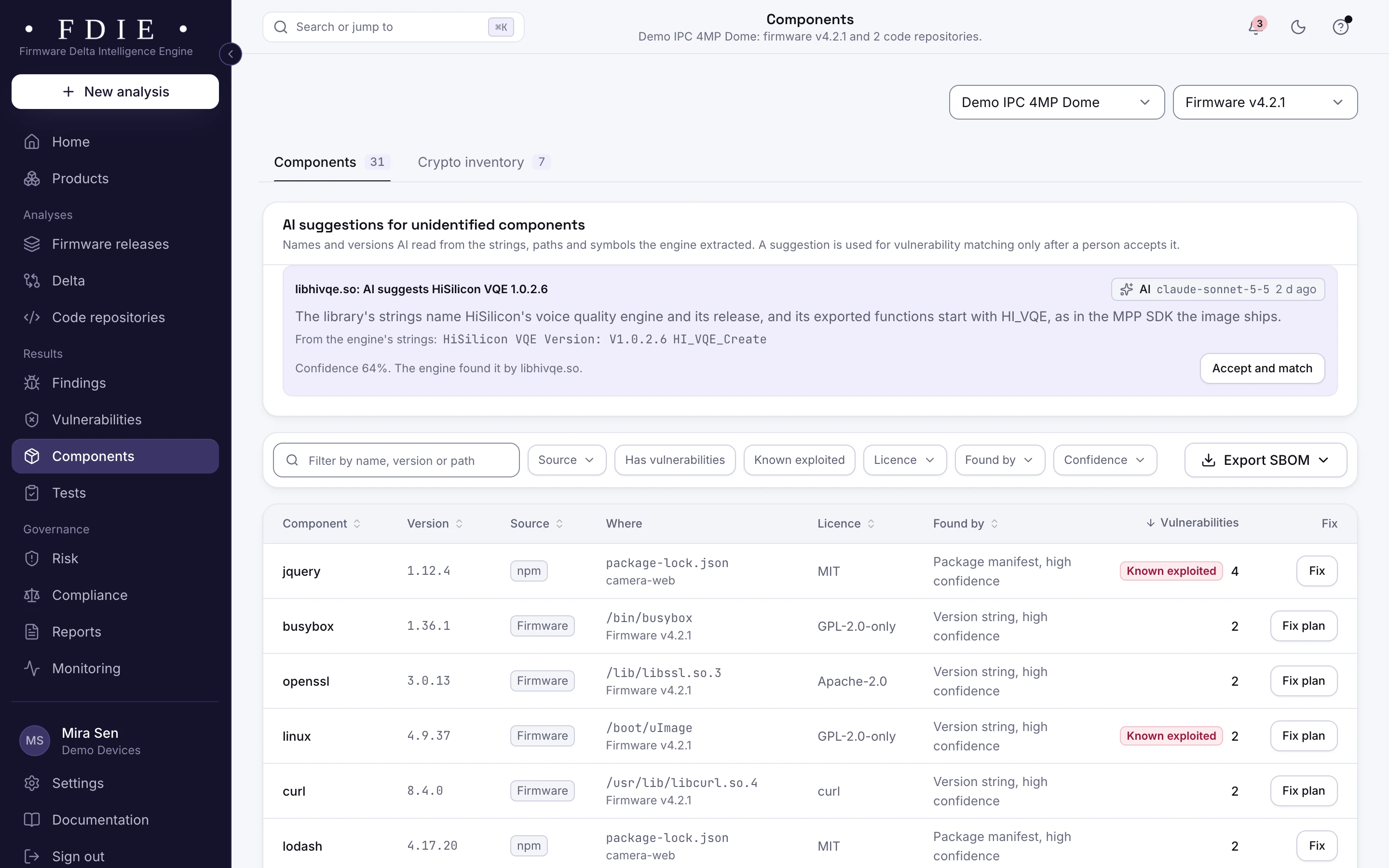
The components list that forms the SBOM: each component with its version, its source (firmware, npm or Conan), where it was found, its licence, how it was identified and how many vulnerabilities it has, with fix and fix plan buttons, an Export SBOM button and a crypto inventory tab.The same screen in the light theme.
The component list that forms the SBOM, shown with the app's sample organisation.

The challenge

Why a firmware SBOM is hard

  • The SDK is a black box

    Chip vendors ship board support packages full of open source, often at old versions and with local patches. Few of them come with a list of what is inside.

  • Build manifests miss what ships

    A manifest lists what you meant to include. Prebuilt libraries, vendor binaries and copied code reach the image without ever appearing in it.

  • Buyers want it with every release

    Operators, tenders and enterprise buyers ask for an SBOM with each release, and for a quick answer when a vulnerability lands. A spreadsheet kept by hand does not keep up.

How FDIE helps

What changes with FDIE

Read from the binary that ships

FDIE unpacks Linux file systems such as SquashFS and UBIFS, vendor wrappers such as uImage and TRX, and bare-metal images for ESP32 and Cortex-M with its own readers. Components are identified in the files that ship, so the SBOM describes the image, not the intention.

  • Each component with its version, location and how it was identified
  • Containers unpacked layer by layer, and archive bombs refused
  • What could not be read listed as a coverage gap
How an image is read
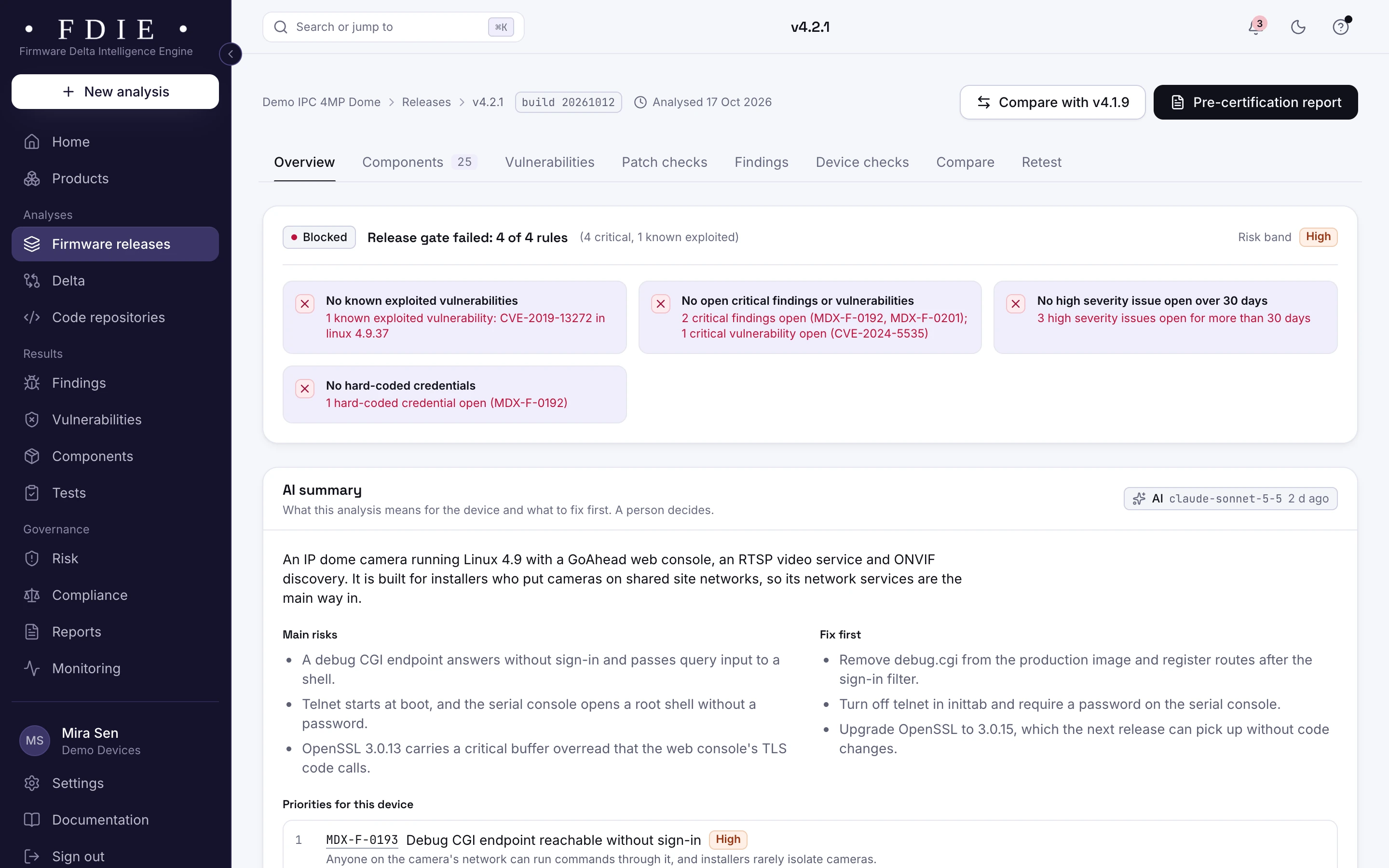
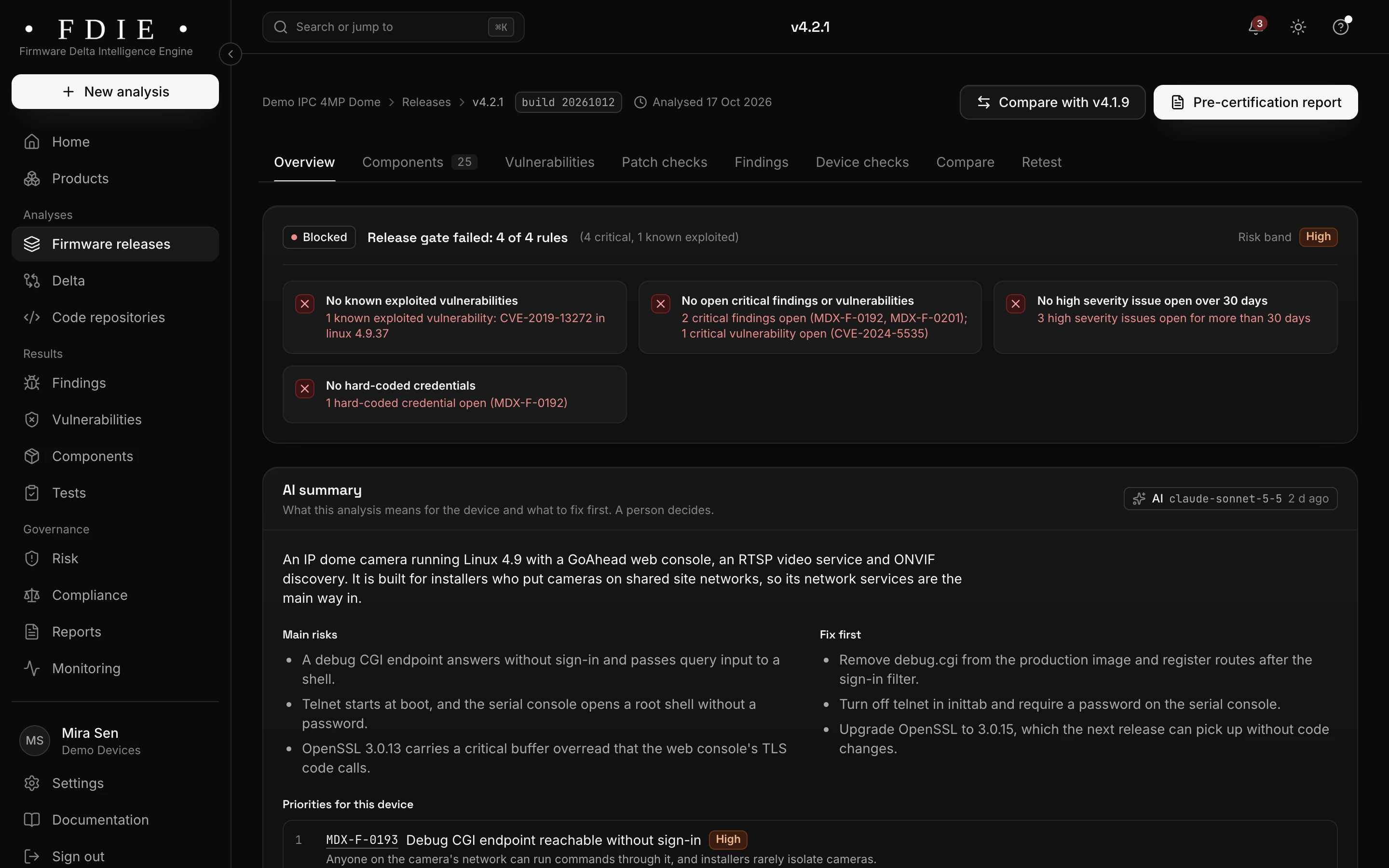
A firmware release overview for camera firmware v4.2.1: the release gate blocked on four rules, among them one known exploited vulnerability and critical findings, severity counts compared with the previous release, what is inside the image (components, binaries, file systems, kernel version) and the coverage gaps the analysis could not check.The same screen in the light theme.

Versions, licences and known vulnerabilities

Every component comes with its licence and is matched to NVD and OSV, ranked with CISA KEV and EPSS. Function use shows whether your programs call the vulnerable code, so a match is a lead to judge, not only a version string.

  • The licence of each component
  • Vulnerabilities with severity, EPSS and the fixed version
  • Whether your programs call the vulnerable function
Vulnerabilities in detail
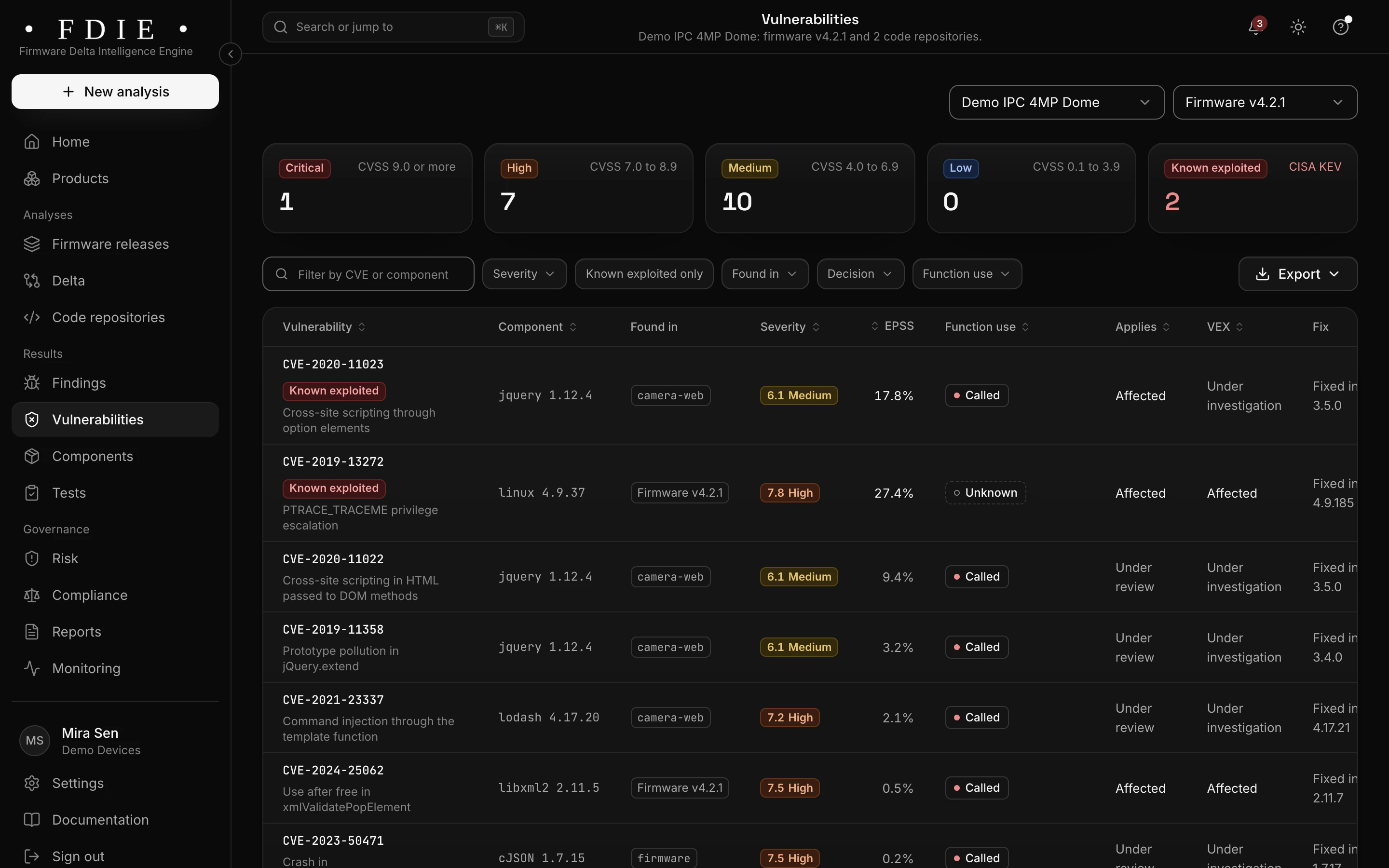
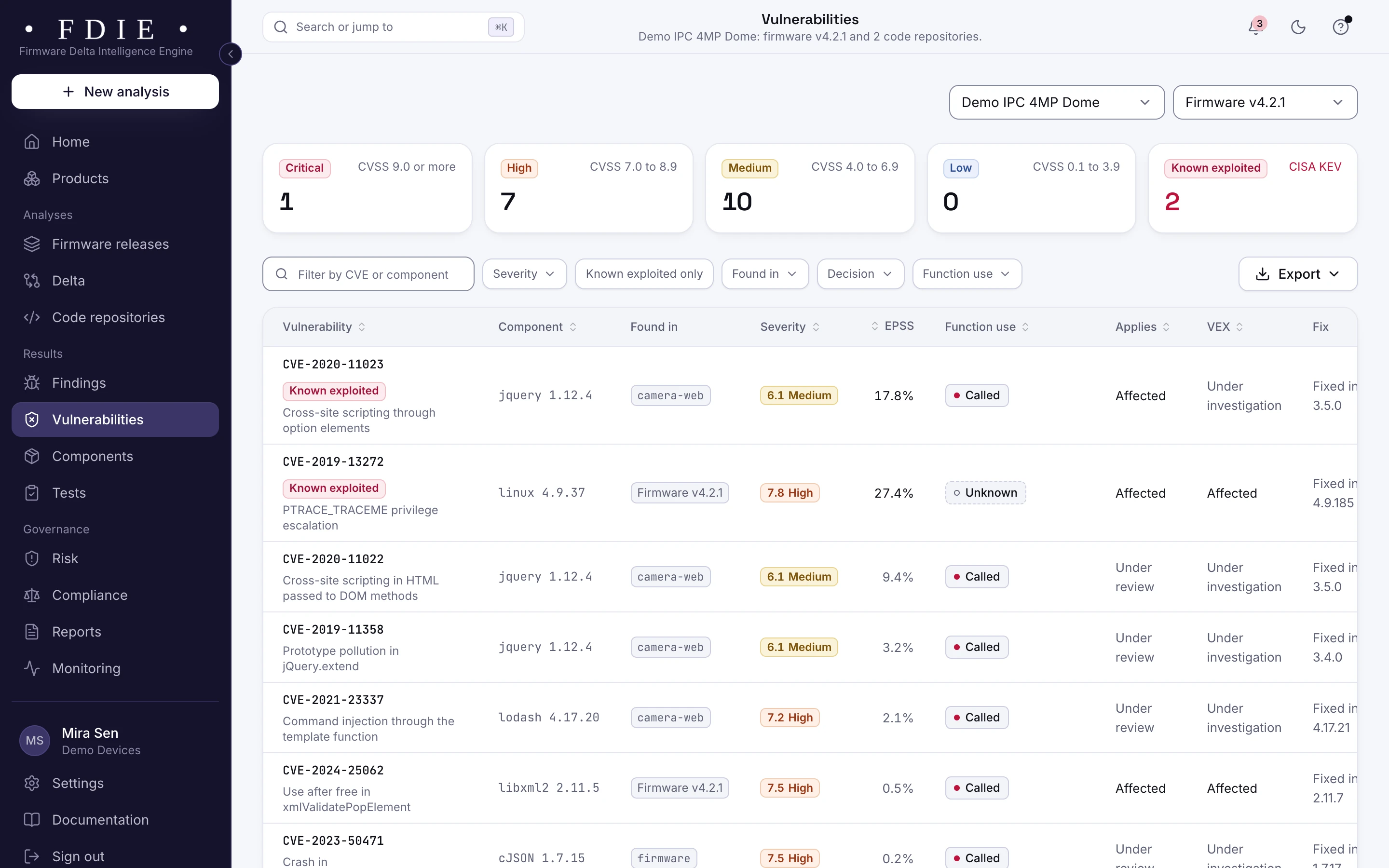
The vulnerabilities list: one row per CVE with the affected component, where it was found in firmware and code repositories, severity, EPSS probability, whether the product calls the vulnerable function, applicability, VEX status and the version that fixes it, with known exploited entries from CISA KEV marked.The same screen in the light theme.

Your source and your firmware in one place

Connect GitHub, GitLab, Bitbucket or Azure DevOps and the dependencies from your manifests and lockfiles join the firmware's components in the same product. Exact upgrades can open as pull requests on a new branch, never merged for you.

  • Dependencies from npm, Go, PyPI, crates.io, Maven, Packagist and Conan
  • An SBOM per release, per product or per repository
  • Upgrade pull requests your team reviews and merges
Source code analysis
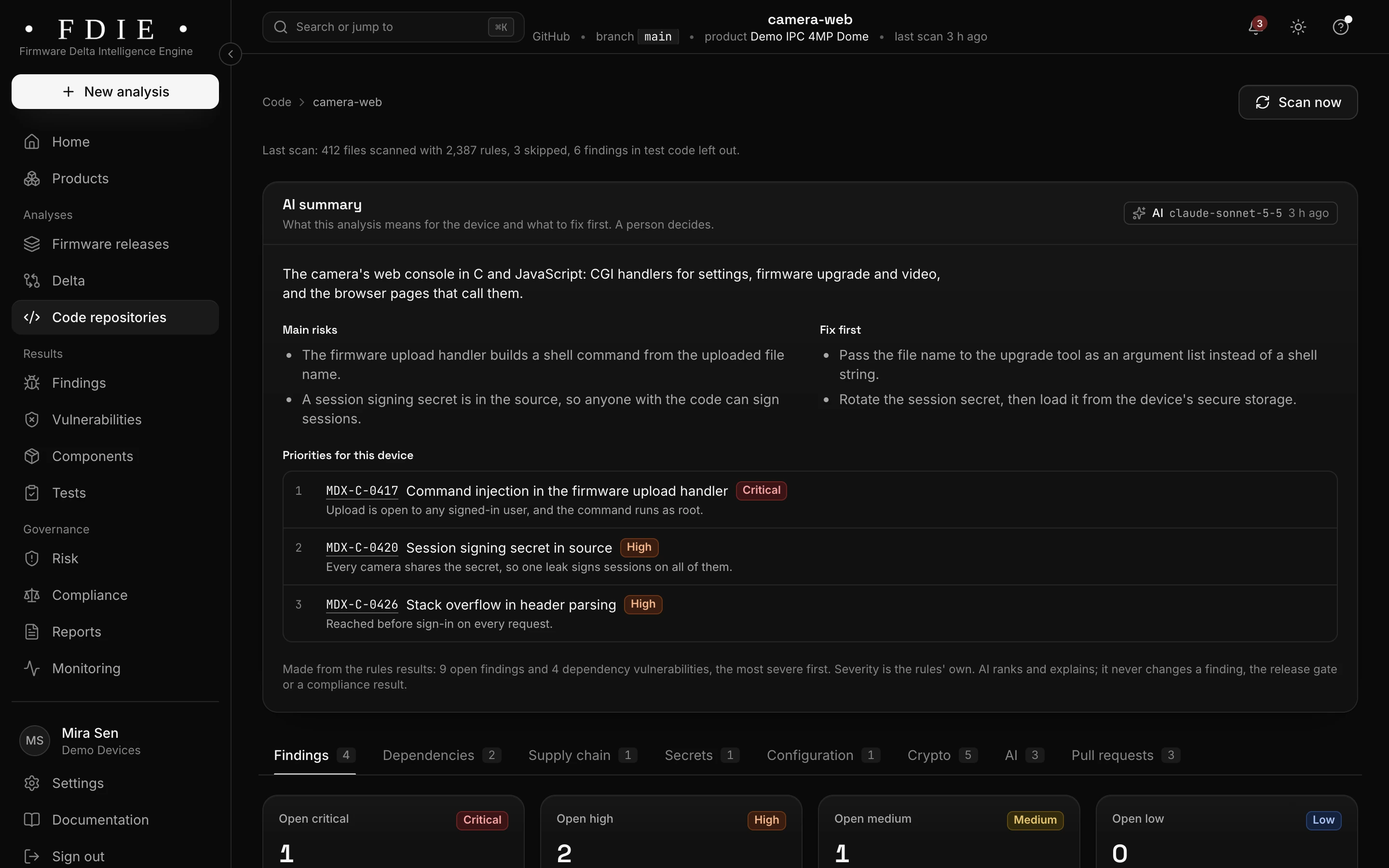
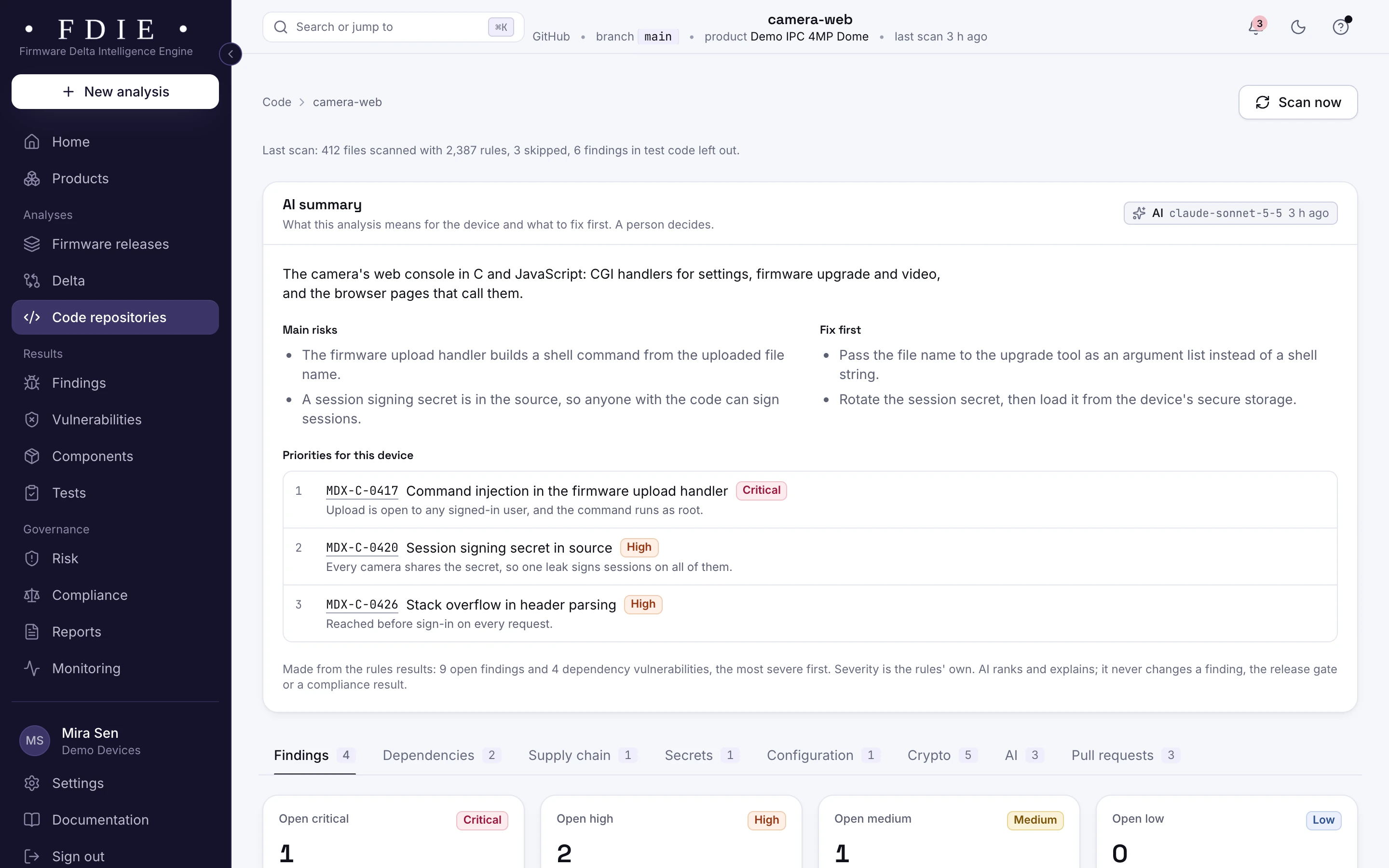
A connected GitHub repository for the camera's web interface: the AI summary of its main risks and what to fix first, three priorities (command injection in the firmware upload handler, a session signing secret in source and a stack overflow in header parsing), and tabs for findings, dependencies, supply chain, secrets, configuration, crypto, AI and pull requests.The same screen in the light theme.

SBOM and VEX your buyers can use

Export the SBOM in CycloneDX 1.6 or SPDX 2.3. When a vulnerability does not affect your product, your team records a VEX statement with its reason and exports it, so the next questionnaire is answered from records, not from memory.

  • Standard formats that buyers' tools read
  • VEX as CycloneDX, OpenVEX or CSAF 2.0, written by your team
  • Exports in CSV, JSON and PDF as well
Reports and exports
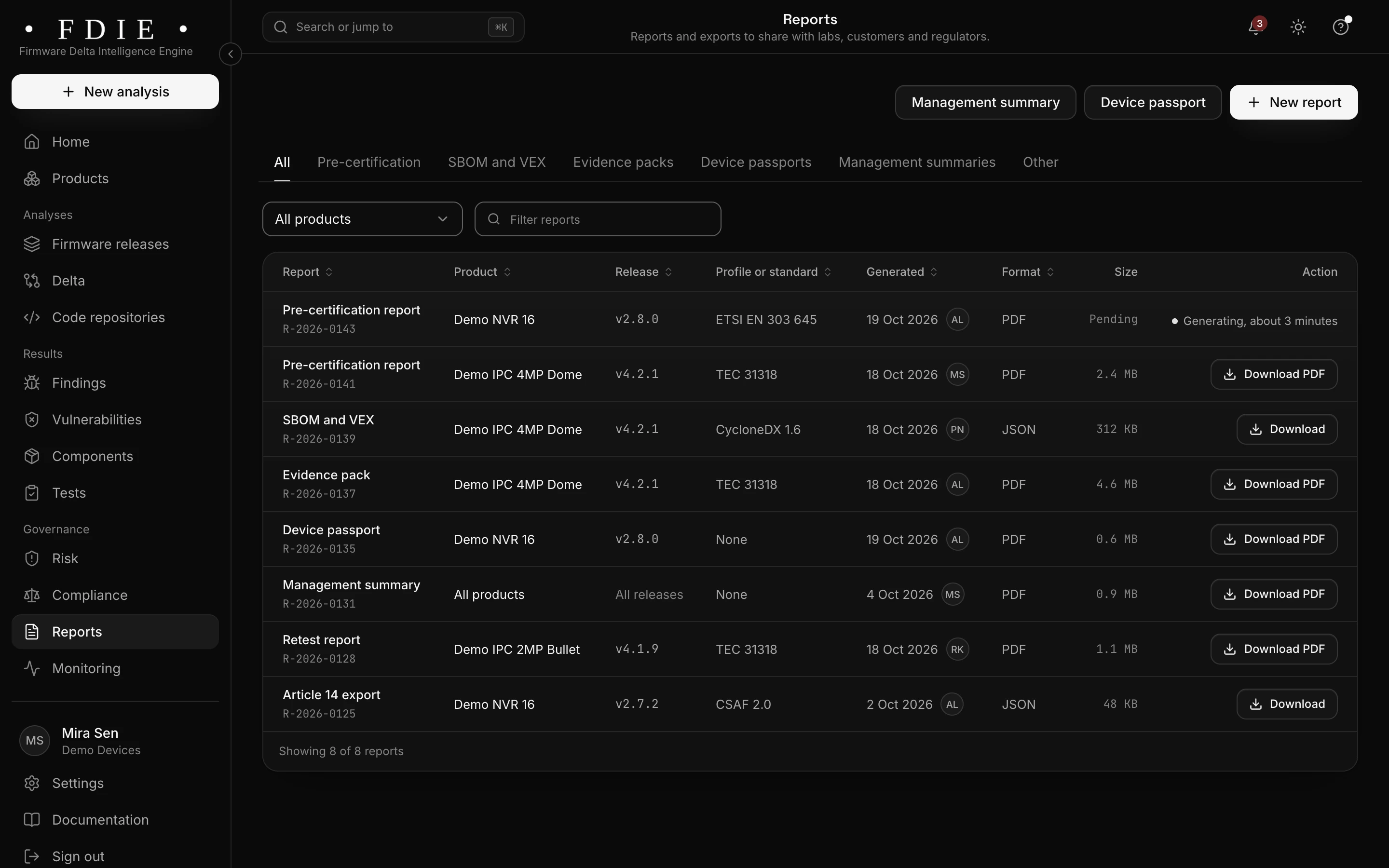
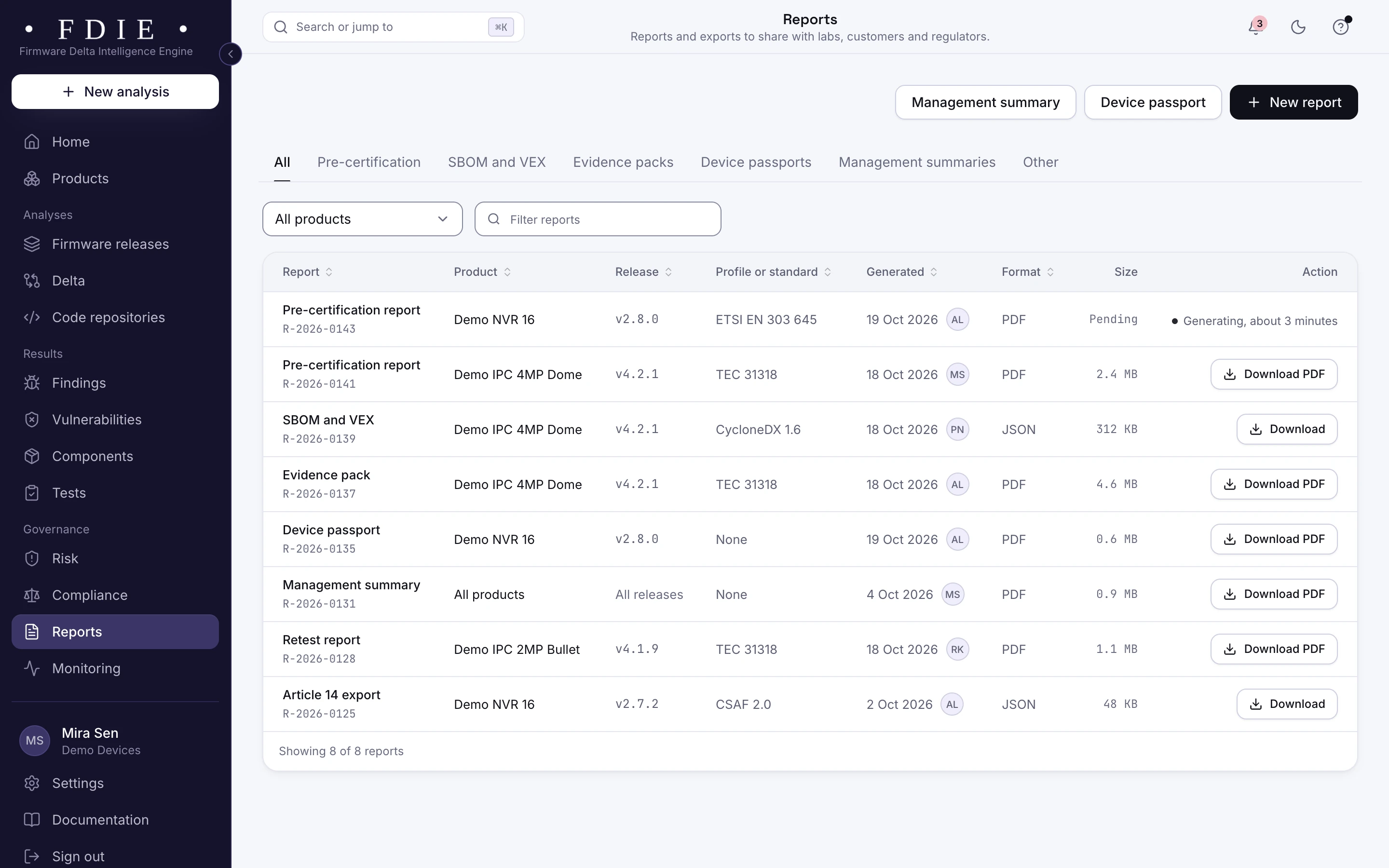
The reports list: pre-certification reports, SBOM and VEX, an evidence pack, a device passport, a management summary, a retest report and an Article 14 export, each with its product, release, standard, date, format and a download button.The same screen in the light theme.

How it works

From firmware image to evidence in four steps

  1. 1

    Add each release

    Upload the firmware image, import it from a GitHub or GitLab release, or let CI send each build. Connect the source if you have it.

  2. 2

    Components identified

    FDIE unpacks the image, reads its programs and libraries and identifies each component with its version and licence.

  3. 3

    Review matches and gaps

    Check the vulnerability matches, record VEX for the ones that do not apply and see what the analysis could not read.

  4. 4

    Export and share

    Export the SBOM and VEX for a buyer, a tender or a lab, and keep them with the release they describe.

Rules by market

Rules this helps with

Buyers and tenders in every market ask for an SBOM. ER-01 testing in India reviews the bill of materials, and for products sold in the EU, the EU CRA asks manufacturers to document their components. Section 889 evidence shows components from covered vendors for your counsel.

Compliance by market

India

EU and UK

US

Evidence and gap finding, not certification: the lab or certification body decides.

Deliverables

What your team gets

  • SBOM

    Per release, product or repository, in CycloneDX 1.6 or SPDX 2.3.

  • VEX statements

    Your team's reasons a vulnerability does not apply, in CycloneDX, OpenVEX or CSAF 2.0.

  • SBOM and VEX report

    The same content as a signed PDF, for people who read rather than parse.

  • Licences

    The licence of every component, exported in CSV or JSON for your legal review.

  • Upgrade pull requests

    Exact dependency upgrades on a new branch, one per package, never merged for you.

  • Coverage gaps

    What the analysis could not read, with the reason, so an empty result is never mistaken for a clean one.

Questions

Do we need the source code?

No. A firmware image on its own gives you its components and their vulnerabilities. Source code adds the dependencies from your manifests and lockfiles.

How is this different from an SBOM made at build time?

A build SBOM lists what your manifests declare. FDIE reads the image that ships, so prebuilt vendor libraries and copied code show up too. Connecting your repository adds the declared dependencies beside them.

What if part of the image cannot be read?

It is listed as a coverage gap with the reason, never counted as a pass.

How do we say a vulnerability does not affect us?

Your team records a VEX statement with its reason and exports it as CycloneDX, OpenVEX or CSAF 2.0.

Does AI decide what goes in the SBOM?

No. Components come from FDIE's own readers and rules. Full results without AI: every finding comes from FDIE's own rules and engines. Bring your own AI key (BYOK) and your AI makes them sharper. AI explains and proposes; your team decides.

Find out what the lab would flag in your firmware

A 45-minute call with our team. Bring one firmware image.

Request access