Firmware security for IP cameras and NVRs

Camera and NVR firmware is built on a chip vendor's SDK, with a web interface, RTSP streams, ONVIF and often a cloud P2P SDK. That is where labs and attackers look first. FDIE finds default accounts, open streams, debug shells and old components in the image, and prepares the evidence for ER-01 in India and for the other markets you sell in.

Request access
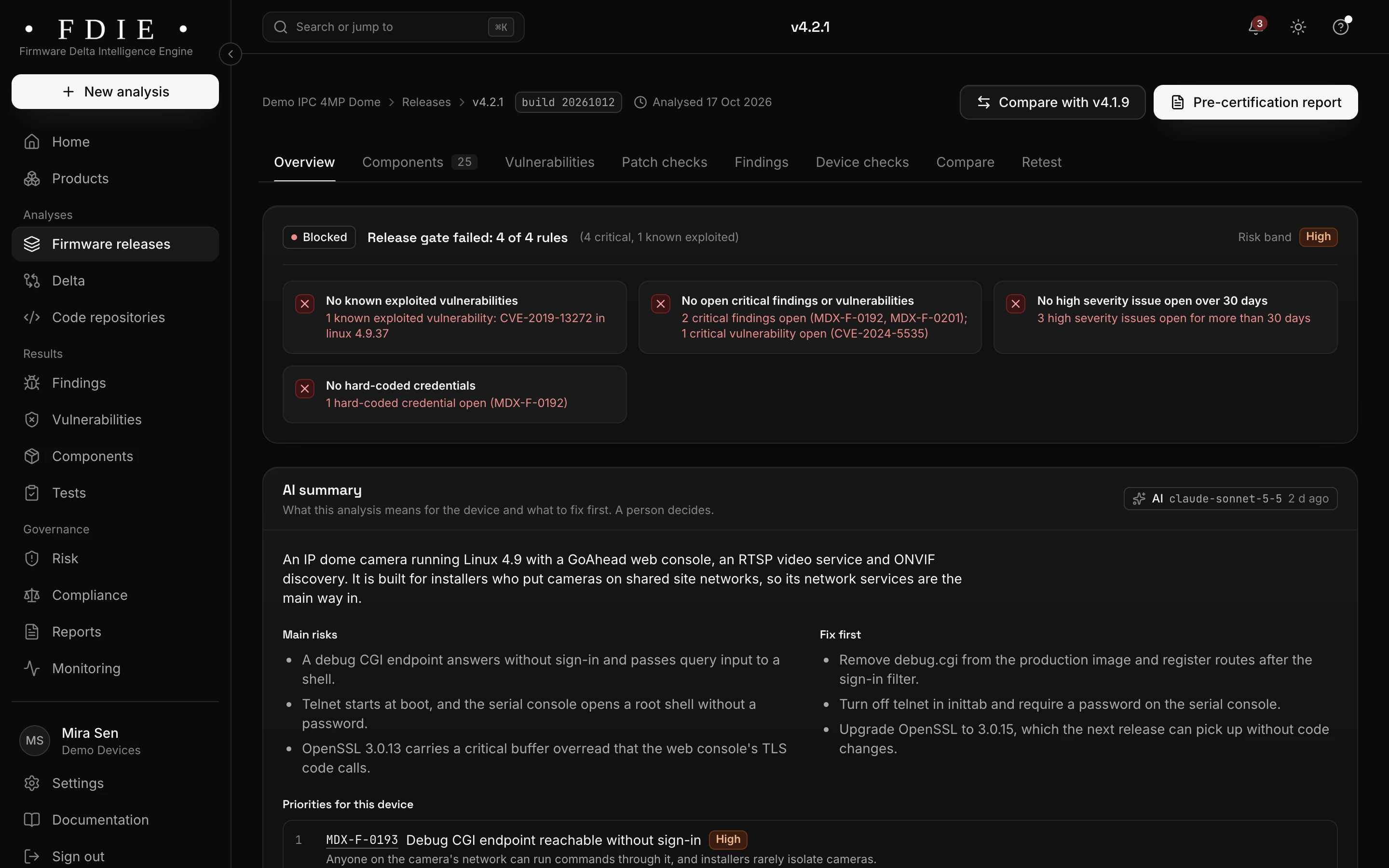
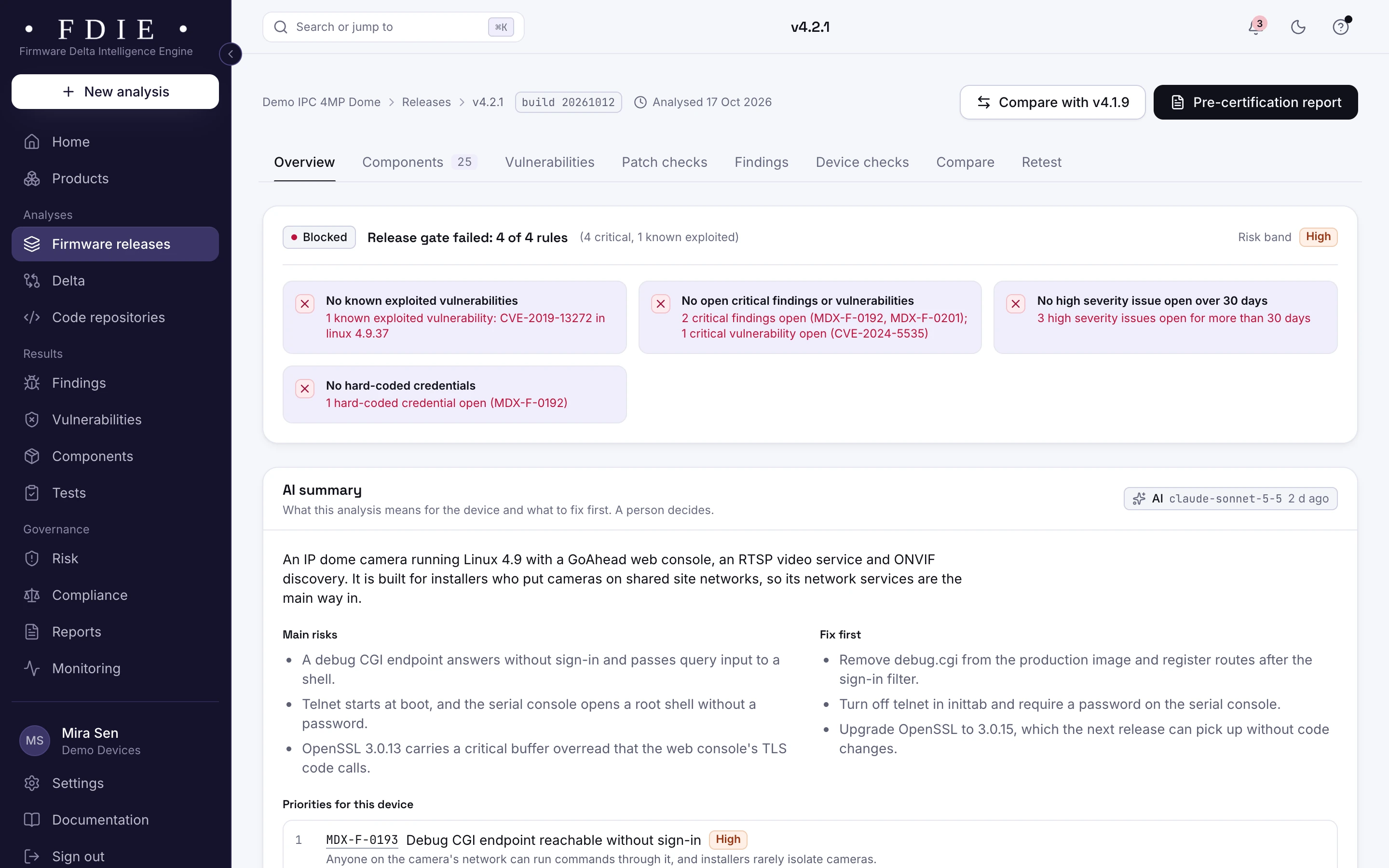
A firmware release overview for camera firmware v4.2.1: the release gate blocked on four rules, among them one known exploited vulnerability and critical findings, severity counts compared with the previous release, what is inside the image (components, binaries, file systems, kernel version) and the coverage gaps the analysis could not check.The same screen in the light theme.
The release overview of the sample camera firmware: the gate held, what is inside and the coverage gaps.

The challenge

Where camera firmware goes wrong

  • The same password on every unit

    Admin, stream and ONVIF accounts shipped with one password on every camera are still a common way in. Every market's rules now start there.

  • Services nobody asked for

    RTSP without authentication, ONVIF discovery at boot, telnet and serial shells left in by the SDK. Each one widens what an attacker on the network can reach.

  • Cloud P2P SDKs

    P2P relay SDKs make a camera reachable from the internet through a vendor's cloud. Some of these SDKs have had serious published flaws, and many teams do not know which one their image carries.

How FDIE helps

What changes with FDIE

Default camera and ONVIF accounts, found

Hard-coded and default accounts for the web interface, the streams and ONVIF are found in binaries, scripts and configuration, along with private keys, tokens, empty passwords and weak password hashes. Evidence is masked, so a password never shows in full.

  • Default stream and ONVIF accounts, with the file they sit in
  • Private keys shared by every unit flagged
  • Weak hashes such as MD5 crypt, and extra root accounts
Passwords and keys
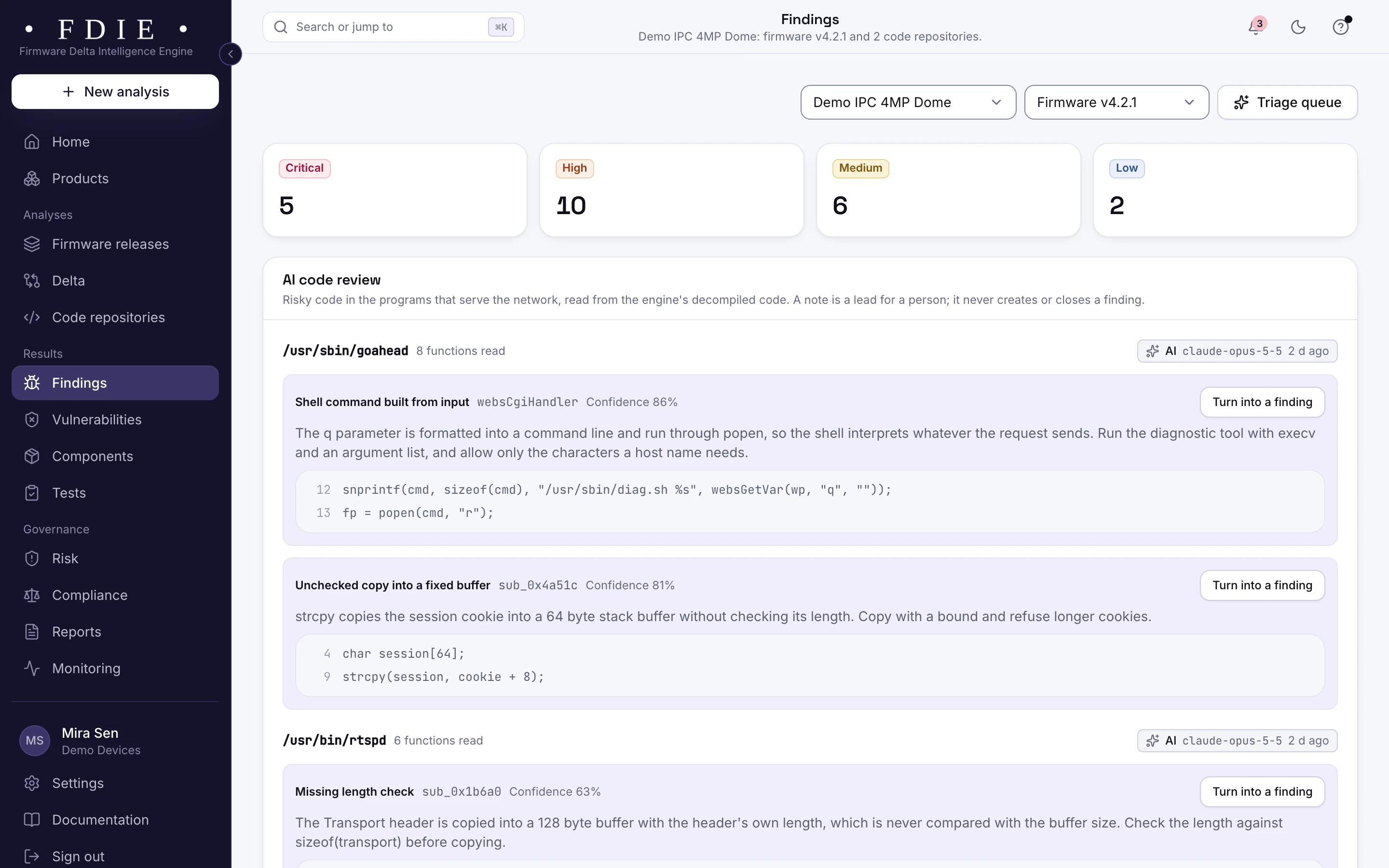
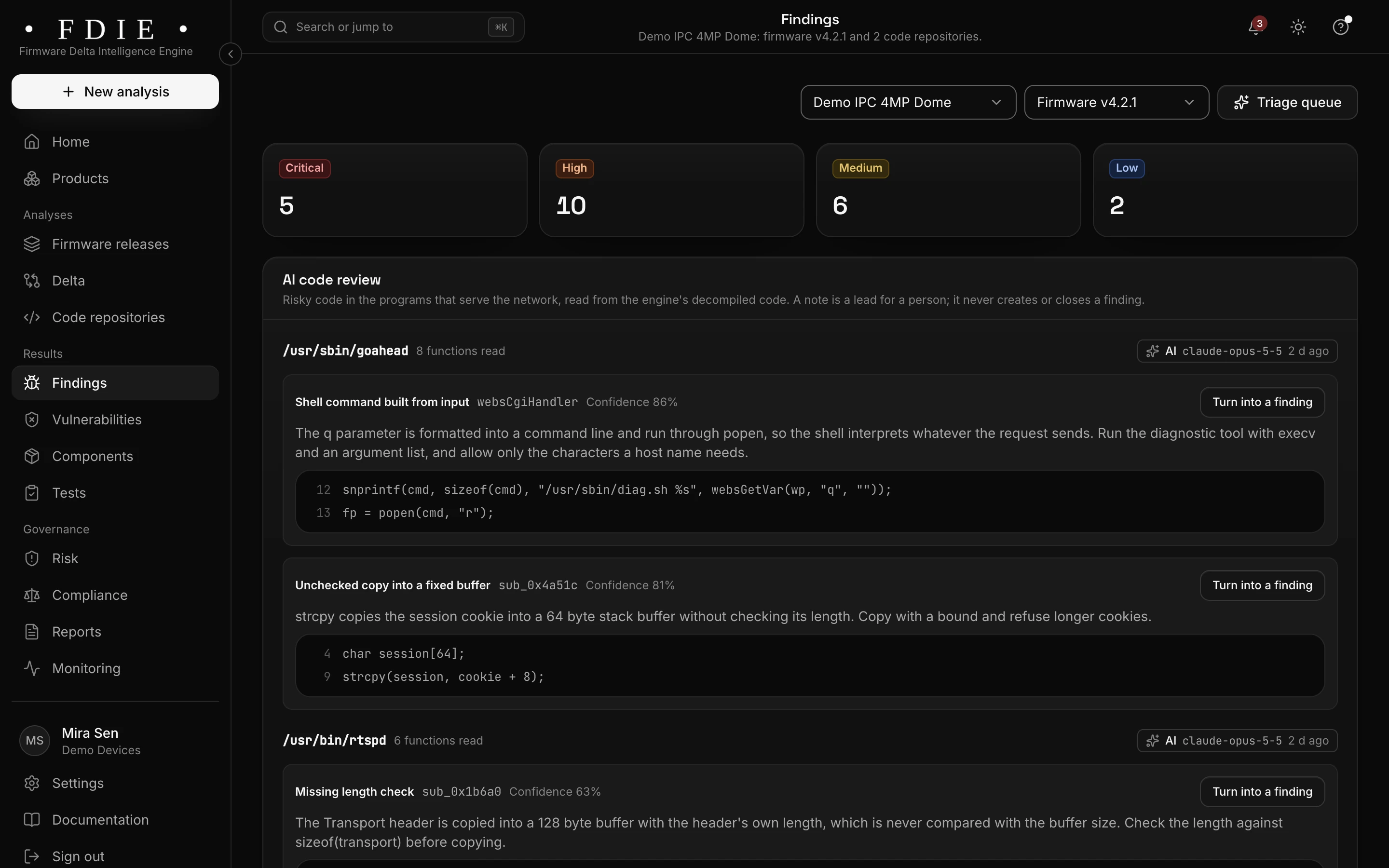
The findings list for one product, combining firmware and code: severity tiles, tabs for firmware, code, secrets and configuration, and rows such as a hard-coded admin credential in a web login handler and command injection in a firmware upload handler, each with its location, the releases it was seen in, an owner and a status.The same screen in the light theme.

Streams, ONVIF, P2P and debug access

Device checks read the image's streamer and ONVIF configuration, its init scripts and the programs present: streams without authentication, ONVIF services started at boot, shells on UART, ADB or USB serial, telnet and FTP, and cloud P2P relay SDKs. It reads the image; it is not a network scan of your device.

  • Streams and ONVIF without authentication flagged
  • UART, ADB and USB serial shells set to start
  • Cloud P2P relay SDKs named in the image
How device checks work
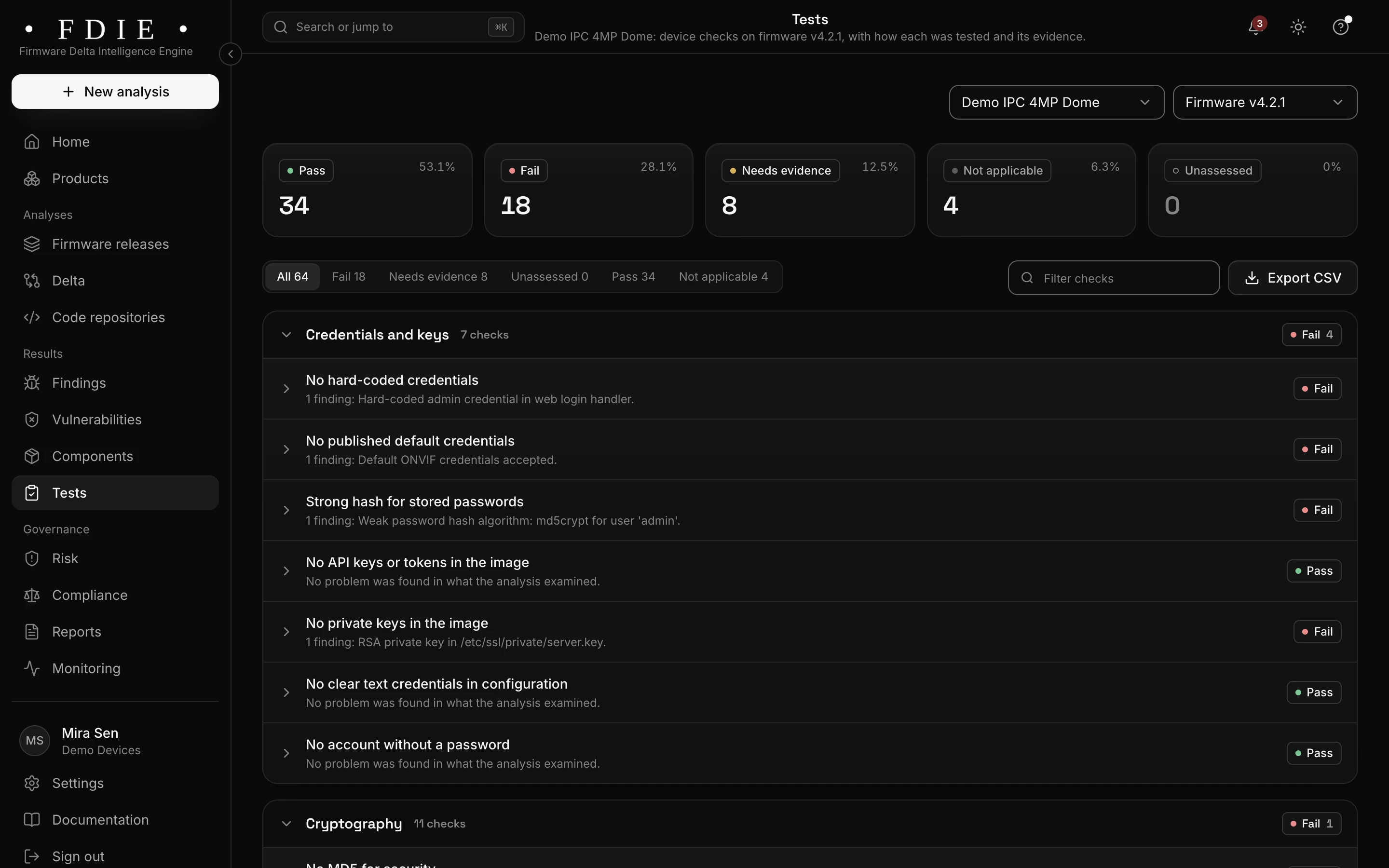
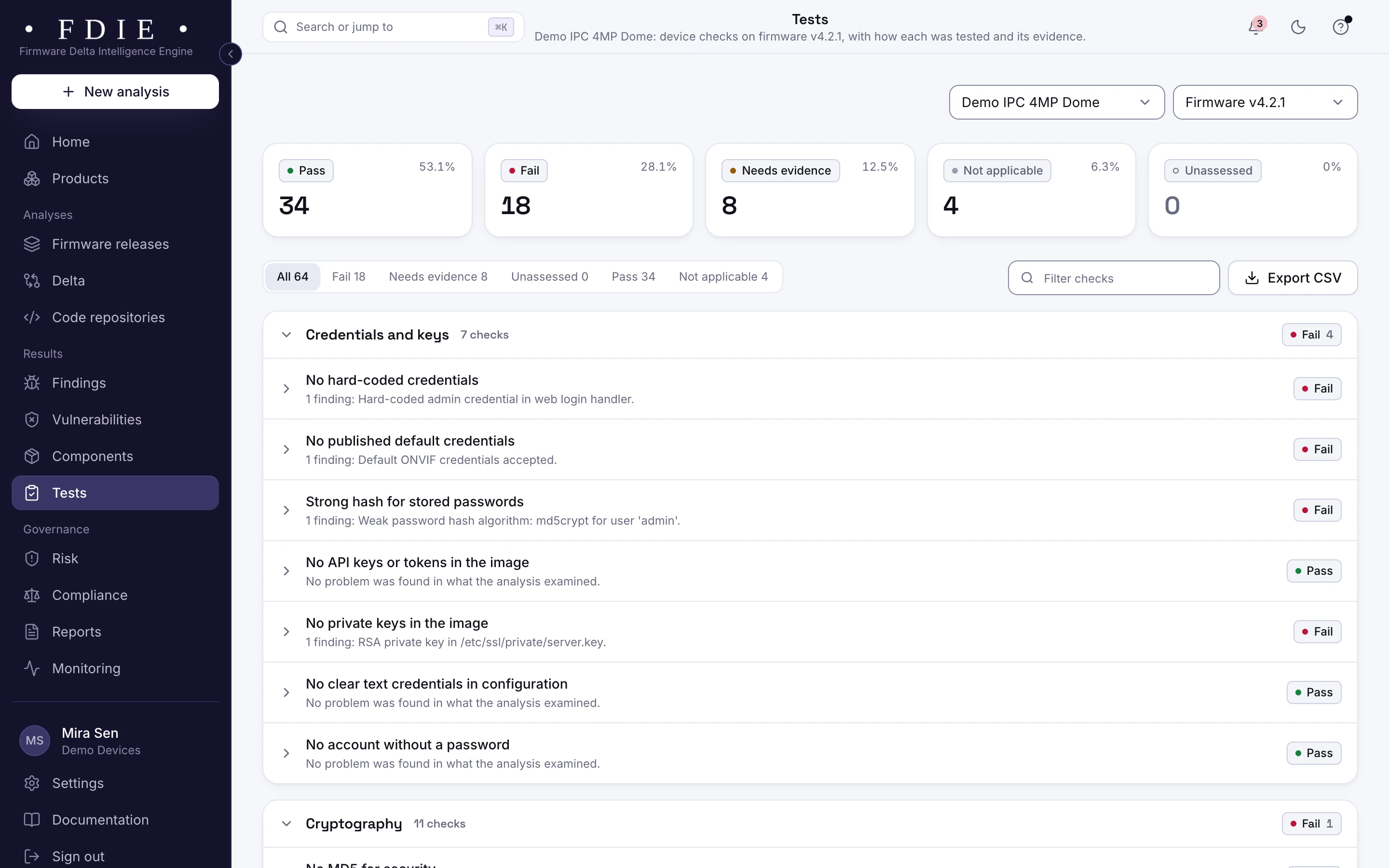
Device checks for one firmware release: all 64 checks counted as passed, failed, needs evidence, not applicable and unassessed, and the credentials and keys group with each check and what was found, for example a hard-coded admin credential, default ONVIF credentials and an MD5 crypt password hash.The same screen in the light theme.

What the SDK put in the image

Embedded Linux file systems such as SquashFS and UBIFS and vendor wrappers such as uImage are unpacked, and programs for ARM, AArch64 and MIPS are disassembled. Components from the SDK and open source come with their versions, licences and known vulnerabilities, exploited ones first.

  • The kernel, BusyBox, TLS libraries and SDK components, with versions
  • Known exploited vulnerabilities from CISA KEV first
  • An SBOM in CycloneDX or SPDX
How an image is read
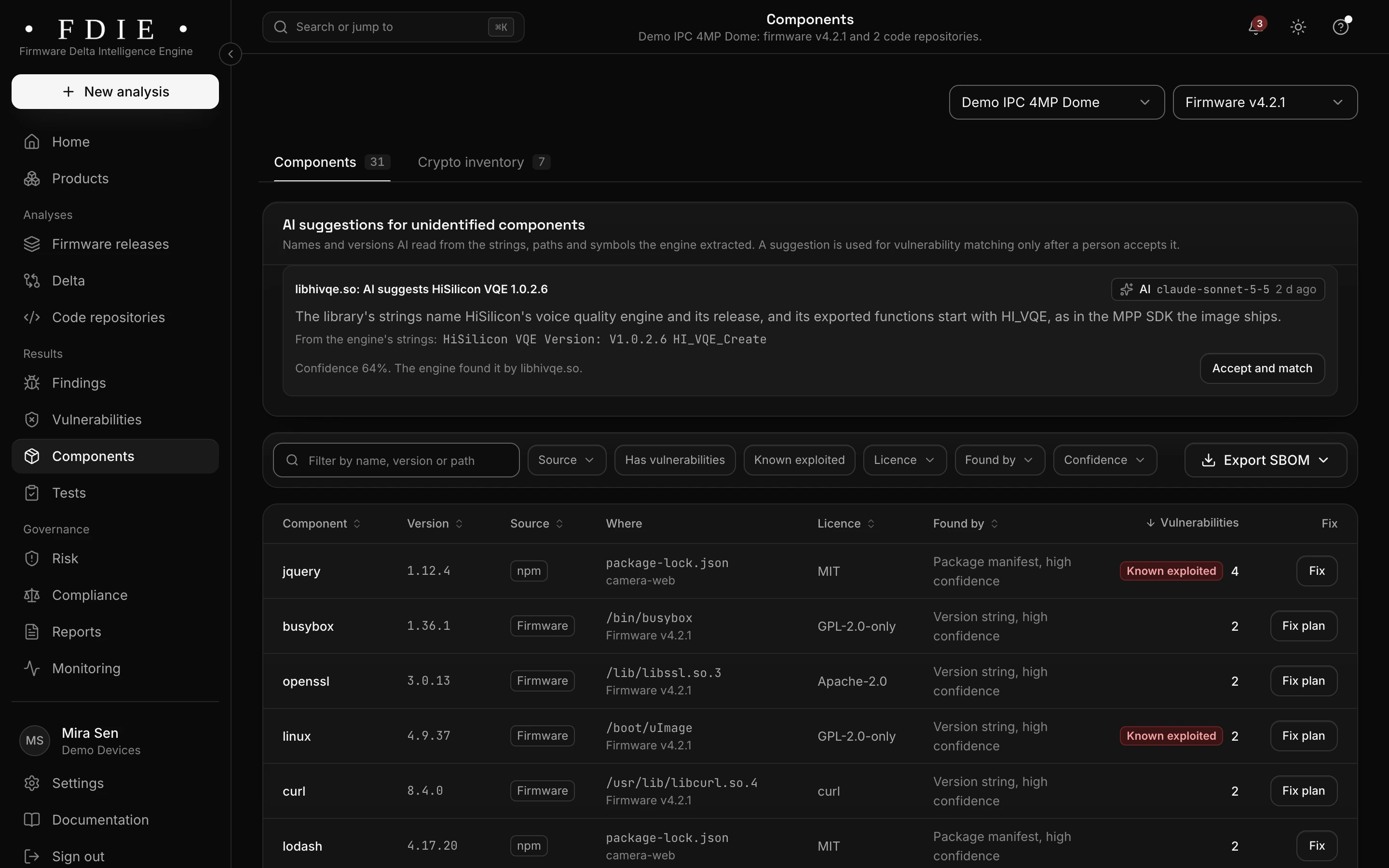
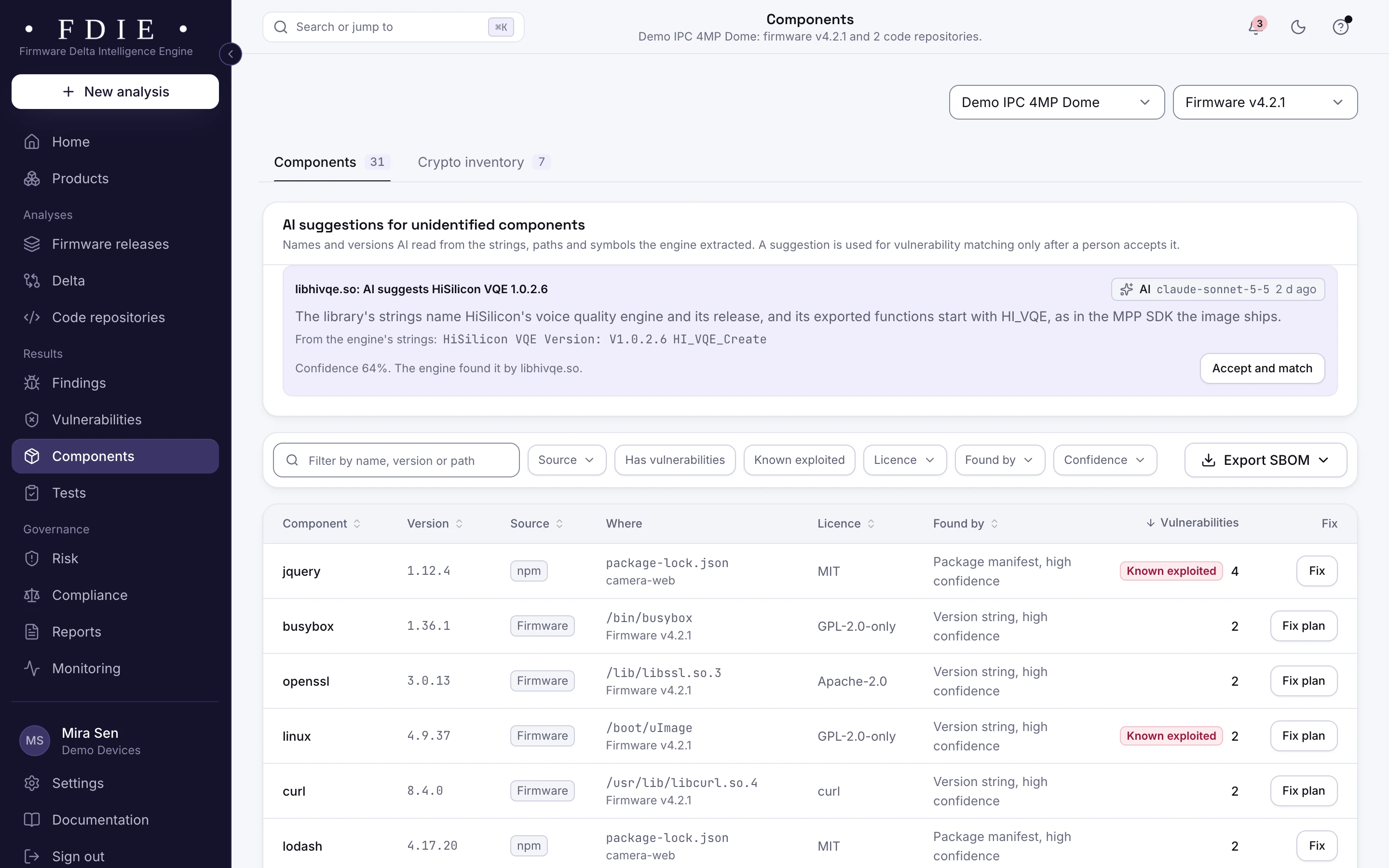
The components list that forms the SBOM: each component with its version, its source (firmware, npm or Conan), where it was found, its licence, how it was identified and how many vulnerabilities it has, with fix and fix plan buttons, an Export SBOM button and a crypto inventory tab.The same screen in the light theme.

Evidence for ER-01, ready for the lab

The device checks decide several ER-01 provisions on their own, such as a checked boot image signature, signed updates with no downgrade, no hard-coded credentials and exploit mitigations. They give part of the evidence for closed debug interfaces, keys unique to each device and TLS. Where the image cannot decide, the app says what the lab will ask for.

  • Each ER-01 provision decided, helped or left to you
  • The bill of materials the lab's supply chain review asks for
  • A pre-certification report as a signed PDF
Handing a camera to the ER-01 lab
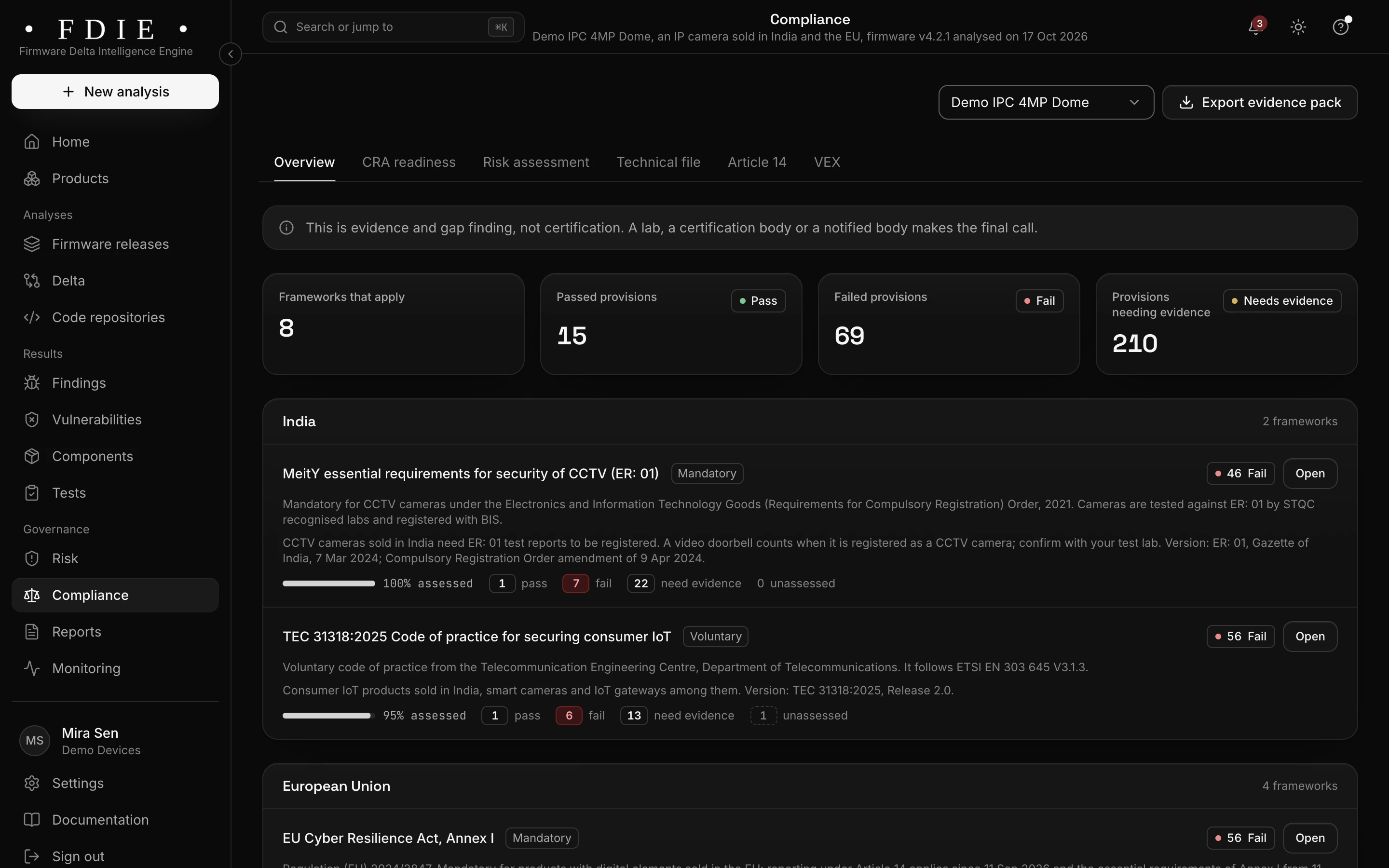
The compliance overview for one release of an IP camera sold in India, the EU, the UK and the US: frameworks that apply, passed and failed provisions and provisions needing evidence, and the frameworks by market, starting with MeitY ER-01 and TEC 31318 for India, each with its assessed share, under a note that this is evidence and gap finding, not certification.The same screen in the light theme.

How it works

From firmware image to evidence in four steps

  1. 1

    Upload the camera build

    Upload the image, import it from a GitHub or GitLab release, or let CI send every build.

  2. 2

    Unpacked and checked

    FDIE unpacks the SDK image, disassembles the programs and runs the device checks, camera checks included.

  3. 3

    Fix accounts, services and components

    Start with default accounts, open streams and known exploited flaws, then the checks ER-01 decides.

  4. 4

    Hand over the evidence

    Export the pre-certification report, the ER-01 evidence and the SBOM for the lab, and keep watching the model once it ships.

Know the split

What the image shows, and what stays with the lab

FDIE analyses the firmware, not the device. Knowing the split tells you what to fix before the lab and what to prepare for it.

From the firmware image, in FDIE

  • Default, hard-coded and ONVIF accounts, keys and tokens
  • Stream and ONVIF settings, and services started at boot
  • Serial shells, debug tools, telnet and FTP set to start
  • Components, their versions and known vulnerabilities
  • Boot and update signature checks, and binary hardening

On the device, with your testers or the lab

  • Live tests of the streams, ONVIF and the web interface
  • JTAG and SWD on the board, and memory extraction
  • The manufacturing audit and the signed statement of compliance
  • The test report for each lead model

Rules by market

Rules this helps with

Since 9 April 2025, BIS grants no new CCTV camera registration in India without ER-01; analog cameras are not covered. Section 889 evidence shows components from covered vendors' software for your counsel, never as a legal verdict.

Compliance by market

India

EU and UK

US

International

Evidence and gap finding, not certification: the lab or certification body decides.

Deliverables

What your team gets

  • Pre-certification report

    A signed PDF of the camera release's checks, findings and fixes.

  • ER-01 evidence

    Provisions decided, helped and left to you, with the evidence behind each.

  • SBOM

    The SDK and open-source components, in CycloneDX 1.6 or SPDX 2.3.

  • VEX statements

    Your team's reasons a vulnerability does not affect the camera.

  • Alerts for shipped models

    New flaws in a supported camera's components, by email, chat or webhook.

  • Risk register

    Accepted risks with owners and due dates, each approved by a second person.

Questions

Does FDIE test the camera itself?

No. It analyses the firmware image. For ER-01, the lab still tests the camera and audits manufacturing.

Which camera firmware can it read?

Embedded Linux images with SquashFS, UBIFS and other file systems, vendor wrappers such as uImage, and programs for ARM, AArch64 and MIPS. What it cannot read is listed as a coverage gap, never counted as a pass.

Do NVRs work the same way?

Yes. NVR firmware is analysed like camera firmware, x86 appliances included, and the camera checks apply wherever stream or ONVIF software is present.

Can it find the P2P SDK our ODM added?

When a known cloud P2P relay SDK is in the image, FDIE names it in a finding that says why it matters, so you can ask your ODM which release it is and how it is set up.

Does it decide NDAA section 889?

No. It shows components from covered vendors' software as evidence for counsel, never as a legal verdict.

Find out what the lab would flag in your firmware

A 45-minute call with our team. Bring one firmware image.

Request access