Firmware security for Android devices

Smart TVs, set-top boxes and Android terminals ship a chip vendor's board support package, its kernel and a long list of apps and services. Every update arrives as an OTA payload that needs checking. FDIE unpacks the payload and the boot image, shows what the firmware contains and flags debug access, secrets and known vulnerabilities before your customers' security teams do.

Request access
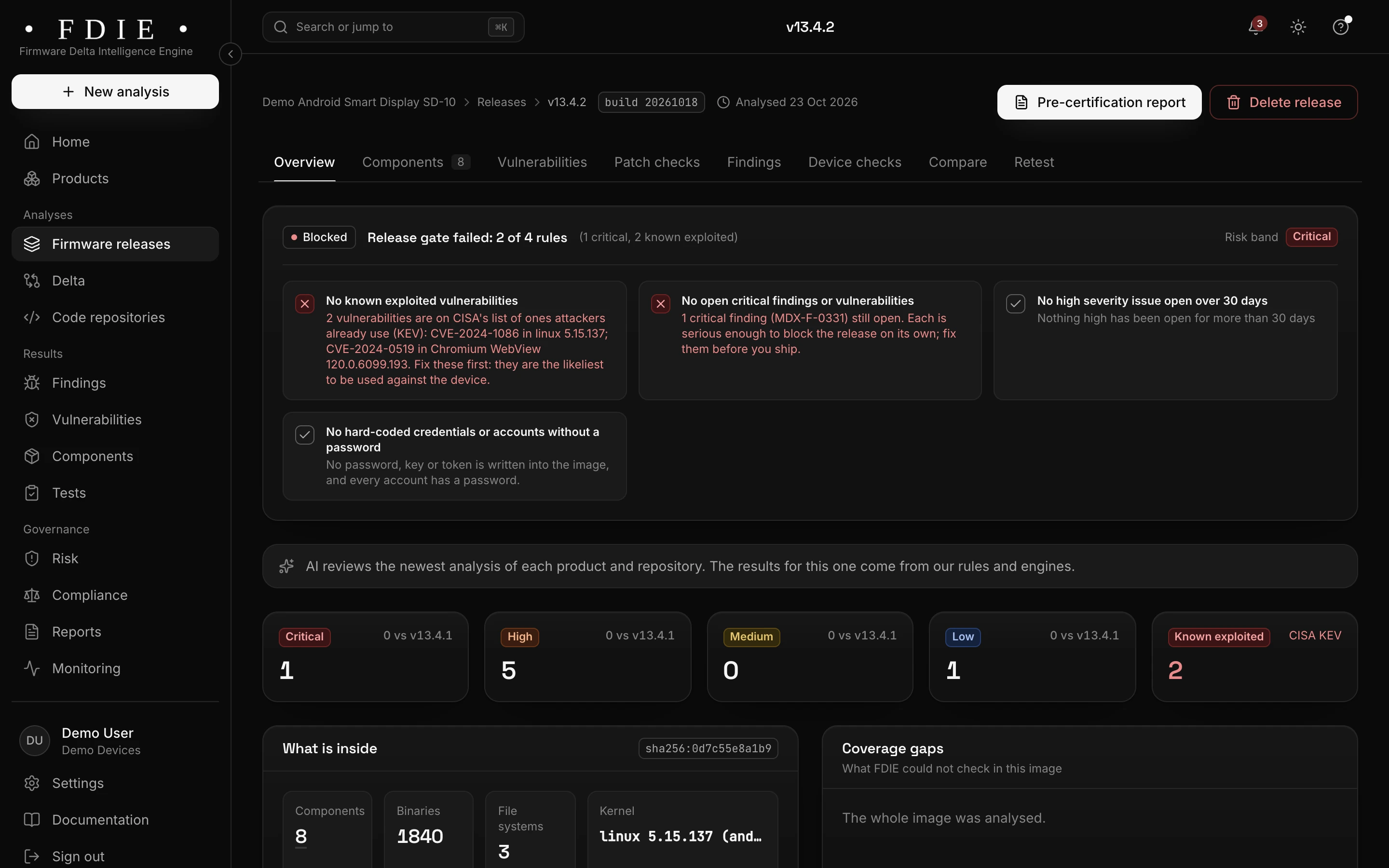
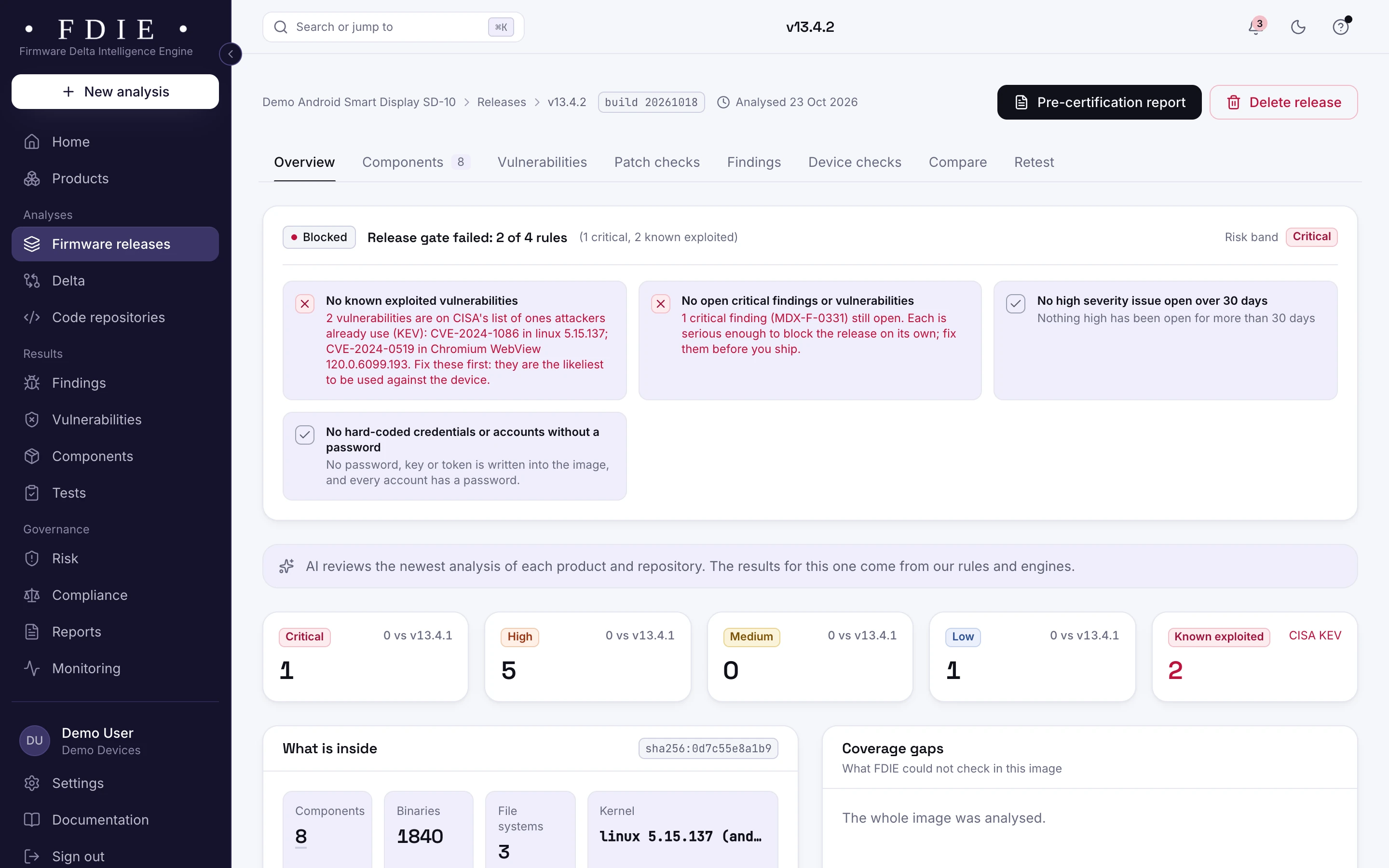
An Android smart display release blocked by its release gate: two known exploited vulnerabilities, in the Linux kernel and Chromium WebView, one critical finding, 1,840 programs and three file systems.The same screen in the light theme.
An Android smart display release from the app's sample organisation: the release gate held on two known exploited flaws, in the kernel and in WebView.

The challenge

Where Android device firmware goes wrong

  • An old kernel under a new interface

    Board support packages tie a device to the kernel the chip vendor shipped, sometimes years old. Its known vulnerabilities come with it.

  • Debug access left in production

    ADB, serial consoles and debug tools are essential during development and dangerous in a shipped TV or terminal. They are easy to leave enabled in a release build.

  • Consumer and payment rules

    Smart TVs and set-top boxes are consumer connectable products under UK PSTI and ETSI EN 303 645. Terminals with payment features and a radio fall under EN 18031 part 3 in the EU.

How FDIE helps

What changes with FDIE

OTA payloads and boot images, unpacked

FDIE unpacks Android OTA payloads and boot images with its own readers, reads the kernel's version and disassembles ARM and AArch64 programs. Android sparse images are read in our tests but not yet measured on a vendor's image, and anything that cannot be read is listed as a coverage gap.

  • Components with versions, licences and known vulnerabilities
  • The kernel version from the boot image
  • What could not be read listed as a coverage gap
Formats and processors
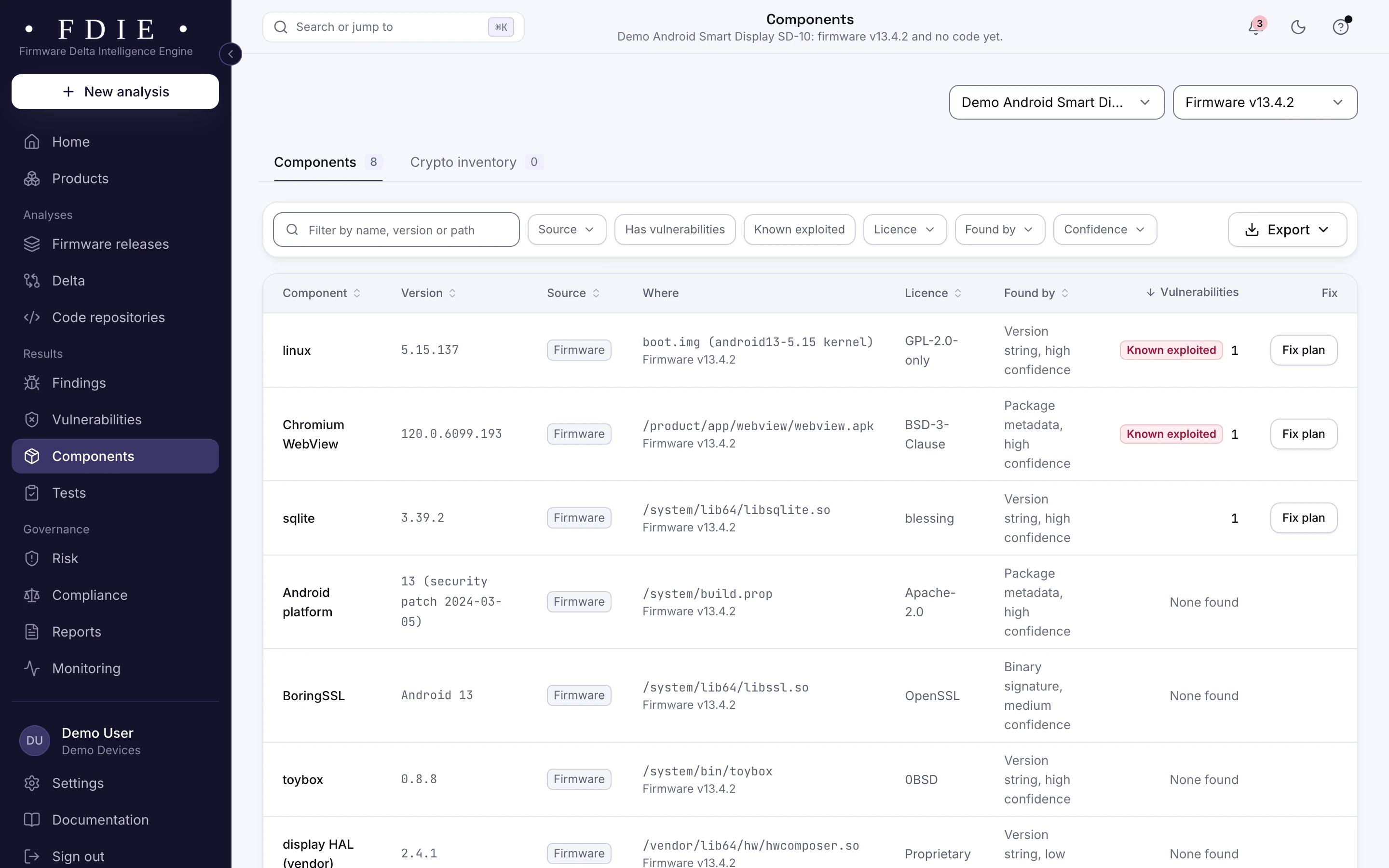
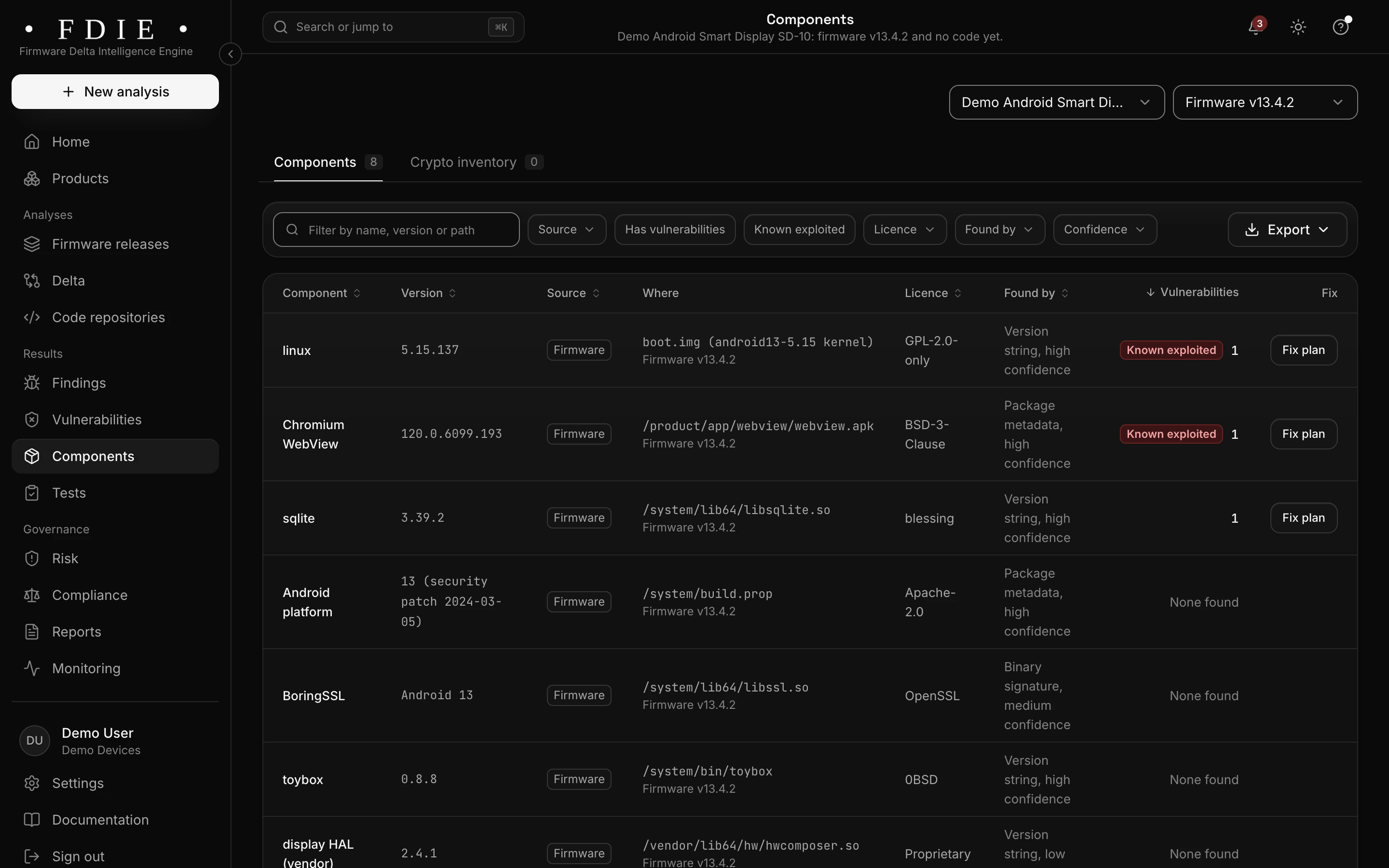
The Android image's components: the Linux kernel in boot.img and Chromium WebView, both known exploited, SQLite, the Android 13 platform with its March 2024 security patch, BoringSSL, toybox and a vendor display HAL.The same screen in the light theme.

ADB, serial shells and debug tools

Device checks read init scripts and configuration for ADB, UART and USB serial shells set to start, debug tools left in the image, telnet and FTP, and services the product does not need. It reads the image; it is not a test of a running device.

  • ADB and serial shells set to start flagged
  • Debug tools and unneeded services listed
  • Only root with user id 0, and no account without a password
How device checks work
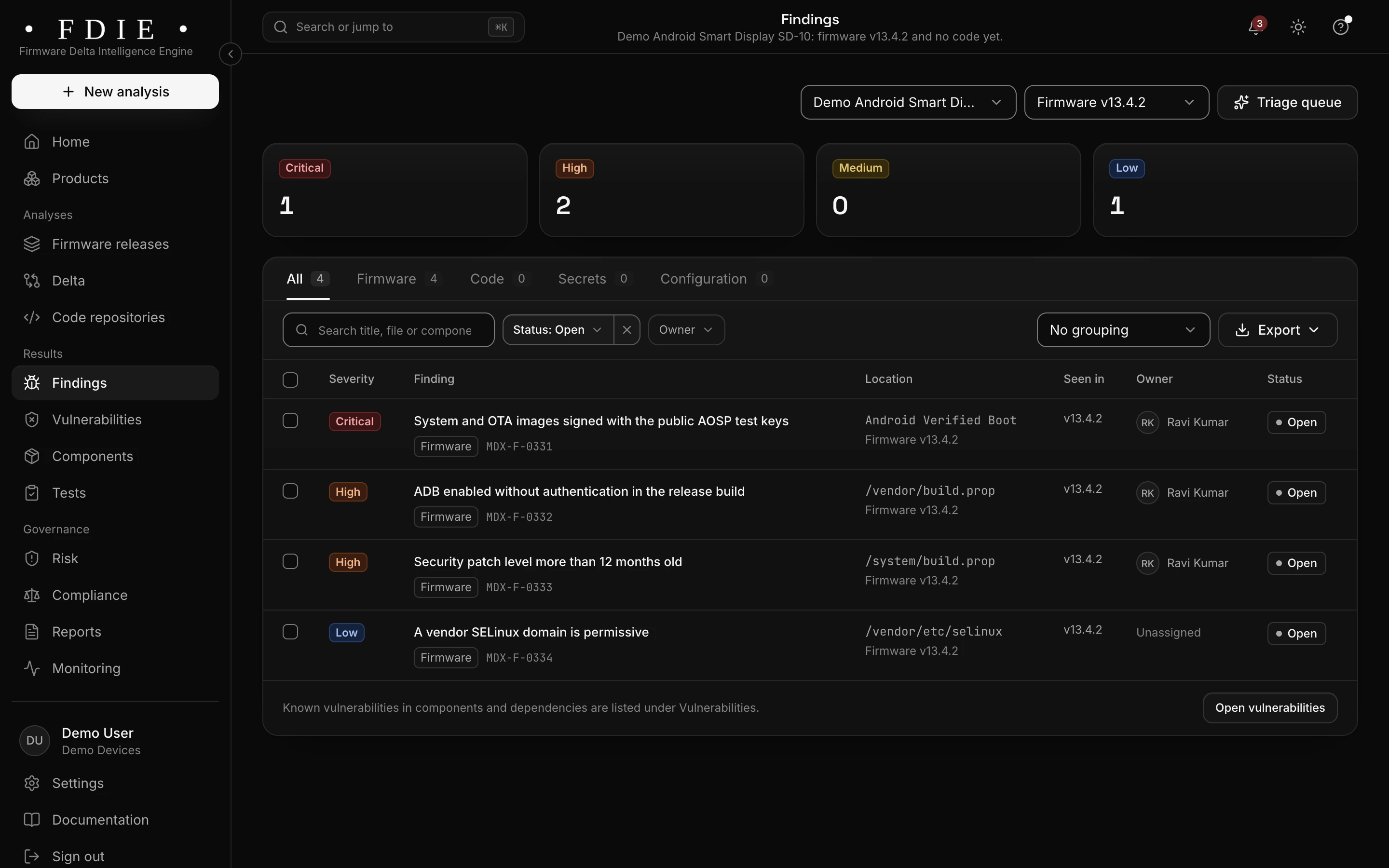
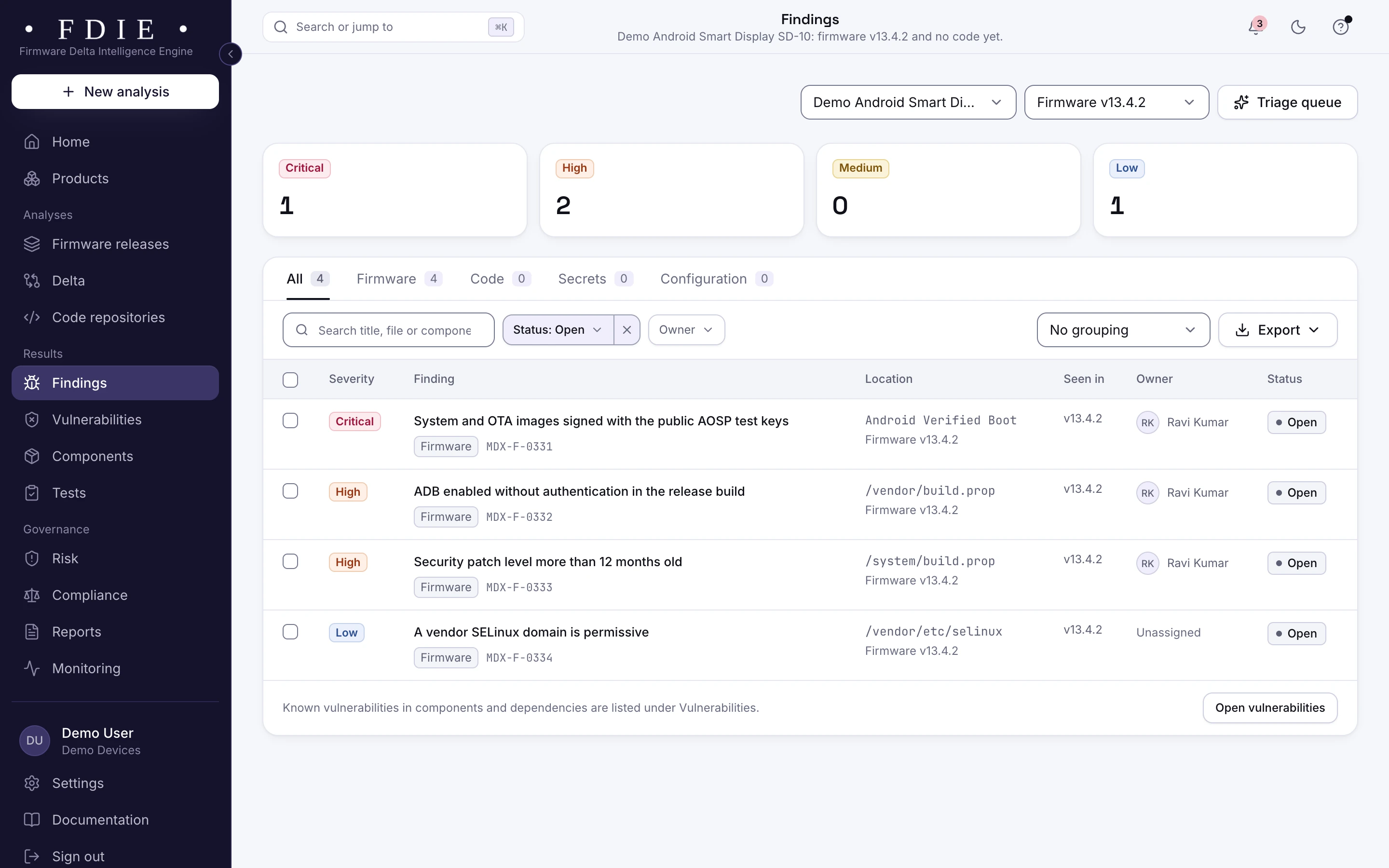
Findings in the Android firmware: system and OTA images signed with the public AOSP test keys, ADB on without authentication in the release build, a security patch level more than 12 months old and a permissive vendor SELinux domain.The same screen in the light theme.

Kernel and component vulnerabilities

The kernel and every identified component are matched to NVD and OSV and ranked with CISA KEV and EPSS. Function use says whether your programs call the vulnerable function, and a device check fails on a high or critical vulnerability in the kernel.

  • Known exploited flaws first
  • The version that fixes each vulnerability
  • VEX statements for the ones that do not apply
Vulnerabilities in detail
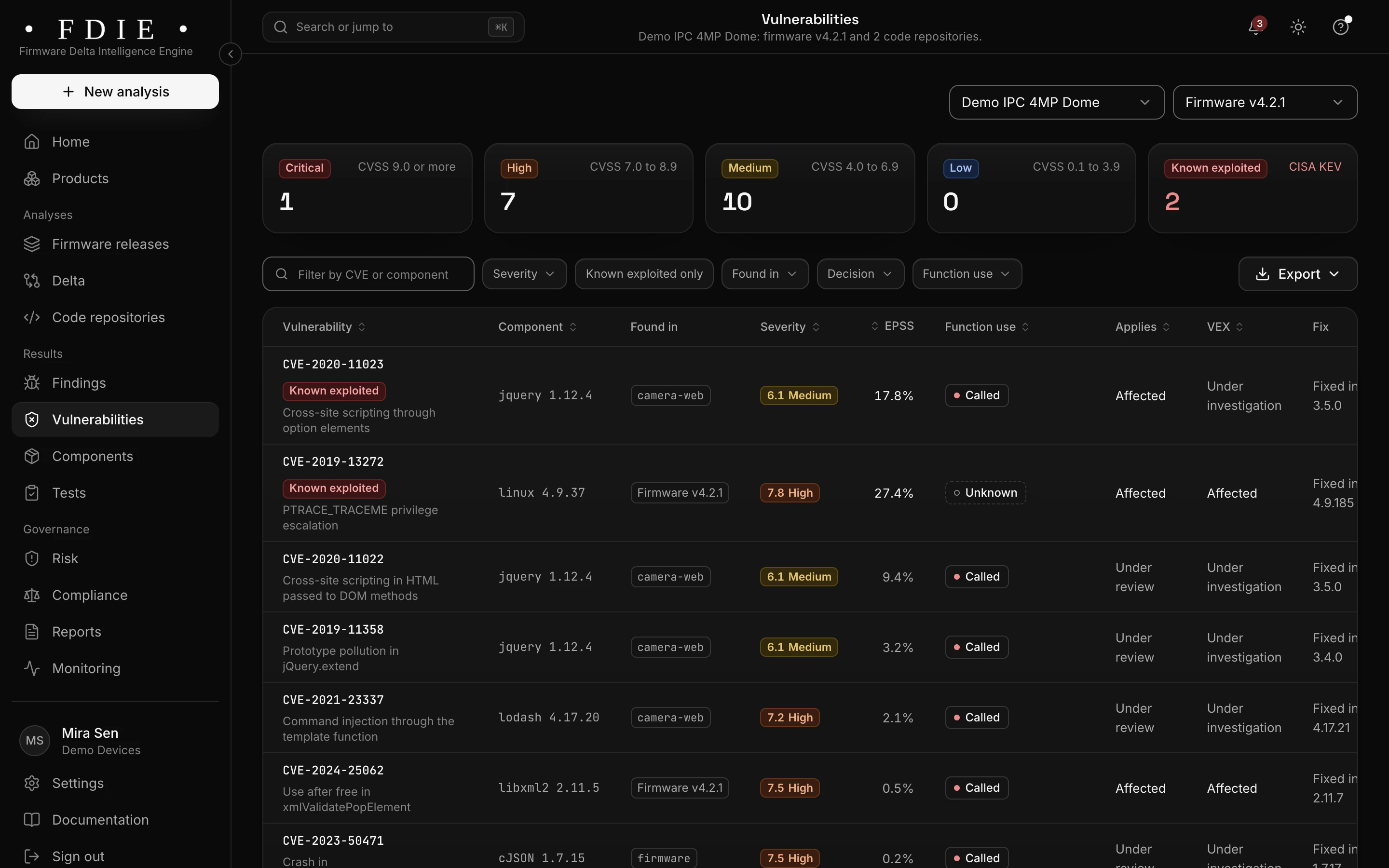
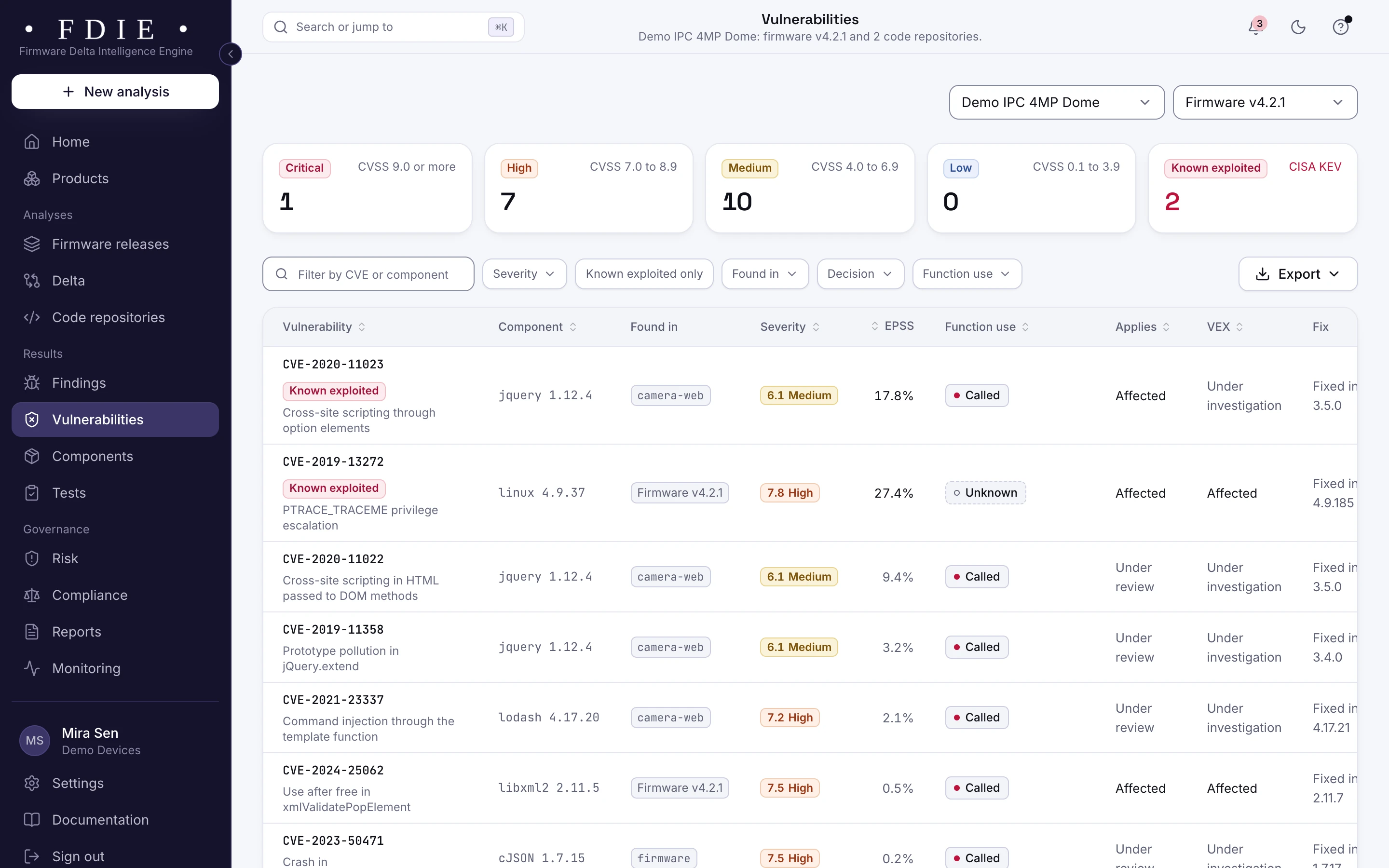
The vulnerabilities list: one row per CVE with the affected component, where it was found in firmware and code repositories, severity, EPSS probability, whether the product calls the vulnerable function, applicability, VEX status and the version that fixes it, with known exploited entries from CISA KEV marked.The same screen in the light theme.

Your apps and their manifests

Connect the repositories of your launcher, apps and companion app and the code engine reads them too, Android manifest settings included. Their findings sit beside the firmware's in the same product, so one release view covers the device and the software you wrote for it.

  • Exported components, backups and transport settings in the manifest
  • Secrets in source code, shown masked
  • Code findings beside the firmware findings of the same product
Source code analysis
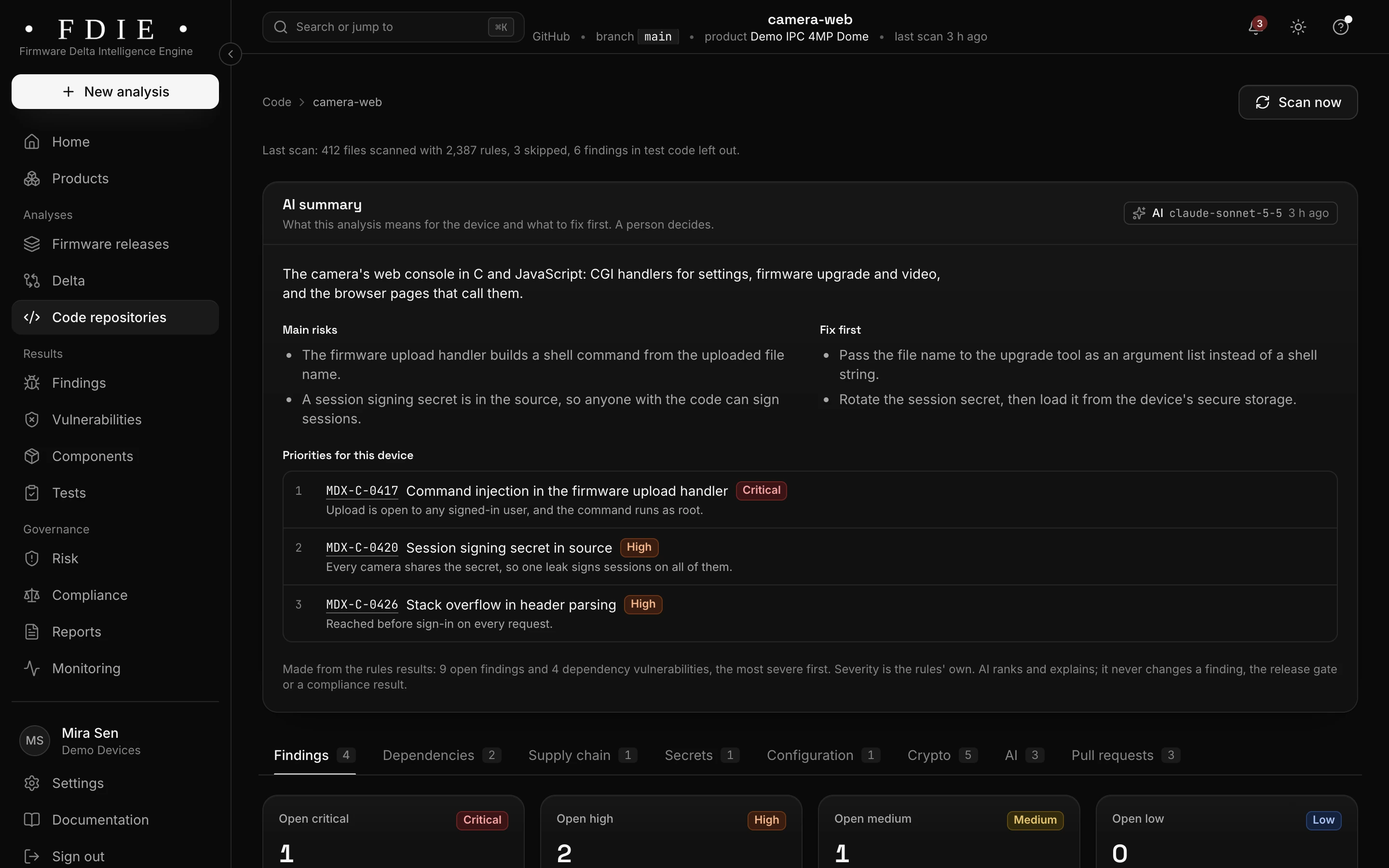
A connected GitHub repository for the camera's web interface: the AI summary of its main risks and what to fix first, three priorities (command injection in the firmware upload handler, a session signing secret in source and a stack overflow in header parsing), and tabs for findings, dependencies, supply chain, secrets, configuration, crypto, AI and pull requests.The same screen in the light theme.

How it works

From firmware image to evidence in four steps

  1. 1

    Upload the OTA or the image

    Upload the OTA payload or the firmware image, import it from a GitHub or GitLab release, or let CI send each build.

  2. 2

    Unpacked and checked

    FDIE unpacks the payload and the boot image, reads the kernel and the programs and runs the device checks.

  3. 3

    Fix what matters first

    Close debug access, remove secrets and work through exploited flaws in the kernel and components.

  4. 4

    Ship with evidence

    Export the SBOM, the evidence for consumer rules and signed reports, and compare each new OTA with the last.

Know the split

What the image shows, and what stays with the lab

FDIE analyses the firmware, not the device. Knowing the split tells you what to fix before the lab and what to prepare for it.

From the firmware image, in FDIE

  • Components, the kernel version and known vulnerabilities
  • ADB, serial shells and debug tools set to start
  • Secrets, keys and tokens in the image
  • Binary hardening and weak cryptography

On the device, with your testers or the lab

  • Apps and services on the running device
  • Verified boot and the bootloader lock on the hardware
  • Payment certification for terminals
  • Penetration tests and the test report

Rules by market

Rules this helps with

Smart TVs and set-top boxes are consumer connectable products under UK PSTI, in force since 29 April 2024. In the EU, EN 18031 part 3 covers radio equipment with payment features until the EU CRA applies in full on 11 December 2027.

Compliance by market

India

  • TEC 31318

    Voluntary code for consumer IoT, Release 2.0 of November 2025

EU and UK

US

International

Evidence and gap finding, not certification: the lab or certification body decides.

Deliverables

What your team gets

  • SBOM

    The kernel and every component found, in CycloneDX 1.6 or SPDX 2.3.

  • Evidence for consumer rules

    UK PSTI, ETSI EN 303 645 and EN 18031, from the image and from what you record.

  • Pre-certification report

    A signed PDF of checks, findings and fixes for the release.

  • Delta report for each OTA

    What changed since the last update, with patch states for each vulnerability.

  • VEX statements

    Your team's reasons a vulnerability does not affect the device.

  • Alerts for shipped models

    New flaws in a supported device's components, by email, chat or webhook.

Questions

Which Android formats does it read?

OTA payloads and boot images. Android sparse images are read in our tests but not yet measured on a vendor's image, and anything that cannot be read is listed as a coverage gap.

Does it test the running TV or terminal?

No. FDIE analyses the firmware image. Apps and services on the running device stay with your testers.

Can we compare two OTA updates?

Yes. Analyse both and compare them: components added, removed, upgraded and downgraded, with vulnerabilities, findings and device checks side by side.

Does it cover payment terminals?

For the firmware, yes, and the app holds EN 18031 part 3 for radio equipment with payment features. Payment certification itself stays with its own labs.

Do we need our app source code?

No. The image alone gives components, vulnerabilities, checks and secrets. Connecting your app repositories adds code findings to the same product.

Find out what the lab would flag in your firmware

A 45-minute call with our team. Bring one firmware image.

Request access