Firmware security for microcontroller and RTOS devices

Sensors, smart plugs, meters and motor controllers often run on a microcontroller with no Linux at all, shipped as an Intel HEX or UF2 file. Many firmware tools stop there. FDIE lays the image out, reads its code and shows what is in it, and it says plainly what it could not read.

Request access
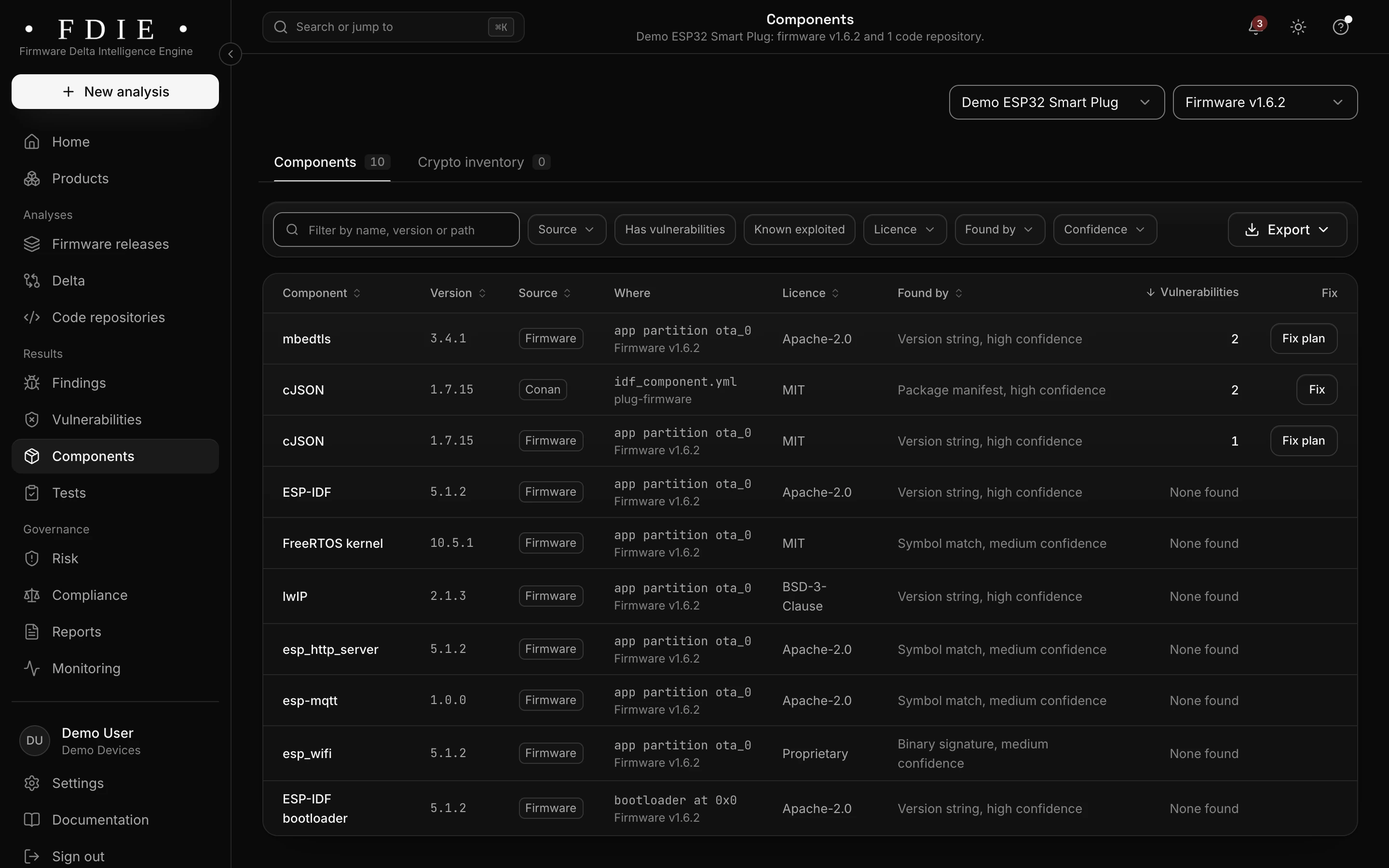
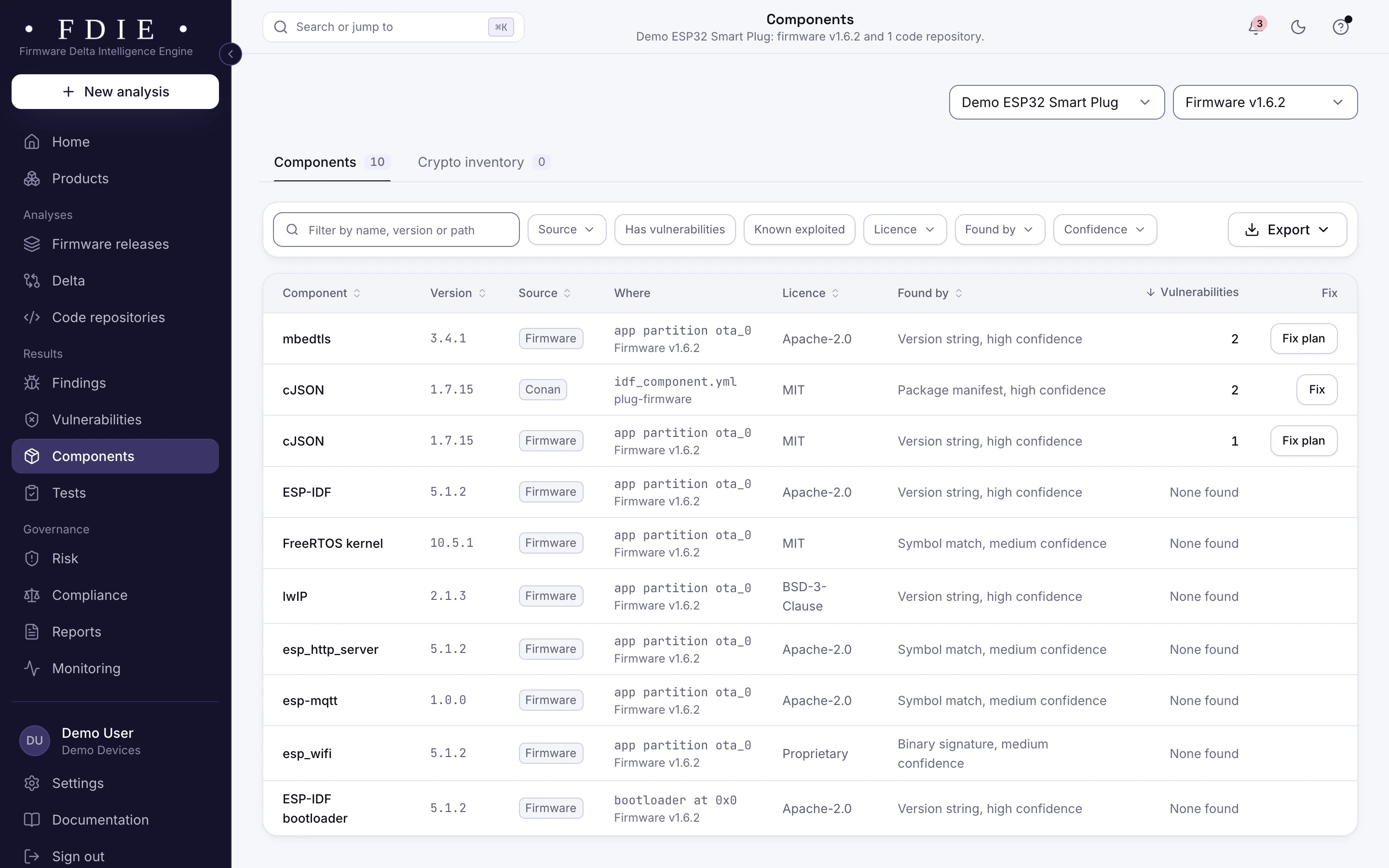
The smart plug's components: mbedTLS, cJSON, ESP-IDF 5.1.2, the FreeRTOS kernel, lwIP and Espressif's HTTP server, MQTT and Wi-Fi libraries in the application partition, found by version strings, symbols and binary signatures.The same screen in the light theme.
The components of an ESP32 smart plug release from the app's sample organisation: ESP-IDF, FreeRTOS, lwIP and mbedTLS in the application partition.

The challenge

Why microcontroller firmware gets skipped

  • No file system to unpack

    A bare-metal image is one block of code and data, often split across HEX records or UF2 blocks. Tools built for Linux images find nothing to unpack and report nothing.

  • Secrets in the flash

    Wi-Fi passwords, cloud tokens and private keys are compiled straight into the image. Every unit carries the same ones, and anyone with a flash reader can extract them.

  • The rules still apply

    A smart plug or a sensor is a consumer connectable product like any other. UK PSTI, EN 18031 and ETSI EN 303 645 do not exempt it because it has no Linux.

How FDIE helps

What changes with FDIE

HEX, S-record, UF2 and DfuSe, laid out

Intel HEX, S-record, UF2 and DfuSe files are laid out as one flat image with its entry point and interrupt handlers. Cortex-M images are found by their vector table, and ESP application and factory images give the ESP-IDF version and the application's name.

  • ESP32 and ESP8266 on Xtensa, ESP32-C and ESP32-H on RISC-V
  • Cortex-M in raw, UF2, DfuSe and Intel HEX files
  • AVR, MSP430, 8051, PIC16, PIC18, PIC24 and dsPIC from HEX and S-record files
Formats and processors
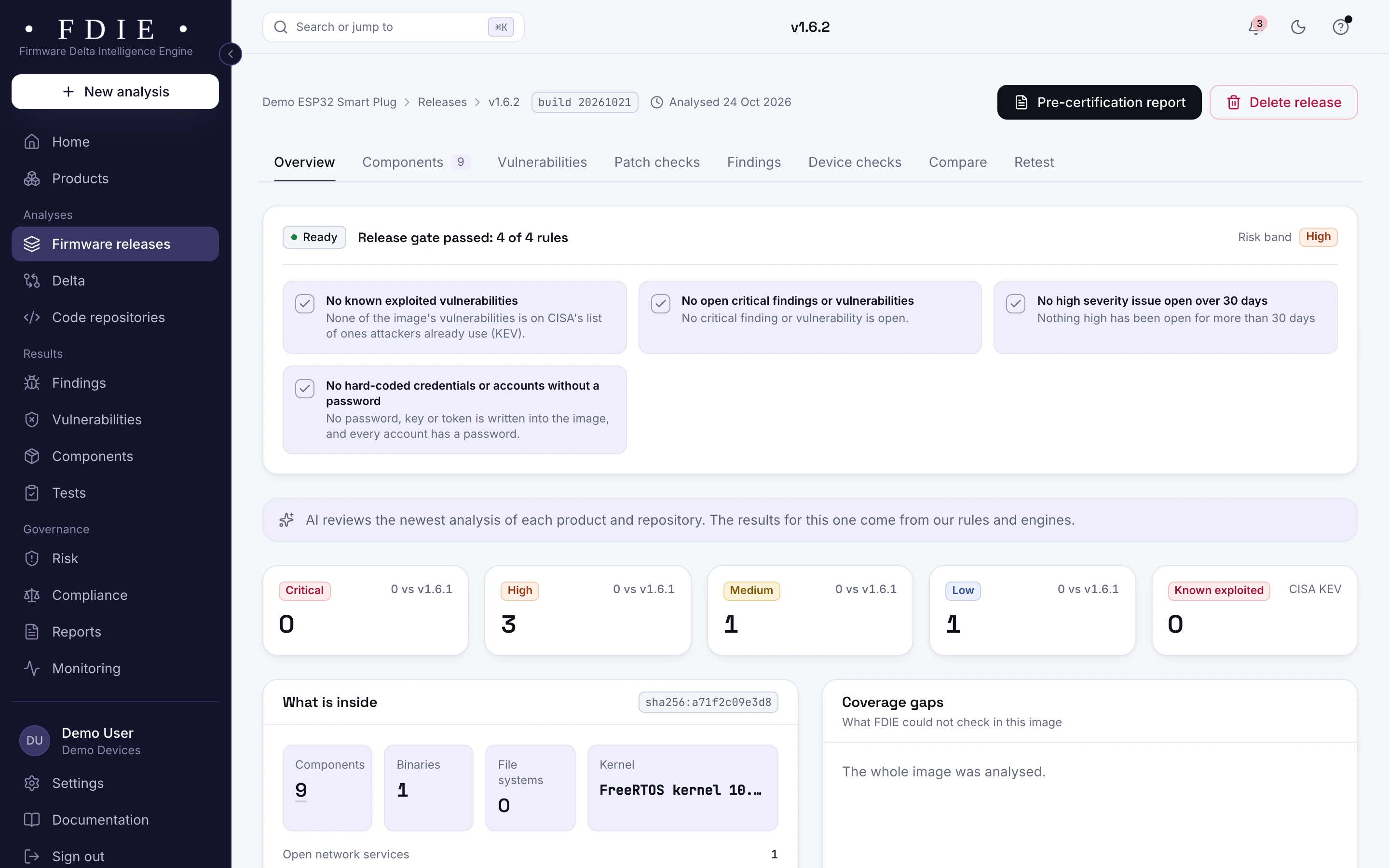
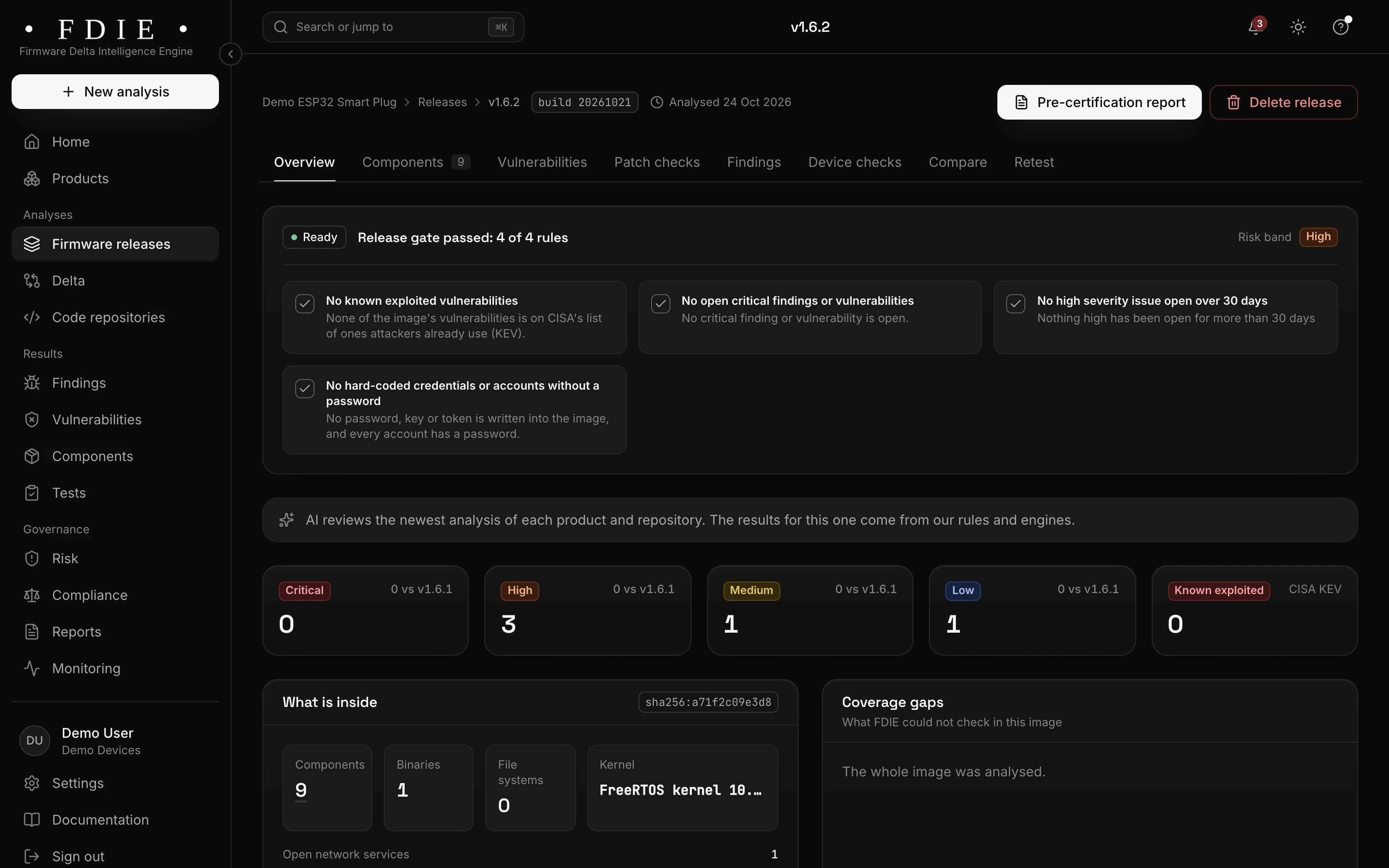
An ESP32 smart plug release that passed its release gate: nine components, one program, the FreeRTOS kernel and one open network service, with the whole image analysed.The same screen in the light theme.

Secrets compiled into the image

Passwords, API keys, tokens and private keys are found in the image and shown masked. Anything in a microcontroller image ships on every unit, so each one is flagged before a flash reader gives it away.

  • Hard-coded passwords and default accounts
  • Private keys and cloud tokens shared by every unit
  • Weak algorithms and short keys in the crypto inventory
Passwords and keys
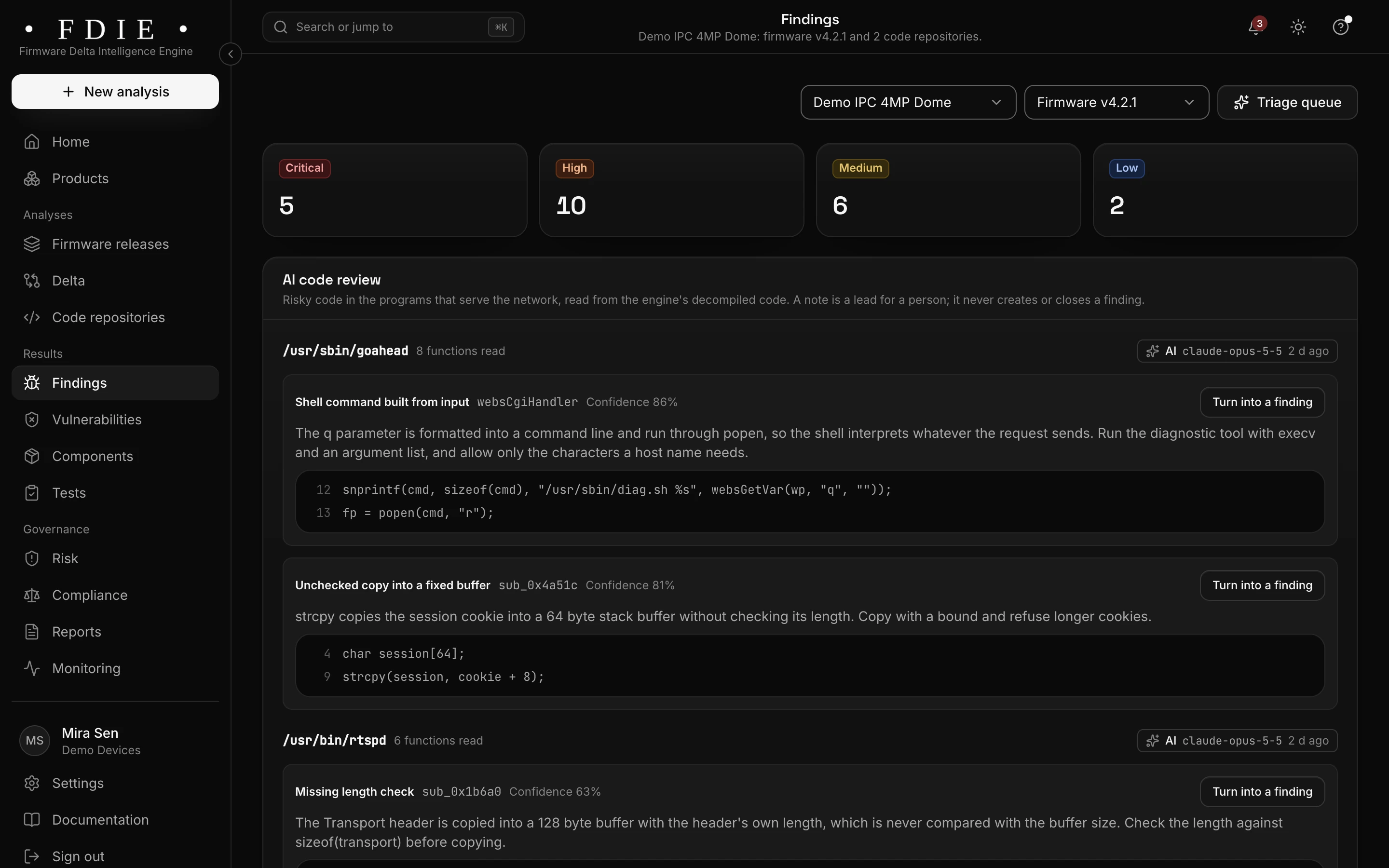
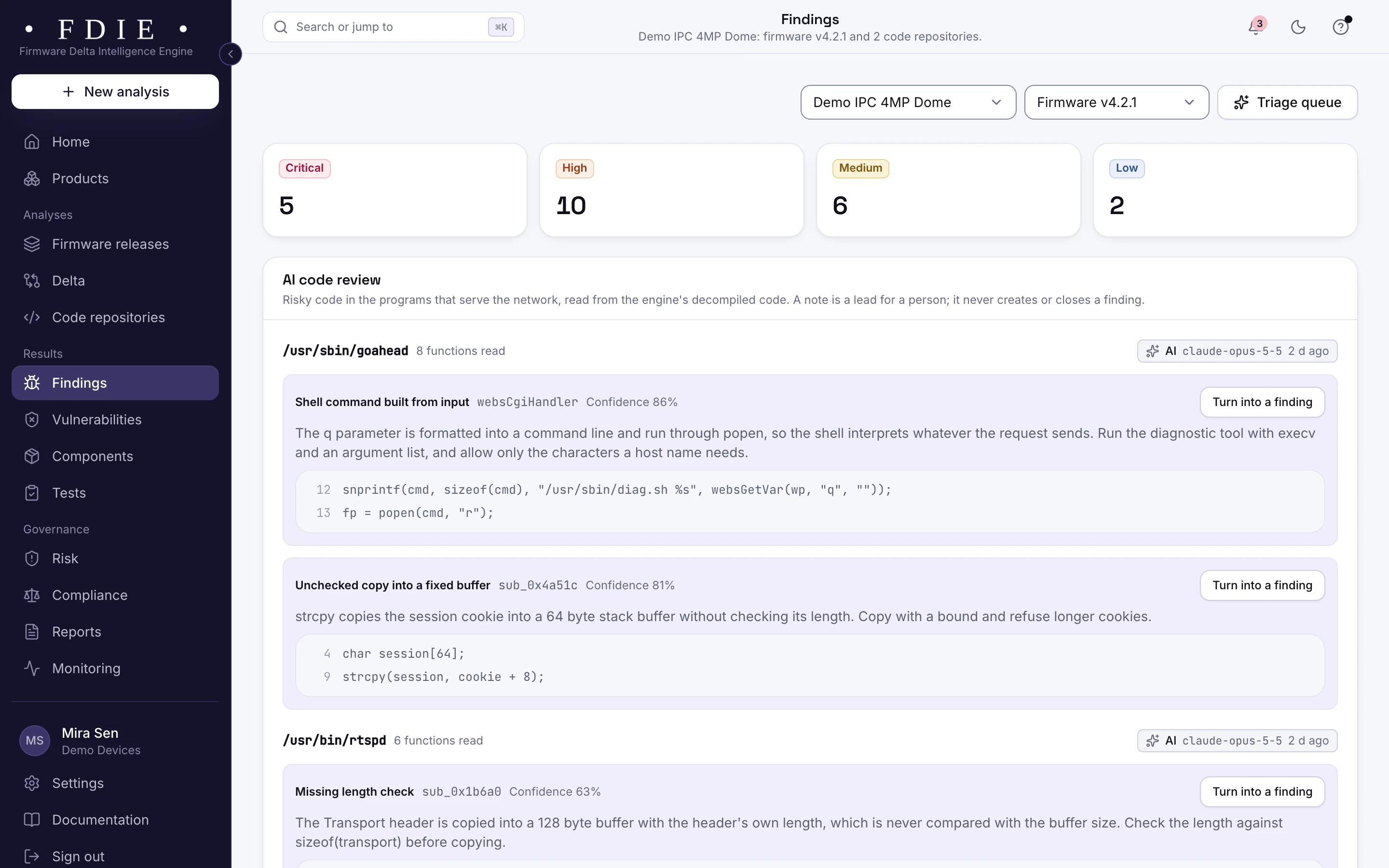
The findings list for one product, combining firmware and code: severity tiles, tabs for firmware, code, secrets and configuration, and rows such as a hard-coded admin credential in a web login handler and command injection in a firmware upload handler, each with its location, the releases it was seen in, an owner and a status.The same screen in the light theme.

Build settings for secure boot and flash encryption

With the source connected, rules read ESP-IDF, Zephyr and MCUboot build configuration: signed boot and updates, flash encryption, and debug shells and stubs left in. TLS settings in mbedTLS and wolfSSL that allow SSL 3.0 to TLS 1.1 or weak cipher suites are found too.

  • Secure boot and flash encryption settings
  • Debug shells and stubs left in the build
  • mbedTLS and wolfSSL settings below TLS 1.2
Build configuration rules
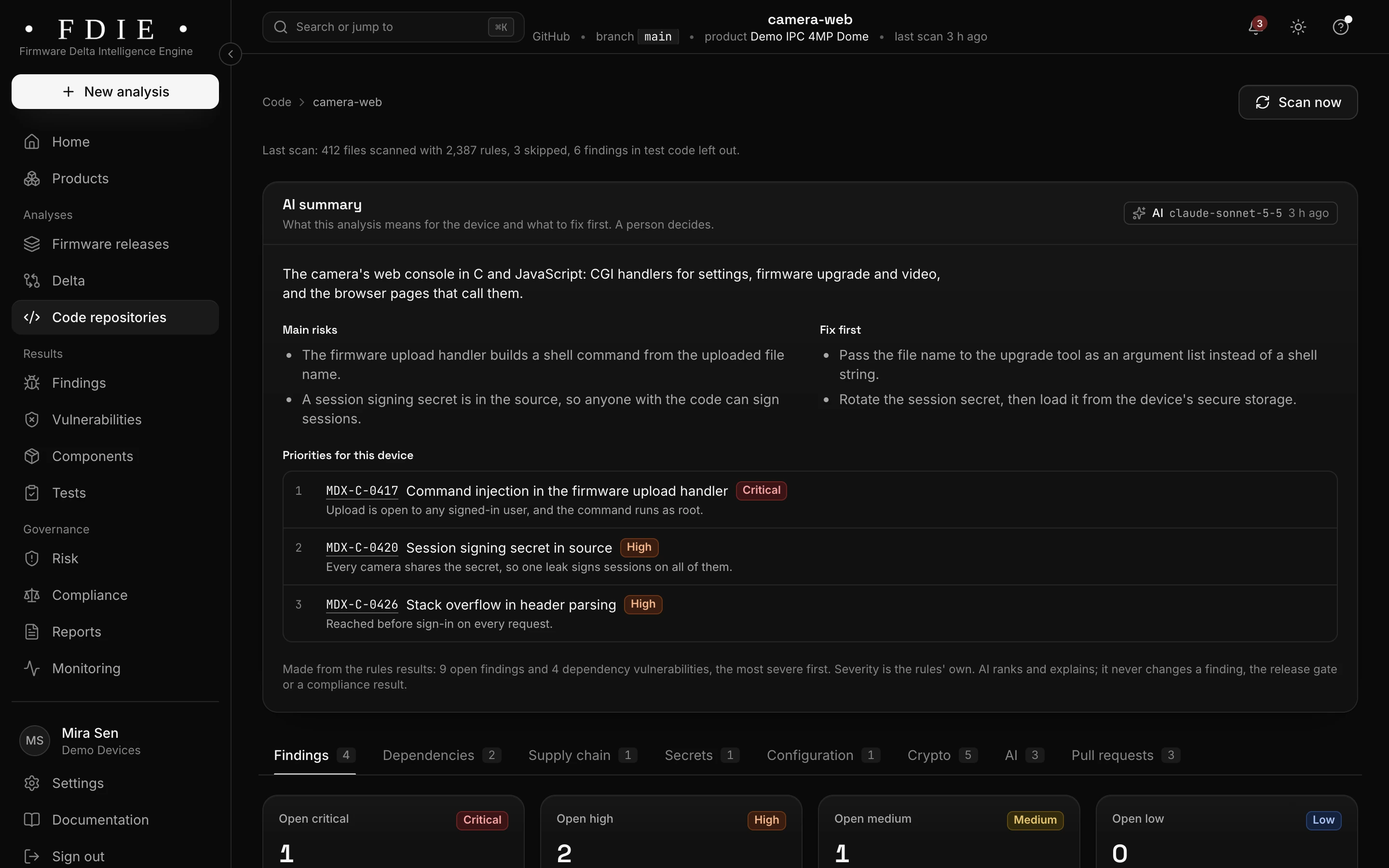
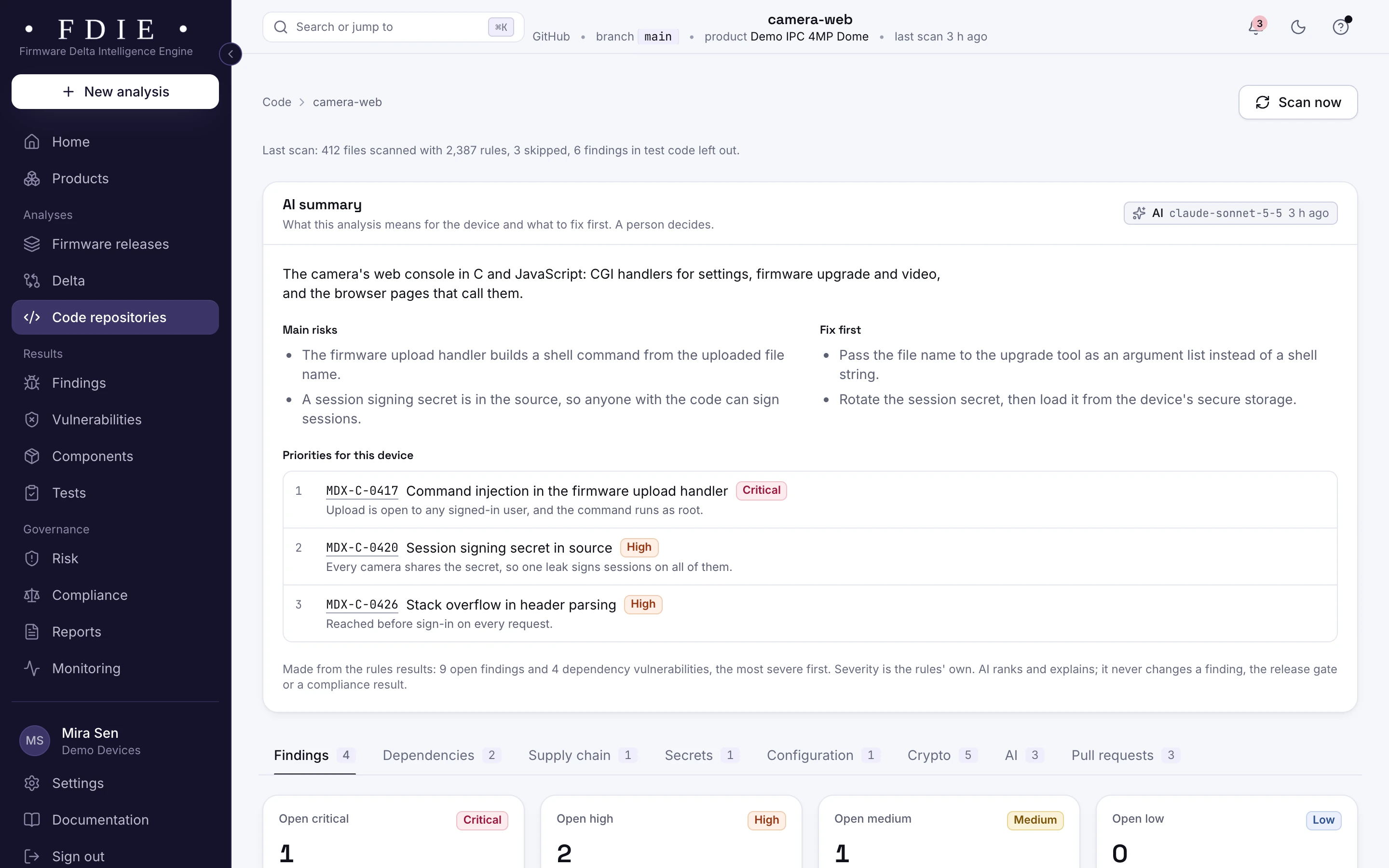
A connected GitHub repository for the camera's web interface: the AI summary of its main risks and what to fix first, three priorities (command injection in the firmware upload handler, a session signing secret in source and a stack overflow in header parsing), and tabs for findings, dependencies, supply chain, secrets, configuration, crypto, AI and pull requests.The same screen in the light theme.

Plain about what it cannot read

ARC images are read for their architecture and libraries but not disassembled, and show as a coverage gap. Of a banked 8051 image, the first 64 KB are read. When an image holds too little readable text, the checks that rely on its strings say not assessed instead of passing.

  • Coverage gaps listed with their reason
  • Checks that cannot decide say what evidence they need
  • Never a pass for what was not examined
Formats and processors
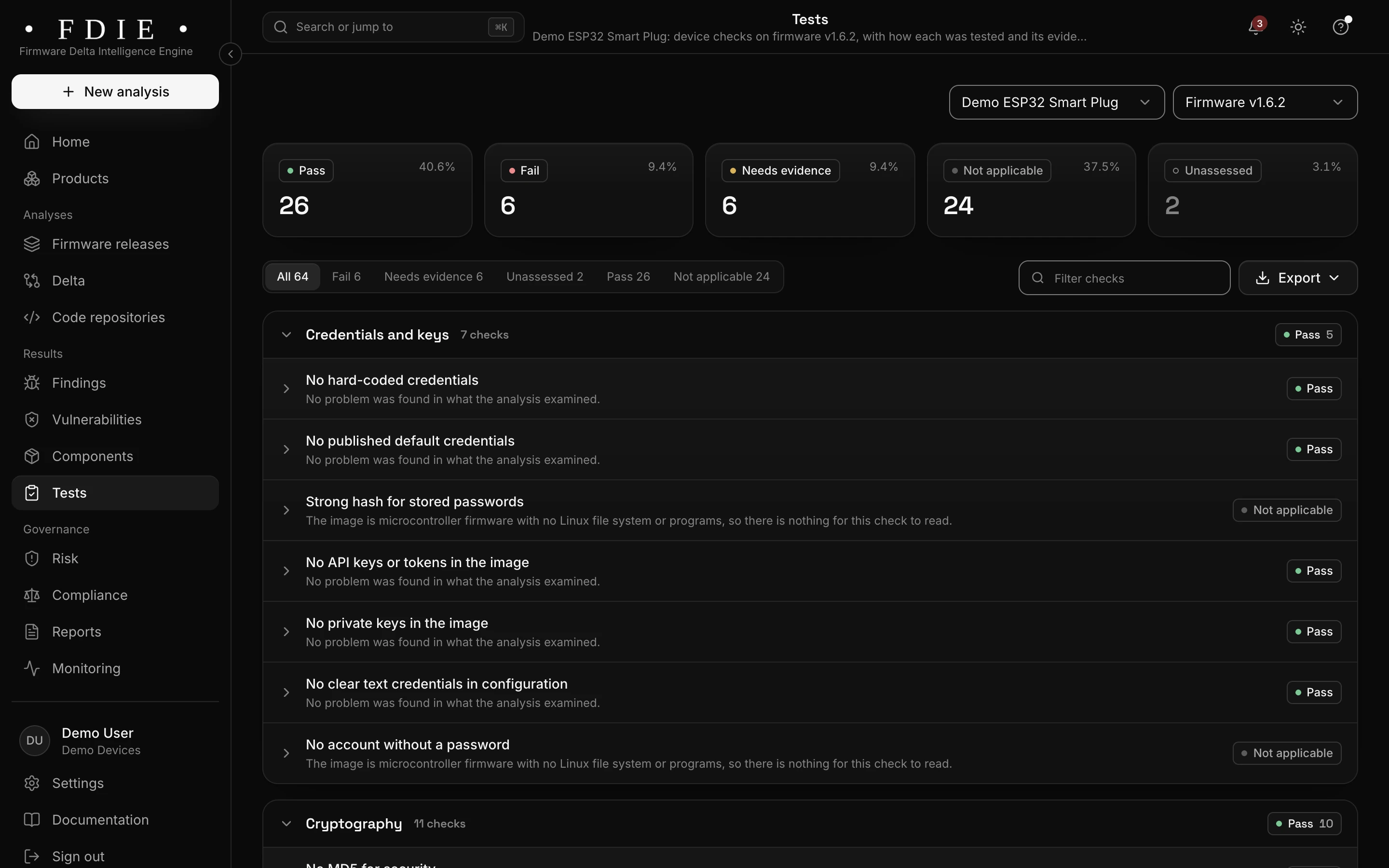
Device checks for the ESP32 firmware: 26 pass, 6 fail, 6 need evidence and 24 not applicable, where each check that reads a Linux file system says why it does not apply to microcontroller firmware.The same screen in the light theme.

How it works

From firmware image to evidence in four steps

  1. 1

    Upload the build file

    An Intel HEX, S-record, UF2 or DfuSe file, an ESP image or a raw binary, as your build produces it.

  2. 2

    Laid out and read

    FDIE finds the chip, lays the image out from its entry point and interrupt handlers and disassembles the code.

  3. 3

    Review findings and gaps

    Fix secrets and weak settings first, and see which checks the image could not decide.

  4. 4

    Export the evidence

    Export the SBOM, the evidence for consumer device rules and signed reports, and record the product's support period.

Know the split

What the image shows, and what stays with the lab

FDIE analyses the firmware, not the device. Knowing the split tells you what to fix before the lab and what to prepare for it.

From the firmware image, in FDIE

  • The chip, entry point and interrupt handlers
  • Secrets, keys and tokens compiled into the image
  • Components such as the ESP-IDF version
  • Weak cryptography in the code

On the device, with your testers or the lab

  • Running the code on the chip and its radio
  • Debug ports such as SWD and JTAG, and read-out protection
  • Bluetooth and Wi-Fi provisioning over the air
  • Side-channel and fault injection tests

Rules by market

Rules this helps with

Consumer device rules apply whatever the processor: UK PSTI since 29 April 2024, and EN 18031 for radio equipment in the EU until the EU CRA applies in full on 11 December 2027.

Compliance by market

India

  • TEC 31318

    Voluntary code for consumer IoT, Release 2.0 of November 2025

EU and UK

US

International

Evidence and gap finding, not certification: the lab or certification body decides.

Deliverables

What your team gets

  • SBOM

    Components found in the image, in CycloneDX 1.6 or SPDX 2.3.

  • Evidence for consumer rules

    Provisions helped by the checks, and those left to you, for each market.

  • Pre-certification report

    A signed PDF of checks, findings and fixes for the release.

  • Coverage gaps

    What the analysis could not read, with the reason, so an empty result is never mistaken for a clean one.

  • Build setting findings

    Secure boot, flash encryption and TLS settings from your source.

  • Alerts through the support period

    New flaws in the product's components, for as long as you support it.

Questions

Which microcontrollers does it read?

ESP32 and ESP8266 on Xtensa, ESP32-C and ESP32-H on RISC-V, Cortex-M, and AVR, MSP430, 8051, PIC16, PIC18, PIC24 and dsPIC in Intel HEX and S-record files. ARC is read but not disassembled.

Do we need an ELF file with symbols?

No. A HEX, S-record, UF2 or DfuSe file is enough; FDIE lays it out from the entry point and interrupt handlers. AVR and MSP430 ELF programs are read as well.

What happens with a banked 8051 image?

FDIE reads the first 64 KB of a banked 8051 image. Code in the other banks is not analysed.

Is the firmware run on a chip?

No. The image is read; with runtime evidence on, ESP32, ESP32-S3, ESP32-C3 and Cortex-M images also run under emulation in a separate isolated job, never on a chip.

Does it read Zephyr and MCUboot projects?

Yes, when you connect the source. Rules read their build configuration for signed boot and updates, flash encryption, debug shells and TLS settings.

Find out what the lab would flag in your firmware

A 45-minute call with our team. Bring one firmware image.

Request access