For engineers
What happens to your firmware after you upload it to FDIE
By Manish SharmaPublished 9 min read
Founder and CEO, MAGDOX. Writes on firmware security and device regulation.
Before you upload firmware anywhere, you should know what happens to it. FDIE unpacks a firmware image with its own readers, disassembles the programs inside and lists the components and their versions as an SBOM. It matches them to NVD and OSV with known exploited vulnerabilities first, and runs its device checks. Whatever it could not read or decide is shown as a coverage gap, never as a pass, and every result carries the evidence behind it.
Results as of . We keep improving FDIE’s engine for accuracy, so later runs may score differently; this post records what we measured on that date.
In short
- FDIE by Magdox unpacks a firmware image without running it, lists its components and versions, and matches them to known vulnerabilities, known exploited ones first.
- It runs device checks and exports an SBOM and VEX. Anything it could not read or decide is shown as a coverage gap, never as a pass.
- FDIE reads, unpacks and examines the firmware without running it. When runtime evidence is on (on Business by default, on the paid pilot on request), programs from the image also run under emulation, in a separate isolated job with the firmware's own network refused.
A firmware image is a sealed box. By the time it is a single .bin file, it holds a kernel, a root file system and a few hundred programs. It also holds third-party libraries you may not have chosen, configuration, certificates and sometimes a forgotten debug shell. Before you ship it, or before a lab tests it for ER-01, ITSAR or the EU Cyber Resilience Act, you want to know what is inside and what is wrong.
This post follows an image through FDIE, step by step, using public OpenWrt 23.05.5 router images that anyone can download to check our numbers. Where a step has limits, we say so, because a firmware report is only useful if you know what it did not look at.
1. Upload, or import from a release
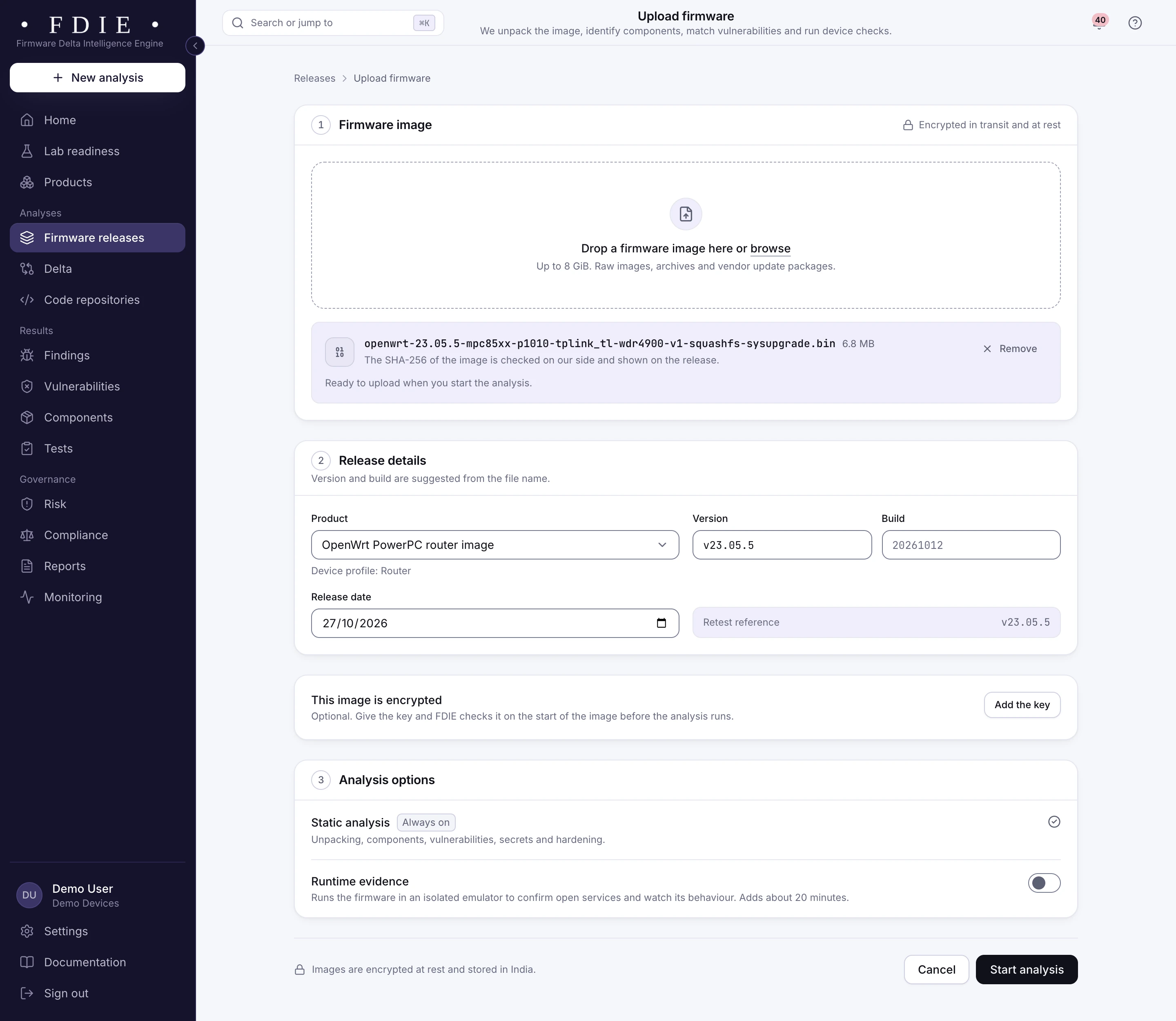
You upload the image file, up to 8 GiB, or import it from a GitHub or GitLab release, and attach it to a product and a version.
The version and build are suggested from the file name, and you confirm them. The product's device type (camera, NVR, router, gateway, doorbell) decides which device checks and compliance frameworks apply later. If you connect the firmware's source repository too, code findings appear beside firmware findings for the same product, but nothing below needs the source.
2. Format detection and unpacking
FDIE recognises the container by its structure, strips vendor headers and unpacks nested layers with its own readers, up to six levels deep. Unpacking never runs anything from the image.
A typical router image is a vendor header around a kernel and a SquashFS root file system. A camera image may be a ZIP holding a TRX holding a UBI volume. FDIE removes uImage, TRX, D-Link, AVM EVA and Dahua ZIP headers, and finds file systems behind FIT, Seama, Netgear CHK and TP-Link headers at any offset. It reads:
| Kind | What FDIE reads |
|---|---|
| Flash file systems | SquashFS 2 to 4 with every compression, UBI and UBIFS, YAFFS2 |
| Disk images | ext4, FAT and EROFS, with MBR and GPT partition tables |
| Archives and compression | cpio, tar, ZIP, Microsoft Cabinet; gzip, bzip2, xz, LZMA, zstd |
| Android | OTA payloads and boot images |
| Microcontroller files | Intel HEX, S-record, UF2 and DfuSe, laid out as one flat image |
| UEFI | Firmware volumes and capsules, every module, the Secure Boot keys and the revocation list |
Some formats are read in our tests but not yet measured on a vendor's image:
- JFFS2, CramFS, RomFS, ext2 and ext3
- 7z and Android sparse images
- standalone LZO, lz4 and heatshrink streams
- Rockchip and Ambarella images
Unpacking is where hostile input lives, so it has hard limits:
- 250,000 files per image
- decompression bombs refused
- symbolic links kept inside the unpacked tree
- device nodes, pipes and sockets removed
- setuid bits cleared
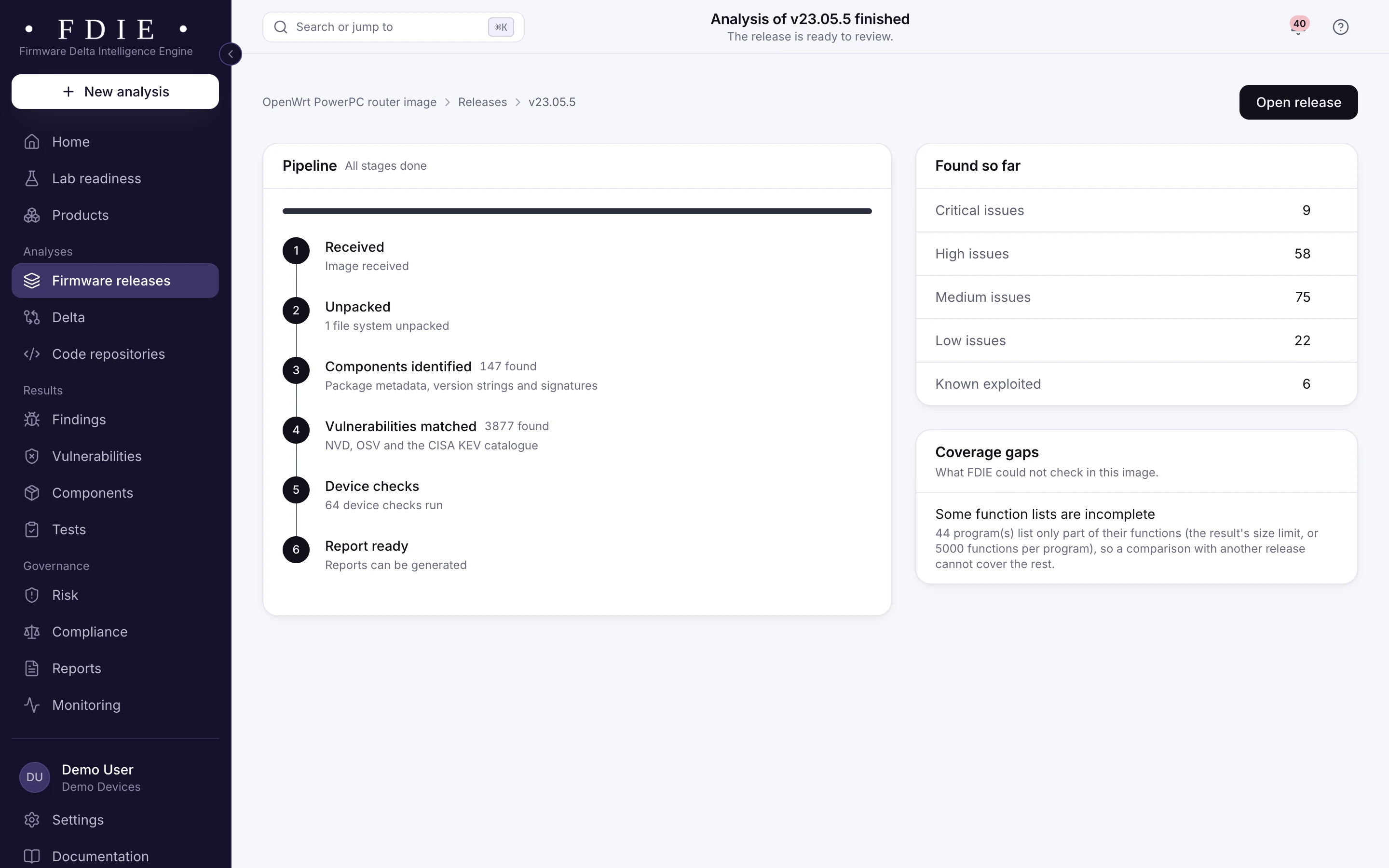
A layer FDIE cannot read becomes a coverage gap in the results. An image that is encrypted throughout fails with a reason, so you never get an empty report that looks clean.
3. File systems, kernel and configuration
Each unpacked file system is walked as a tree. The kernel version comes from the kernel itself, and package databases, init scripts and configuration files are read in place.
On 19 October 2026 we ran four OpenWrt images for less common processors. Two of them came apart like this:
| Image | What it came apart into | Kernel |
|---|---|---|
| archs38 SD card (ARC) | MBR partition table, FAT32 partition, ext4 root, two U-Boot images | 5.10.221 |
| SiFive HiFive Unleashed (RISC-V 64) | GPT table with its named partitions, FAT boot partition, ext4 root | 6.6.110 |
The kernels of the PowerPC and MIPS64 images read as 5.15.167. From the same tree, FDIE also:
- lists network services from configuration, init scripts and the programs present (a static reading, not a port scan)
- finds secrets and default credentials, shown masked
- inventories cryptography and certificates
4. Programs and microcontroller images
Every ELF program is read for its architecture, byte order, imports, exports and hardening flags. Programs of 22 instruction sets are disassembled into functions, a call graph and pseudo-code, within a time budget.
The time budget is a real limit, and we show it. On the PowerPC TL-WDR4900 image, our measured run found 146 programs and 35,556 functions, and analysed 47 programs completely within the budget. The rest are listed as coverage gaps instead of being silently cut short. ARC programs are read for their architecture and libraries but not disassembled, and the results say so.
Bare-metal images (Cortex-M, AVR, MSP430, 8051, PIC, dsPIC and others, in HEX, S-record, UF2 or DfuSe files) have no ELF headers. FDIE takes their entry point and interrupt handlers from the vector table.
The call graph tells you whether a program actually calls the vulnerable function of a matched CVE. It also drives the taint leads.
Where untrusted input from the network, the environment, NVRAM settings or web form fields reaches a risky call, FDIE reports a lead. Each lead names a possible memory-safety, format-string or command-injection issue, with its confidence and the path it followed. These are leads for an engineer to confirm.
5. Components and versions
Components come from package databases (opkg, dpkg and apk), version strings, linked libraries and 76 signatures. Kernel and U-Boot banners and the ESP-IDF application descriptor add more.
Getting the version right is most of the work in vulnerability matching, so we measure it against something we did not produce. OpenWrt publishes a manifest of every package in each image. On the four images above, FDIE found every package of the manifest at the same version:
| Image | Manifest packages found at the same version |
|---|---|
| PowerPC | 144 of 144 |
| MIPS64 | 115 of 115 |
| ARC | 116 of 116 |
| RISC-V 64 | 106 of 106 |
On an earlier set of 17 OpenWrt images, it found 194 of 194 components. Each component in the list shows its version, where it was found, its licence, how it was identified and with what confidence.
The confidence matters. A version read from a package database is stronger evidence than one guessed from a string, and your triage should treat them differently.
6. Vulnerability matching and ranking
Components with a package URL are matched against OSV's affected ranges, the rest against NVD's CPE ranges. Results are ranked in this order:
- known exploited first, meaning the CVE is in the CISA KEV catalogue, which CISA calls "the authoritative source of vulnerabilities that have been exploited in the wild"
- then severity
- then EPSS, the FIRST model that estimates the probability of exploitation activity in the next 30 days
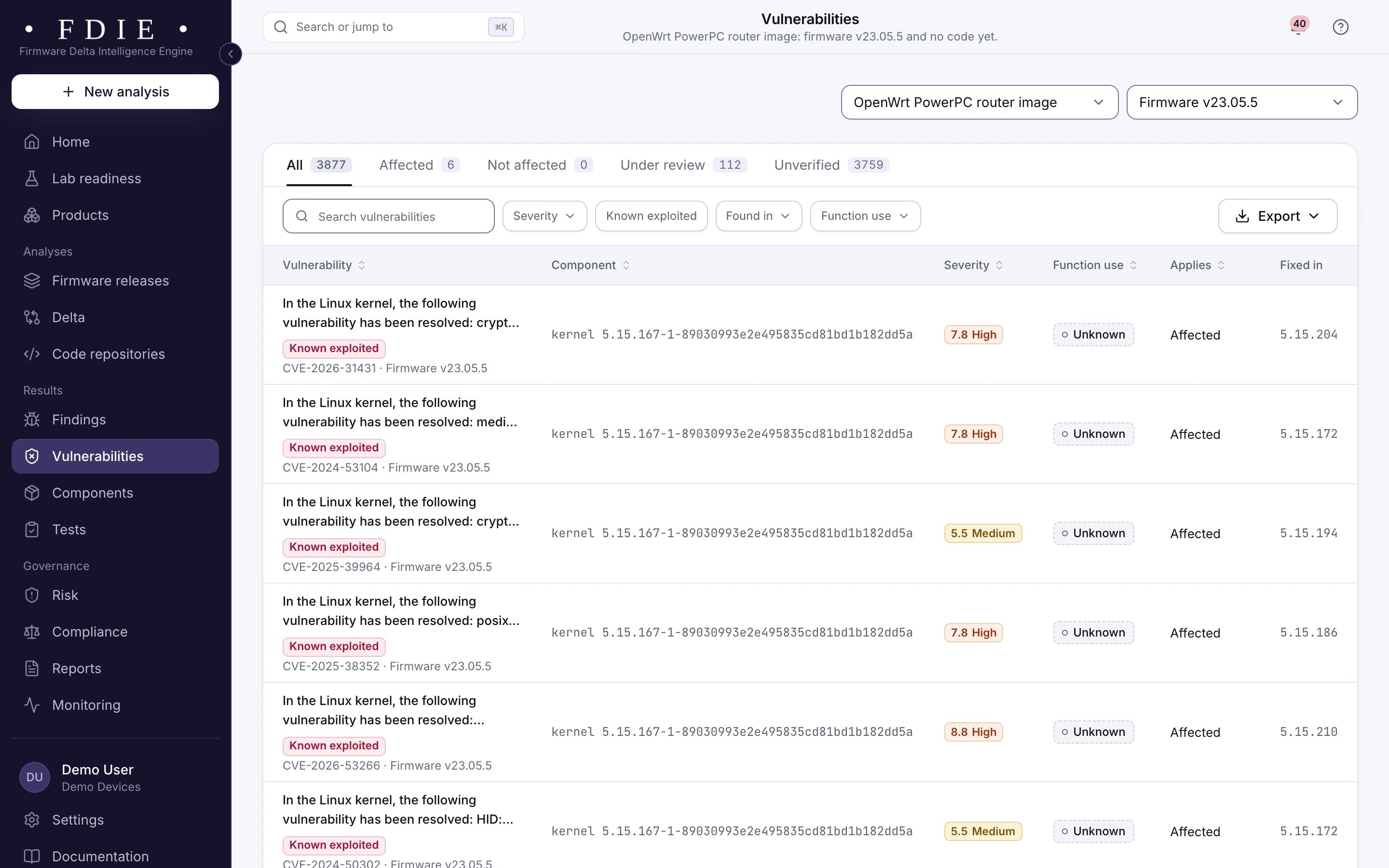
Each row also shows where the component was found, the version that fixes it and whether your programs call the vulnerable function.
Matching is where false alarms are born. A vendor build string, a test release or a misread advisory sentence can add a CVE that does not apply, or hide one that does. Decisions your people make on a vulnerability are kept when the data refreshes.
7. What do the device checks look for?
FDIE's device checks fall into nine groups, and each ends in one of five states: passed, failed, needs evidence, not applicable or unassessed. The groups are:
- credentials and keys
- cryptography
- binary hardening
- secure boot
- updates
- attack surface
- known vulnerabilities
- scripts and web interface
- runtime behaviour
A check passes only when every test behind it ran and found nothing. A check that cannot be decided from an image, such as whether your update server enforces TLS, says it needs evidence. The two runtime checks are decided only when the firmware ran under emulation; otherwise they stay unassessed. The four UEFI Secure Boot checks are not applicable on images that are not UEFI firmware.
On a bare-metal image with almost no readable text (under 256 characters of it, as in a small boot loader), the checks that search text are marked not assessed rather than passed.
For scale, the four OpenWrt images above failed between 15 and 17 checks each in our 19 October run. OpenWrt's release images are general-purpose builds, not hardened for one product. A list like this is exactly what a product team needs to work through before a lab does.
8. Which SBOM and VEX formats come out?
You can export an SBOM for each release in CycloneDX 1.6 or SPDX 2.3, and VEX statements, written by your team, in CycloneDX, OpenVEX or CSAF 2.0.
This lines up with what Indian buyers are starting to ask for. CERT-In's Technical Guidelines on SBOM (version 2.0, dated 9 July 2025) cover both. For software supplied to government and public sector organisations, the SBOM should be in SPDX or CycloneDX. Suppliers should also publish VEX with one of four statuses: not affected, affected, fixed or under investigation.
FDIE helps you write VEX: each vulnerability shows whether the component is present, whether the vulnerable function is called and what fixes it. The statement itself is a decision a person makes and signs off, so the app records who made it and keeps it across refreshes.
9. Evidence, reports and the next release
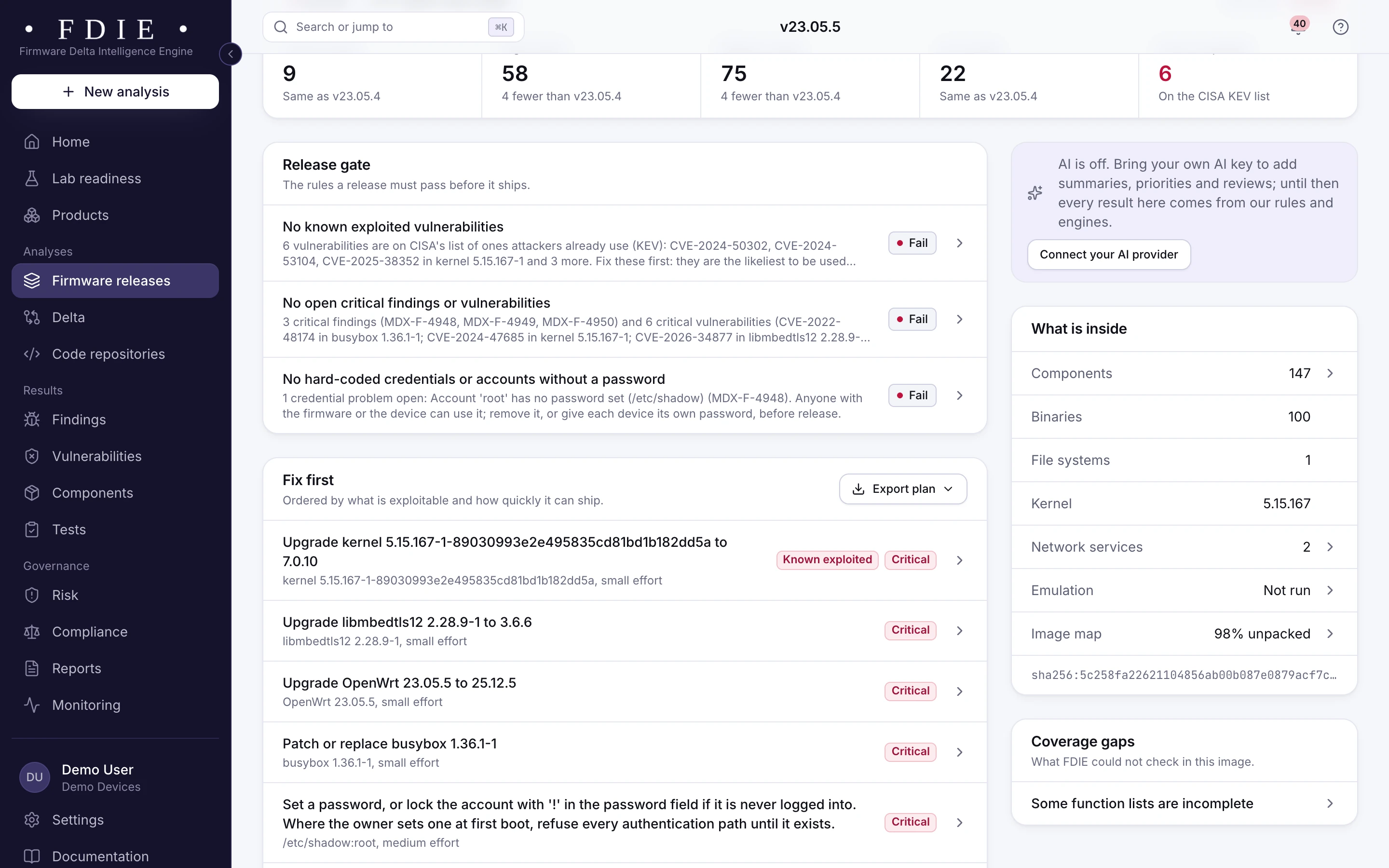
Every finding carries where it was found and why it matters, and the next release is compared with this one.
The release overview gives a ship or hold decision, with the failed rules and the coverage gaps beside it. Reports are signed with Ed25519: readiness, evidence pack, SBOM and VEX, device passport, release delta and others. Lists export as CSV, JSON or PDF. When you upload the next release, FDIE compares the two:
- components added, removed, upgraded or downgraded
- vulnerabilities new or no longer matched
- changed functions, findings and device checks
- network services
What does FDIE not do yet?
The analysis reads, unpacks and examines the firmware without running it. When runtime evidence is on (on Business by default, on the paid pilot on request), programs from the image also run under emulation, in a separate isolated job with the firmware's own network refused. What the run finds is marked as found by running the firmware; with runtime evidence off, findings that only show at runtime are not in your report.
We have measured emulation in our lab on 87 real images, last on 25 October 2026: routers, cameras, a NAS, single-board computers and microcontrollers. Of these, 52 ran, meaning a Linux image booted and was reachable on the network, or a microcontroller image reached its main loop. A network service answered after a full boot on 37 of the 87.
Those are lab numbers on a named set, not a promise for every image. A release where emulation did not run still has its full static analysis.
To see these steps on your own image, book a 30 or 45 minute call with one firmware file. We will go through the results with you.
Questions
Does FDIE run the firmware I upload?
FDIE reads, unpacks and examines the firmware without running it. When runtime evidence is on (on Business by default, on the paid pilot on request), programs from the image also run under emulation, in a separate isolated job with the firmware's own network refused.
Which SBOM and VEX formats can I export?
SBOMs in CycloneDX 1.6 and SPDX 2.3, and VEX in CycloneDX, OpenVEX and CSAF 2.0. Your own people write the VEX statements; FDIE does not decide them for you.
What happens when FDIE cannot read part of an image?
The part it could not read, decrypt or finish in time is listed as a coverage gap in the results. An image that is encrypted throughout fails with a stated reason instead of an empty report.
How large an image can I upload?
Up to 8 GiB per image, or you can import the file from a GitHub or GitLab release.
Where is my firmware kept?
In the region your organisation chooses when it is set up, India, the European Union or the United States, with its backups in that region too.
Sources
- National Vulnerability Database (NIST) nvd.nist.gov
- OSV, open source vulnerability database osv.dev
- CISA Known Exploited Vulnerabilities catalog cisa.gov
- FIRST Exploit Prediction Scoring System (EPSS) first.org
- CycloneDX specification overview cyclonedx.org
- SPDX specifications spdx.dev
- OpenVEX specification github.com
- OASIS Common Security Advisory Framework (CSAF) 2.0 docs.oasis-open.org
- CERT-In Technical Guidelines on SBOM, QBOM and CBOM, AIBOM and HBOM, version 2.0 (9 July 2025) cert-in.org.in
- OpenWrt 23.05.5 release downloads downloads.openwrt.org
OpenWrt is a registered trademark of Software Freedom Conservancy; see openwrt.org. Product and project names are trademarks of their owners, used only to identify the public firmware, software and standards discussed. MAGDOX is not affiliated with or endorsed by them.