For engineers
Default passwords and keys in firmware: find and fix them
By Manish SharmaPublished 6 min read
One default password or shared private key can fail a lab test and put every device at risk. Hard-coded secrets in firmware sit in six places: the account database, the web interface's configuration, init scripts and NVRAM defaults, keys and certificates, cloud and API tokens, and program strings. The fix is the same everywhere: nothing secret is the same on two devices, and secrets are created at first boot or in the factory and stored securely. The release fails if a known secret is found in the image.
In short
- Hard-coded secrets hide in six places: account databases, web interface files, init scripts and NVRAM defaults, keys and certificates, cloud tokens, and program strings.
- One extracted image is enough. A shared password or key found in it works on every device you have sold.
- The fix is a rule and a gate: no secret is the same on two devices, and the build fails if a known one turns up.
Six places, one fix
Hard-coded secrets hide in six places in a firmware image:
- the account database
- the web interface's own files
- init scripts and NVRAM defaults
- certificates and private keys
- cloud tokens
- the strings inside programs
Each one turns a single extracted image into access to every device you have sold. The fix is a rule and a gate. No secret may be the same on two devices, secrets are made on the device or in the factory, and the build fails if a known one turns up.
The rules agree. ETSI EN 303 645 forbids universal passwords outside the factory default state (5.1-1) and hard-coded critical security parameters in source code (5.4-3).
India's CCTV test reviews all code, third-party binaries included, for hard-coded credentials and backdoors (item 2.6). It also asks for keys unique to each device (item 1.2). MITRE files the mistakes as CWE-798, CWE-1392 and CWE-321.
Why one image is enough
An attacker does not need your device, only your update file, because once it is unpacked a shared password or key works on every unit.
CISA's 2016 alert on Mirai described a botnet that found its victims with a list of 62 common default usernames and passwords. In 2015, CERT/CC's VU#566724 documented home routers, IP cameras and VoIP phones shipping the same X.509 certificates and SSH host keys. That allows impersonation and decryption of their traffic.
1. The account database
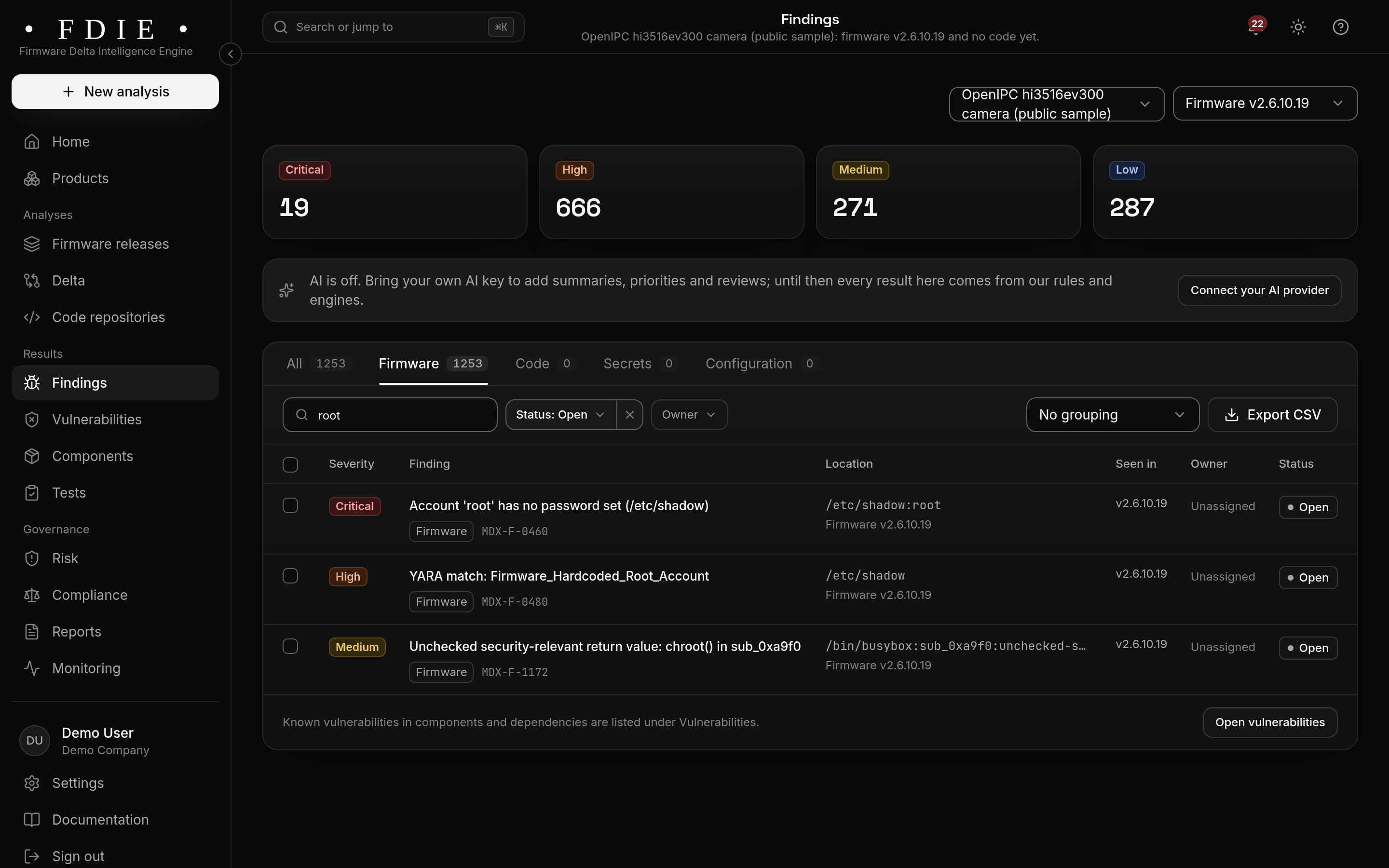
Start with /etc/passwd and /etc/shadow. Three things matter:
- Accounts with no password. An empty second field in
/etc/shadowlets anyone log in as that user over any service that accepts it. - Extra accounts with user id 0. A second root account is the classic backdoor.
- Weak or known hashes. DES crypt and MD5 crypt (
$1$) fall to commodity cracking, and a hash of a published default password is as good as the password itself.
A line to worry about looks like this, with the hash shortened:
root:$1$<salt>$<hash>:19000:0:99999:7:::
support::19000:0:99999:7:::
Some legitimate firmware ships with no root password by design and forces the choice at first use. OpenWrt's documentation says a fresh install has no root password, and tells you to set one in the web interface. That is defensible for a general-purpose router OS, and ETSI 5.1-1 allows a factory default state. The test is whether the device refuses to work normally until the password is set.
2. The web interface's own files
Embedded web servers keep their own credentials, separate from /etc/shadow. Look for password files for lighttpd, Boa or GoAhead, JSON or INI files for the management application, and CGI scripts that compare the submitted password with a constant.
Open camera firmware documents its defaults openly. The OpenIPC web interface's README gives root with password 12345 and asks for a change at first login. Your product needs the same forced change, or a unique password printed on each unit.
Check the streaming side too. RTSP and ONVIF services in cameras can have their own accounts in their own configuration files. A stream that needs no login at all is the same problem in a different shape.
3. Init scripts and NVRAM defaults
Boot scripts set things that never appear in any configuration file. Look in /etc/init.d, /etc/inittab, rc files and any vendor startup script for:
chpasswdorpasswdfed a constant, which resets a password on every boot;telnetd -l /bin/shor a shell bound to the serial console, which skips login altogether;nvram setlines and NVRAM default dumps carrying the administrator, Wi-Fi or PPPoE passwords.
NVRAM defaults deserve care. A factory reset restores them, so a secret there survives every attempt to fix it in the field.
4. Certificates and private keys
Every PEM file in the image needs an owner. A private key shipped in the image is known to anyone with the image. So a TLS server key, an SSH host key or, worst of all, the key that signs your updates must not be there.
Generate host keys at first boot, or provision them per unit in the factory into secure storage. Item 1.5 of India's CCTV requirements asks for keys in secure storage, and item 1.2 for keys unique to each device.
Check the certificates as well. RSA keys under 2048 bits, expired certificates and MD5 or SHA-1 signatures are findings even when the key is not secret.
UEFI firmware has its own version of the problem. PKfail (CVE-2024-8105, CERT/CC VU#455367, August 2024) was UEFI firmware shipped with test Platform Keys whose private halves were not secret. So anyone could sign boot code that Secure Boot would trust.
5. Cloud and API tokens
Connected devices talk to a cloud, and the credentials for that talk often travel inside the image. They include MQTT broker usernames and passwords, API keys for the vendor's backend, keys for peer-to-peer video SDKs and object storage keys for uploading clips.
ETSI EN 303 645 names API keys and private keys as exactly the kind of credential that reverse engineering finds. The fix is per-device identity: give each unit its own certificate or token at manufacture. Let the cloud issue short-lived credentials after the device proves who it is, and make every key revocable without a firmware update.
6. Inside the programs, and in bare-metal images
Secrets compiled into a program show up as strings: a password compared in a login function, a key in a data section. On Linux images, string search across every program finds most of them.
Microcontroller images are harder. Microchip's dsPIC and PIC24 parts store text two or three bytes to a 24-bit program word, which no plain string scan reads.
A check that searches text has little to go on in an image with little readable text, and a "pass" there means less.
How to fix each one
| Where | Fix | Rule it answers |
|---|---|---|
| Account database | No empty passwords; one root; strong hashes such as SHA-512 crypt or yescrypt; unique or user-set password before first use | ETSI 5.1-1 and 5.1-2; CWE-1392 |
| Web interface and services | Credentials from the same unique source; no constant comparisons in code; authentication on every stream | CCTV item 2.6; CWE-798 |
| Init scripts and NVRAM | No passwords set from scripts; NVRAM defaults free of secrets; no shell without login on any console | CCTV items 1.1 and 2.6 |
| Keys and certificates | Generated at first boot or provisioned per unit into secure storage; signing keys never in the image | CCTV items 1.2 and 1.5; CWE-321 |
| UEFI | Production platform keys, never test keys; check every firmware variables file you ship | VU#455367 |
| Cloud tokens | Per-device identity, short-lived tokens, revocation without an update | ETSI 5.4-3 |
Then make it stick: fail the release when a known secret appears, so the next build cannot quietly bring one back.
Finding them before you ship
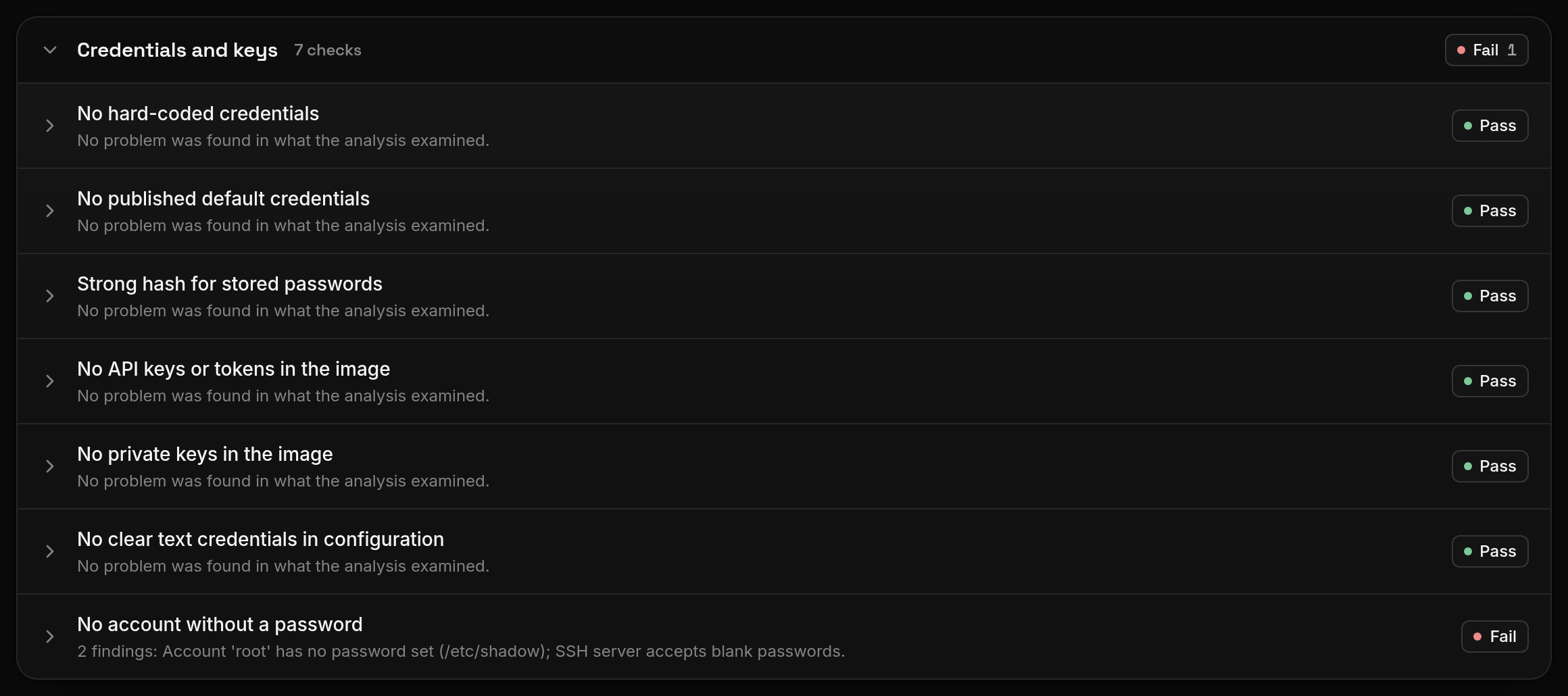
FDIE by Magdox looks for secrets and default credentials across the whole unpacked image: account databases, configuration, scripts, certificates and programs. It masks every value before results leave the analysis.
Seven of its 64 device checks cover credentials and keys. They range from hard-coded and published default credentials to private keys, tokens, password hashes and accounts without a password. The release gate can fail on any hard-coded credential.
Questions
Why are default passwords in firmware dangerous?
Because every unit shares them and they end up in public lists. CISA's 2016 alert on the Mirai botnet described malware that scanned for devices using a short list of 62 common default usernames and passwords.
Is a default password allowed if the user must change it?
ETSI EN 303 645 provision 5.1-1 requires passwords to be unique per device or defined by the user in any state other than the factory default. Forcing a change before first use meets that; a shared password that keeps working does not.
What is PKfail?
CVE-2024-8105, published by CERT/CC as VU#455367 in August 2024. UEFI firmware shipped with test Platform Keys, so anyone holding the matching private key could sign boot code that Secure Boot would accept.
How do I keep a private key out of my firmware image?
Generate it on the device at first boot, or provision it per unit in the factory into secure storage, and ship only the code that uses it. Item 1.2 of India's CCTV requirements asks for keys and certificates unique to each device.
Sources
- CISA alert TA16-288A, Heightened DDoS Threat Posed by Mirai and Other Botnets cisa.gov
- CERT/CC VU#566724, Embedded devices use non-unique X.509 certificates and SSH host keys kb.cert.org
- CERT/CC VU#455367, Insecure Platform Key (PK) used in UEFI system firmware signature (CVE-2024-8105) kb.cert.org
- ETSI EN 303 645 V3.1.3, Cyber Security for Consumer Internet of Things (PDF) etsi.org
- STQC, IoTSCS P01 Procedure for CCTV Testing, Evaluation and Certification (PDF) stqc.gov.in
- MITRE CWE-798, Use of Hard-coded Credentials cwe.mitre.org
- MITRE CWE-1392, Use of Default Credentials cwe.mitre.org
- MITRE CWE-321, Use of Hard-coded Cryptographic Key cwe.mitre.org
- OpenWrt, The OpenWrt Login openwrt.org
- OpenIPC microbe-web, README (default login) github.com
- Debian package tracker, edk2 (source of qemu-efi-aarch64) tracker.debian.org
- Bus Pirate firmware v8.0-rc2 release github.com
OpenWrt is a registered trademark of Software Freedom Conservancy; see openwrt.org. Product and project names are trademarks of their owners, used only to identify the public firmware, software and standards discussed. MAGDOX is not affiliated with or endorsed by them.