
When you release firmware v1.5.0 to fix a known vulnerability, you expect the CVE to disappear from your next analysis report. But then v1.5.1 ships with a library update, and suddenly you have a new report with 200 findings. How many of those are new? How many were there in v1.4.x? How many did your team already triage and decide to accept?
Without cross-version tracking, you answer these questions by comparing PDF reports side by side or exporting to a spreadsheet and running VLOOKUP. This does not scale, and it does not produce audit evidence.
The Problem with Point-in-Time Analysis
Single-version firmware analysis gives you a snapshot: here are the CVEs, here are the hardening gaps, here is the compliance score. That snapshot is useful for releasing v1.4.2. But firmware products live across many versions over years.
A medical device manufacturer might maintain six concurrent firmware versions across active device generations. A router vendor ships updates every quarter. An industrial controller might have firmware versions that differ by only a few KB of changes but need to be tracked separately for certification purposes.
For each of these organizations, the security question is not just “what is in this firmware?” but “what changed from the version we already analyzed?” and “did the vulnerability we accepted in v1.3 get fixed in v1.5, or is it still there?”
Without an answer to these questions, security teams end up doing one of two things: re-triaging the entire finding list from scratch with each new version (expensive and slow), or drifting toward treating the analysis as a compliance checkbox rather than an actionable process (risky).
What Delta Intelligence Tracks
Delta Intelligence compares two firmware versions at the component, binary, and finding level. The output shows:
New CVEs introduced. Components added or upgraded in the new version that bring new CVE exposure. These require triage.
CVEs resolved. Vulnerabilities present in the old version that are no longer present in the new one, because the component was removed or upgraded to a patched version.
CVEs that carried over. Vulnerabilities that were present in the old version and are still present in the new version, without the component changing. These are the ones your team already triaged. Carry-forward means you do not triage them again unless the context changed.
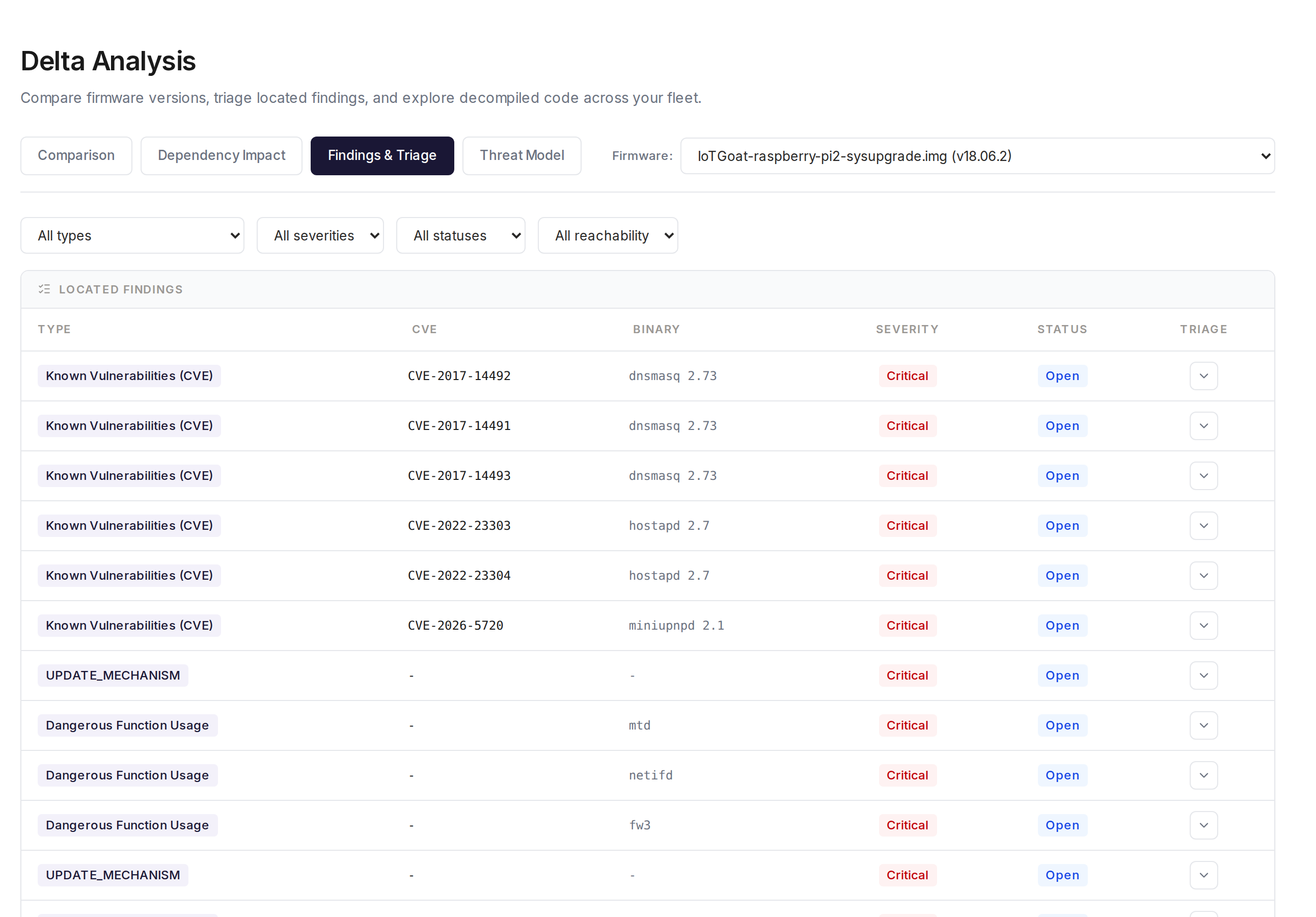
Every located finding - CVEs and dangerous function usage alike - gets a per-row status and triage control your team works through directly.
Compliance score changes. How the A-F grades across your compliance frameworks changed between versions. A firmware update that inadvertently removes stack canaries from a rebuilt binary will show up as a compliance score regression.
New binaries and removed binaries. Which executable files were added to or removed from the firmware image. New binaries introduce new attack surface; removed binaries reduce it.
Component lineage. For each component in the new firmware, whether it was present in the old version and at what version. A component that went from OpenSSL 1.1.1t to OpenSSL 3.0.8 requires re-evaluation of OpenSSL CVEs even if the CVE identifiers are the same.
Why Carry-Forward Matters for Compliance
EU CRA Article 13 requires manufacturers to have a documented vulnerability management process. Part of that process is demonstrating that known vulnerabilities have been assessed and that the assessment is being maintained over time.
If you release firmware v1.5.0 and your SBOM shows 40 CVEs, an auditor will eventually ask: what did you do about these 40 CVEs? The answer cannot be “they were there in v1.4.x too and we did not look at them again.” The answer should be: “We triaged these 40 CVEs. 12 are not exploitable in our product as evidenced by our VEX document. 8 have no available fix and are being tracked in our vulnerability management system. 5 were resolved in v1.5.0. The remaining 15 are under continuous monitoring.”
Delta Intelligence makes this answer possible by giving you the lineage of each CVE across versions. Your VEX document from v1.4.x can be automatically extended to v1.5.0 for components that did not change, rather than being manually reassessed from scratch.
Blast Radius Analysis
When a CVE is found in a shared library, the question is not just whether the library is affected, but how many binaries in the firmware link against it. A vulnerability in a library dynamically linked by 30 different daemons has a larger attack surface than one linked by a single utility that runs at boot and exits.
Blast radius analysis identifies, for each vulnerable component, every binary in the firmware that depends on it. This helps prioritize triage: a vulnerability in a library used by the network-facing web server daemon is higher priority than the same CVE in a library used only by an offline diagnostic tool.
This data also feeds into SBOM dependency relationships, which is one of the NTIA minimum elements. The dependency graph in your SBOM shows which executables depend on which libraries, and this same graph supports blast radius calculation.
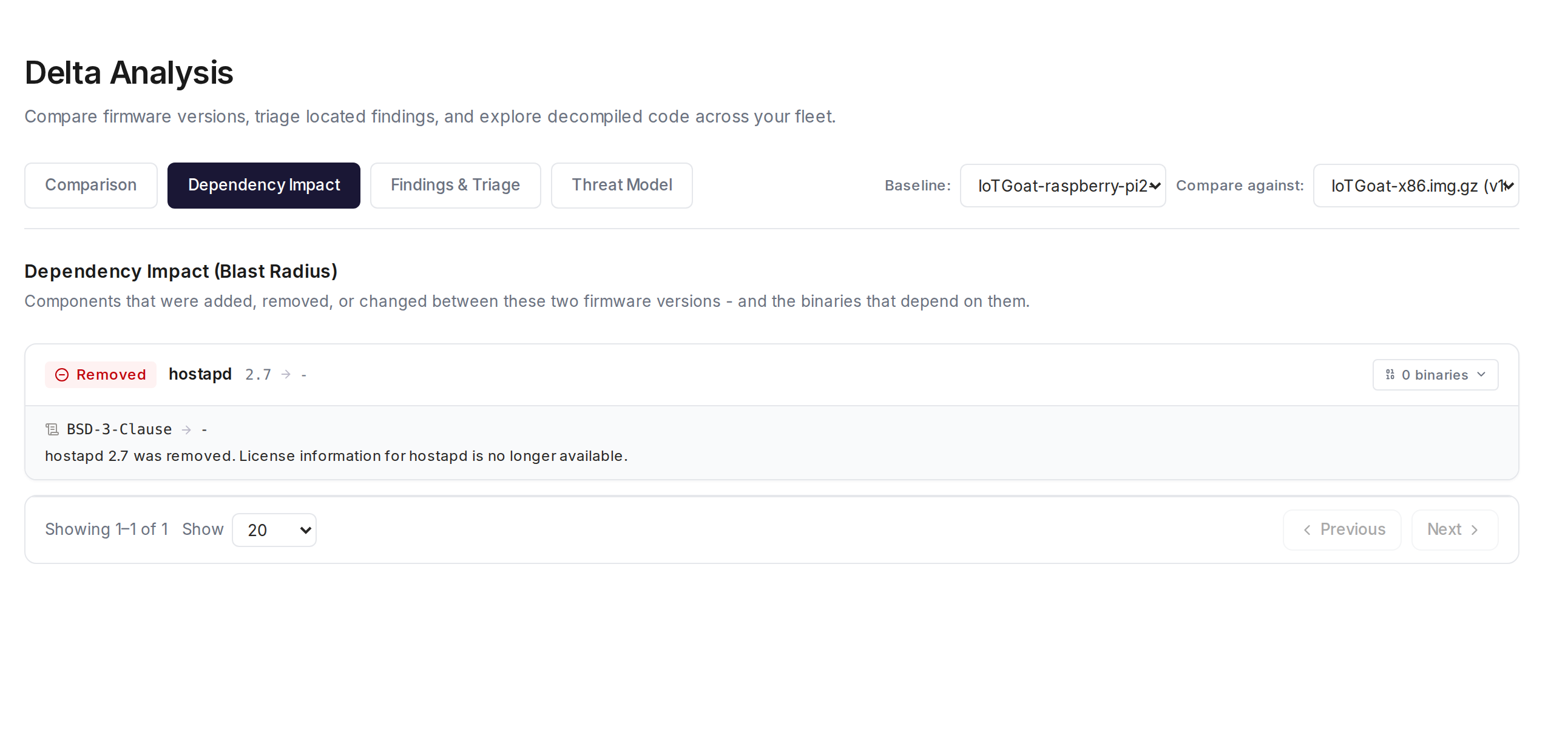
Dependency Impact analysis between two real firmware builds: what changed, its license implications, and which binaries were affected.
Patch Verification
Declaring that a CVE is fixed in a firmware update is not the same as proving it. Build systems are complex. A patch can be applied to a source tree but fail to reach a pre-compiled vendor binary that was not rebuilt. A version string can be updated without the underlying code actually changing.
Patch verification checks, at the binary level, whether the specific code changes associated with a CVE fix are present in the new firmware version. This requires knowing what code was changed to fix the CVE, which is available for well-documented CVEs in open-source components. When the diff is known, binary-level comparison can confirm whether the patched code path is present.
This is available on Enterprise and above in FDIE, as part of the Delta Intelligence feature set.
How Delta Intelligence Fits Into a Release Process
A firmware security review process that uses Delta Intelligence looks like this:
- When a new firmware version is built, upload it to FDIE alongside the previous version.
- Delta Intelligence generates the diff: new CVEs, resolved CVEs, carry-forwards, compliance changes.
- The security team triages only the new findings. Carry-forwards are automatically tagged with the previous triage decision.
- For resolved CVEs, Delta Intelligence confirms whether they were actually fixed at the binary level (patch verification).
- The output is a delta report that can be attached to the release documentation: this version introduced X new CVEs, resolved Y, carried Z forward with accepted risk documented in the VEX.
- The updated SBOM and VEX for the new version are generated and stored alongside the release.
This is a sustainable process. The triaging effort scales with the number of changes in each release, not with the total CVE count accumulated across all components.
Example: What a Delta Report Shows
A firmware update from v1.4.2 to v1.5.0 that updates BusyBox, adds a new Python-based management daemon, and removes an unused UPnP service might produce a delta like:
- 3 CVEs resolved (BusyBox 1.33 CVEs fixed by upgrade to 1.35)
- 7 new CVEs introduced (Python 3.11 and its dependencies in the new management daemon)
- 2 CVEs removed (were in the UPnP binary that was removed)
- 28 CVEs carried forward (components unchanged between versions)
- Compliance: OWASP FSTM score improved from B to A (new daemon compiled with full hardening)
- ETSI EN 303 645 score unchanged at A
The security team reviews the 7 new CVEs, confirms the 3 resolved ones are genuinely gone, and updates the VEX for the 28 carry-forwards where the component and context are unchanged. Total new triage effort: 7 CVEs instead of 40.
Getting Started with Delta Intelligence in FDIE
Delta Intelligence is available on Pro and above. To run a delta analysis, upload both firmware versions to FDIE and select the comparison target from the analysis dashboard. The delta report is available in the same interface as the single-version reports, with findings filtered by status: new, resolved, carry-forward.
The SBOM and VEX outputs for the new version include lineage metadata linking each component to its previous version, which is useful for audit documentation.
Frequently Asked Questions
What if there is no previous version to compare against? The first analysis of a firmware image is a baseline. Delta Intelligence requires at least two versions. If you are starting from scratch, analyze your current production firmware first to establish the baseline, then use Delta Intelligence from that point forward.
How does Delta Intelligence handle version strings that were not updated? Component identification is based on binary content analysis, not just version strings. If a component’s binary content changed between versions, Delta Intelligence will detect this even if the version string was not updated. This catches cases where a patch was applied without incrementing the version.
Can I compare across non-consecutive versions? Yes. You can compare any two versions that have been analyzed in FDIE. Comparing v1.0 to v2.0 skips the intermediate versions but gives you the full change set between those two endpoints.
How does this relate to VEX carry-forward? When components carry forward unchanged between versions, their VEX statements from the previous version remain valid. FDIE flags these carry-forward CVEs with the applicable VEX status from the previous analysis, so your team can confirm the VEX disposition rather than re-investigating from scratch.
Is Delta Intelligence available for the on-premise deployment? Yes. All FDIE features including Delta Intelligence are available in the Enterprise on-premise deployment. The analysis runs entirely within your own infrastructure.